Best Free Technical SEO Tools in 2026: 10 Tools for Crawling, Indexing, Speed & Schema
Expert reviewed

Free technical SEO tools help you find crawl errors, check indexing, diagnose slow pages, and validate structured data without buying a full software suite. The strongest starting combination is Screaming Frog, Google Search Console, PageSpeed Insights, and the two structured-data validators, with five additional tools covering cloud crawling, Bing diagnostics, and deeper performance investigation.
The 10 tools below are compared by diagnostic purpose, useful free access, ownership requirements, and limitations. The practical differences matter: Screaming Frog allows 500 URLs per crawl, Ahrefs Free provides 5,000 monthly crawl credits per verified project, and a successful live inspection does not confirm that Google indexed a page.
Start with commercially important pages. A blocked service page, incorrectly canonicalized product category, or unresponsive inquiry form deserves attention before a cosmetic score deduction.
How to choose free technical SEO tools for the problem you need to solve
The best technical SEO audit tools answer different questions. Crawlers expose patterns across URLs. Search-engine reports provide engine-specific evidence. Performance tests investigate loading and interaction problems. Validators inspect structured data.
| Tool | Primary task | Useful free access | Main restriction |
|---|---|---|---|
| Screaming Frog SEO Spider | Desktop crawling | 500 URLs per crawl | JavaScript rendering and saved crawl sessions require a license |
| Ahrefs Free - Site Audit | Verified-site cloud crawling | 5,000 crawl credits per project per month | Ownership verification and monthly credits |
| Google Search Console | Google indexing diagnostics | Core property reports and URL Inspection | Authorized property access required |
| Bing Webmaster Tools | Bing indexing diagnostics | URL Inspection, Site Explorer, and Site Scan | Verified property; exact scan allowance not established |
| PageSpeed Insights | Field and lab performance analysis | Public page tests | Field data depend on sufficient samples |
| Lighthouse | Repeatable local audits | Open-source browser and command-line use | Single-page automated checks |
| Chrome DevTools | Performance debugging | Local traces and interaction investigation | Results reflect local test conditions |
| WebPageTest | Configurable remote performance testing | Starter allowance of 150 runs per month | A run is not a complete multi-run test |
| Google Rich Results Test | Google-supported structured-data checks | URL and code testing | Does not cover every Schema.org type |
| Schema Markup Validator | Broader Schema.org validation | Public URL and code validation | Does not apply Google's feature-specific eligibility rules |
Freshness and methodology: These are documentation-based recommendations using research dated October 3, 2026, not hands-on benchmark results. Free-plan restrictions can change. Exact quotas are omitted where the research did not establish them.
For the query "best technical SEO tools 2026," the useful definition of "best" is task fit, not the longest feature list. This selection excludes trial-only access and does not treat a vendor health score as evidence of lost revenue.
Before submitting URLs, code, or test sessions to hosted services, check confidentiality and result-sharing settings. Local tools are preferable for some private environments, although they still make network requests.
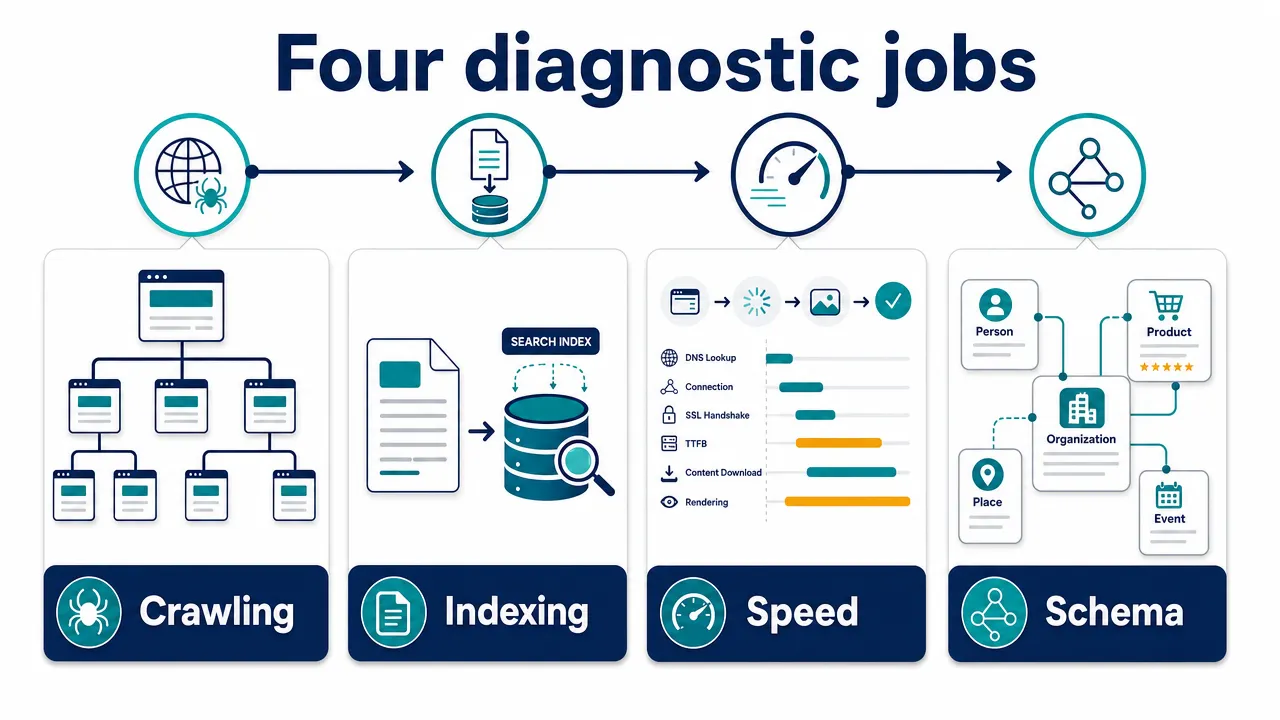
Free SEO crawling tools for finding site-wide problems
SEO crawling tools show what a crawler fetched and discovered. They do not establish whether Google indexed those pages. Always record crawl scope, completion status, and whether JavaScript execution was enabled.
1. Screaming Frog SEO Spider: Small-site HTML crawling
Best for: Small, mostly server-rendered websites and teams that want a local desktop audit.
Screaming Frog SEO Spider crawls up to 500 URLs per crawl in its free edition. It can expose broken internal links, redirects, inconsistent canonical declarations, and page-level robots directives.
The free version supports crawl-data exports. Saving and reopening an entire crawl session is a separate licensed feature, as are scheduling and JavaScript rendering.
A useful first pass is straightforward:
- Crawl the website at an appropriate request rate.
- Check whether the 500-URL limit interrupted coverage.
- Review response codes, directives, canonicals, and referring pages.
- Export affected URLs with the internal links that lead to them.
For example, a product category might still link to a discontinued specification page returning 404. Decide whether to restore the page, redirect it to a genuinely relevant replacement, or remove the obsolete link.
Main limitation: A cap-limited crawl is not a complete site audit. Missing content may also reflect the free edition's lack of JavaScript rendering rather than a search-engine problem.
Next handoff: Use Search Console to investigate indexing evidence for important affected URLs.
2. Ahrefs Free - Site Audit: Verified-site cloud audits
Best for: Website owners who need cloud crawling and rendered-content investigation beyond a small HTML-only crawl.
Ahrefs Free, the renamed Ahrefs Webmaster Tools account, includes Site Audit for verified websites. Its documented allowance is 5,000 crawl credits per project per month, with unlimited verified websites.
The units differ from Screaming Frog's limit. Ahrefs counts internal HTML pages returning 200 toward crawl credits; the allowance is not simply a ceiling on every discovered URL.
Configure the scope deliberately, enable JavaScript execution where necessary, and inspect issue groups by template. An exporter might discover that translated product pages inherit an English canonical from a shared component. That pattern deserves investigation before individual metadata warnings.
The most useful output is an affected-template list with representative URLs, directives, internal links, and rendered-content evidence.
Main limitation: Ahrefs cannot determine Google's selected canonical or indexing decision. Exact free export ceilings, scheduling frequency, and history retention were not established in the research.
Next handoff: Inspect representative language variants in Search Console before changing canonical rules across the website.
For structural problems, SeekLab.io's guidance on organizing internal links around important pages adds context beyond a crawler's warning list.
Free SEO indexing tools for checking search-engine evidence
SEO indexing tools help separate three situations: a page cannot be accessed, a page is accessible but not indexed, or a page is indexed but performs poorly. Those situations require different decisions.
3. Google Search Console: Google's recorded and live evidence
Best for: Any authorized team responsible for a website's Google search presence.
Google Search Console provides free indexing reports, sitemap information, search performance data, and URL Inspection. Access requires verified ownership or permission from an owner.
Start with a missing product or service page. Inspect its recorded indexing status, last crawl, declared canonical, and Google-selected canonical. Then run a live test to check the current implementation.
Recorded state and live state are not interchangeable. Google's URL Inspection documentation distinguishes indexed evidence from a current fetch and rendering test. A live test can succeed while Google's recorded state still reflects an earlier version.
That distinction matters after correcting an accidental noindex or canonical error. Immediate technical validation is possible; indexing confirmation may require later processing.
Main limitation: Search Console does not guarantee indexing, rankings, or inquiries. Repeated indexing requests cannot repair contradictory directives or weak internal discovery paths.
Next handoff: Use a crawler to determine whether the same issue affects an entire template.
4. Bing Webmaster Tools: Bing-specific diagnostics
Best for: Teams that need to understand Bing discovery rather than assume it matches Google.
Bing Webmaster Tools provides URL Inspection, Site Explorer, and Site Scan. Microsoft documents verification options that include importing verified Search Console properties.
Inspect important URLs first, then look for patterns across sections. A manufacturer's service directory could appear in Google while Bing reports access problems for representative pages. Compare responses, resources, and reporting dates before changing the entire site.
Site Scan provides supplementary technical checks, but its exact current monthly allowance and JavaScript behavior were not established in the research. Confirm those details in the current account interface.
Main limitation: Bing's reports describe Bing. They cannot prove Google's indexing status, and submitting a URL does not guarantee inclusion.
Next handoff: Compare engine-specific evidence and investigate the actual difference instead of forcing both reports to match.
Remember that robots.txt and noindex serve different purposes. Blocking crawling can prevent a search engine from seeing a page-level noindex. Sitemap submission also supports discovery without guaranteeing indexing.
Free website speed test tools for separating symptoms from causes
The four website speed test tools below serve different roles. PageSpeed Insights supplies field and lab context, Lighthouse supports repeatable automated audits, Chrome DevTools reveals execution details, and WebPageTest adds remote test conditions.
5. PageSpeed Insights: Field data and lab context
Best for: Establishing whether performance concerns appear in available real-user data.
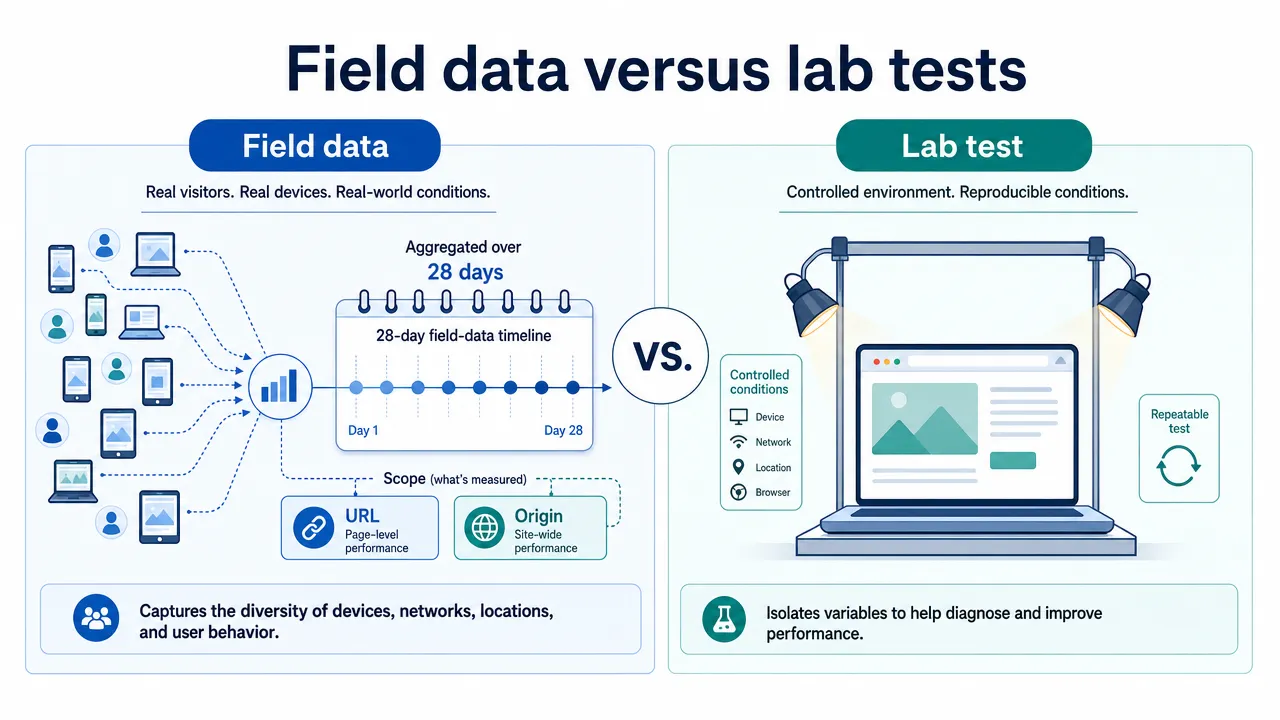
PageSpeed Insights combines Chrome User Experience Report field data, where available, with a Lighthouse lab test.
Read the scope before the score. Field data cover a rolling 28-day period, and Core Web Vitals are assessed at the 75th percentile. When URL-level samples are insufficient, the report may show origin-level data instead.
| Core Web Vital | What it measures | Good threshold |
|---|---|---|
| Largest Contentful Paint, LCP | Loading performance | 2.5 seconds or less |
| Interaction to Next Paint, INP | Interaction responsiveness | 200 milliseconds or less |
| Cumulative Layout Shift, CLS | Visual stability | 0.1 or less |
These thresholds follow Google's Core Web Vitals guidance.
A product inquiry page with origin-level data has not received its own page-specific field verdict. Likewise, missing field data mean insufficient coverage, not a passing result.
Main limitation: One lab score cannot describe an entire website or measure conversion impact.
Next handoff: Reproduce a specific loading or interaction problem in Chrome DevTools. After deployment, allow time for the rolling field window to reflect the change.
6. Lighthouse: Repeatable local audits
Best for: Developers comparing implementation changes under controlled conditions.
Lighthouse is an open-source auditing tool available through Chrome DevTools, the command line, and a Node module. It checks performance alongside automated accessibility, SEO, and best-practice criteria.
Local testing is useful for development and authenticated pages. A developer can audit a replacement product-gallery component before it reaches the public website.
Preserve the report, record the environment, and rerun under equivalent conditions. Compare individual diagnostics and resource behavior rather than celebrating one score movement.
Main limitation: A perfect automated SEO score does not prove index inclusion, useful content, or complete site-wide coverage. Local computing conditions can also change results.
Next handoff: Open DevTools to investigate the resource or task behind a failed audit. PageSpeed Insights uses Lighthouse for lab analysis, so agreement between them is not wholly independent corroboration.
7. Chrome DevTools: Interaction and root-cause debugging
Best for: Developers investigating slow controls, layout shifts, and main-thread bottlenecks.
Chrome DevTools lets developers record page loading and interactions, inspect execution tasks, and connect symptoms to resources.
Suppose opening a quote configurator causes a noticeable delay. Record that exact action, identify the work that blocks the response, and preserve the trace with reproduction instructions.
Useful evidence includes:
- The page state and action performed.
- Device and throttling settings.
- Interaction duration and relevant main-thread tasks.
- Network requests and layout-shift entries.
A fast development laptop can hide problems experienced on slower devices. Testing only initial page loading can also miss a slow filter, menu, or inquiry interaction.
Main limitation: A good local session does not establish good INP for the visitor population.
Next handoff: Retest the repaired interaction immediately, then review later field trends where sufficient data exist.
8. WebPageTest: Configurable remote tests
Best for: International websites investigating loading under selected remote conditions.
WebPageTest provides waterfalls, filmstrips, and configurable remote testing. The researched Starter pricing documents 150 test runs per month, up to three runs per test, 60-day retention, scripts up to three steps, and 30 locations.
A run represents a single page load within a test. Do not interpret 150 runs as 150 complete three-run tests.
For an exporter serving Europe and Asia-Pacific, choose relevant available locations and keep browser and connection settings consistent. Inspect which requests delay visible content rather than reporting that an entire region is "slow."
Basic testing is advertised without an account; continued use and history are associated with a free account. Check current device, browser, and result-privacy settings.
Main limitation: A test location is not a representative sample of every visitor in that market.
Next handoff: Compare the suspected delivery bottleneck with available field evidence. SeekLab.io's guide to prioritizing page-performance fixes provides further implementation context.
Free schema markup tools for validating meaning and eligibility
Schema markup tools answer two separate questions: whether the markup uses Schema.org correctly and whether it meets tested requirements for a supported Google search feature.
9. Google Rich Results Test: Supported Google features
Best for: Checking structured data intended for Google's supported rich-result presentations.
Google Rich Results Test accepts URLs and code samples. It identifies supported types, missing required properties, and other item-level issues.
For JavaScript-generated markup, test the deployed URL. Google's documentation recommends URL input because code mode has JavaScript limitations. Public URL testing also requires anonymously accessible resources.
On a product page, compare visible availability information with the structured-data value. Valid syntax does not make contradictory information accurate.
Prioritize required-property errors over optional warnings, while checking the current requirements for the intended feature.
Main limitation: Passing does not guarantee a rich result. Google's structured-data policies include content and quality requirements beyond the test.
Next handoff: Use Schema Markup Validator for broader vocabulary checks. "No supported items detected" does not mean every Schema.org entity on the page is invalid.
10. Schema Markup Validator: Broader vocabulary validation
Best for: Inspecting Schema.org entities and relationships beyond Google-supported features.
Schema Markup Validator extracts and validates Schema.org structured data, including JSON-LD, RDFa, and Microdata. Its documentation also describes extraction of JavaScript-injected markup.
Inspect the extracted graph, property values, nesting, and syntax messages. A services company might validate Organization and Service entities even though not every entity produces a Google rich-result presentation.
The useful question is whether the markup accurately describes the page and business. Adding more entities without a clear relationship to visible content can create maintenance work without solving a discovery problem.
Main limitation: The validator does not apply Google's feature-specific eligibility rules or certify factual truth. Avoid describing its access as unlimited; exact quotas were not established.
Next handoff: Correct the underlying data model, then run the Rich Results Test where a supported Google feature is relevant.
For 2026 freshness, Google's documentation update log records that FAQ rich results stopped appearing from May 7, 2026. A helpful on-page FAQ remains useful to readers, but should not be sold as a route to that retired presentation.
How to combine free technical SEO tools and prioritize fixes
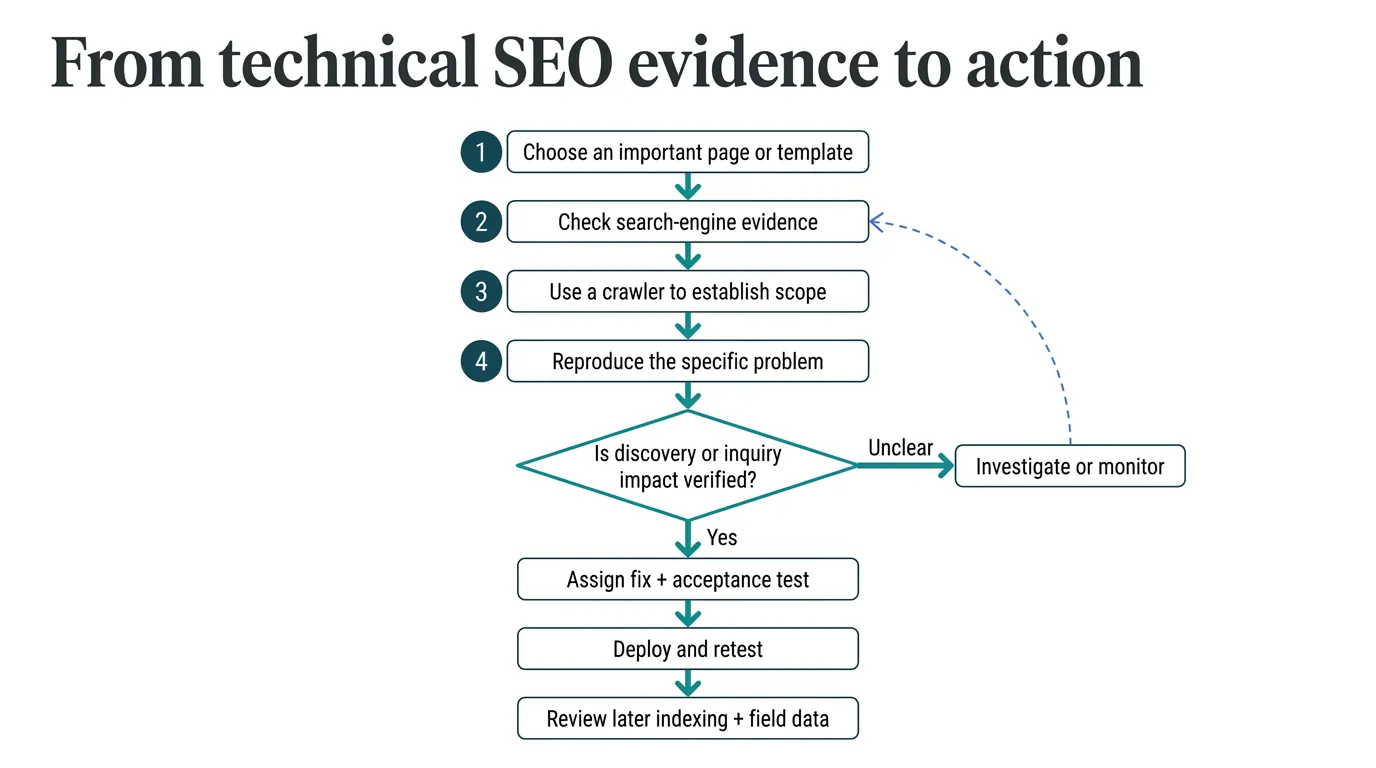
A useful audit ends with decisions, not an exported warning count. Establish page importance, affected scope, evidence strength, implementation risk, and the visitor task involved.
Start with the smallest useful diagnostic stack
For a small, mostly server-rendered company website, begin with Search Console, Screaming Frog, and PageSpeed Insights. Add both validators where structured data are implemented.
For a multilingual exporter, sample important templates in every language. Check selected canonicals before assuming translated pages should be consolidated. Add Ahrefs Free when cloud crawling or JavaScript execution is needed, and WebPageTest when remote delivery conditions require investigation.
For a JavaScript-heavy catalog, compare rendered evidence from Search Console with a JavaScript-enabled crawl. Use DevTools to investigate failures. Missing content in an HTML-only crawler is not enough evidence for a framework rewrite. SeekLab.io's rendering and indexing checks explain this distinction in more depth.
Fix access failures before cosmetic warnings
| Priority | Example | Evidence needed |
|---|---|---|
| Investigate first | Important service pages blocked, broken, or wrongly canonicalized | Reproducible response and affected-template scope |
| Fix next | Slow inquiry interaction or recurring product-template performance issue | Interaction trace or clearly scoped field and lab evidence |
| Schedule | Lower-priority metadata or navigation improvements | Confirmed issue and practical acceptance test |
| Deprioritize | Intentional exclusions, optional warnings, score-only changes | Documented reason no immediate action is justified |
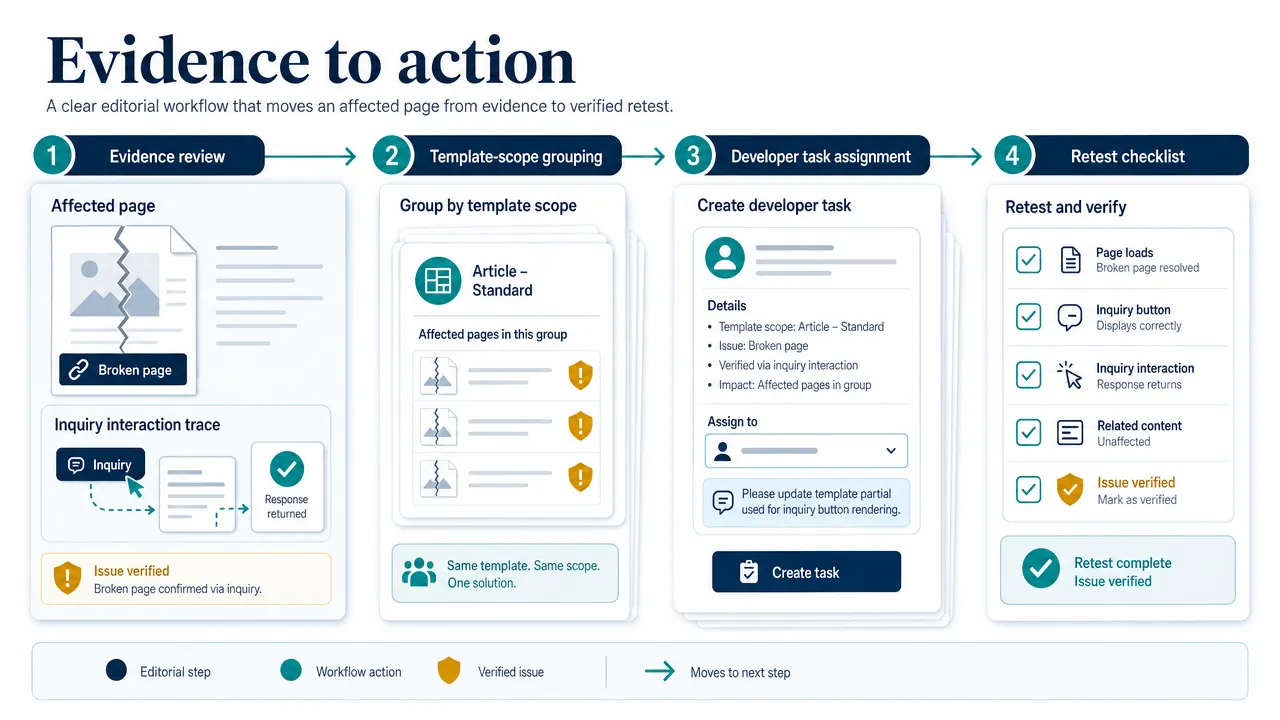
An issue ticket should include affected URLs, business purpose, observed and expected behavior, test settings, supporting evidence, owner, proposed change, rollback considerations, and acceptance criteria.
"Improve performance" is not an actionable ticket. "Reproduce the quote configurator delay under these settings, identify blocking work, and retest the same action after deployment" gives a developer a defined problem.
Know when the free stack is insufficient
Free SEO tools are enough for many initial investigations, but not every release or website. Crawl caps, incomplete history, authenticated environments, and complex rendering can leave material gaps.
Escalate when a proposed change affects many canonicals, redirects, language variants, or shared components. The risk lies in changing a large system on weak evidence, not simply in having many warnings.
Technical readiness also cannot establish buyer relevance. An indexed, fast page can still omit specifications, delivery details, credible industry information, or a clear inquiry path. After verified blockers are resolved, review whether pages match buyer intent before commissioning more content.
Turn findings into a focused growth plan
Free tools are useful for finding technical SEO problems, but they do not decide which issues deserve priority or how a fix should be implemented. SeekLab combines technical SEO diagnosis with implementation prioritization and broader SEO + GEO strategy.
The practical next step is to connect each confirmed issue to affected pages, business impact, an owner, and a clear acceptance test. That keeps crawl warnings and performance scores from becoming an unfocused backlog.
Get a free technical SEO audit to identify which findings matter most, what should be fixed first, and how the changes should be verified.