The Best Hot Topic Analysis Tool for 2026
Expert reviewed

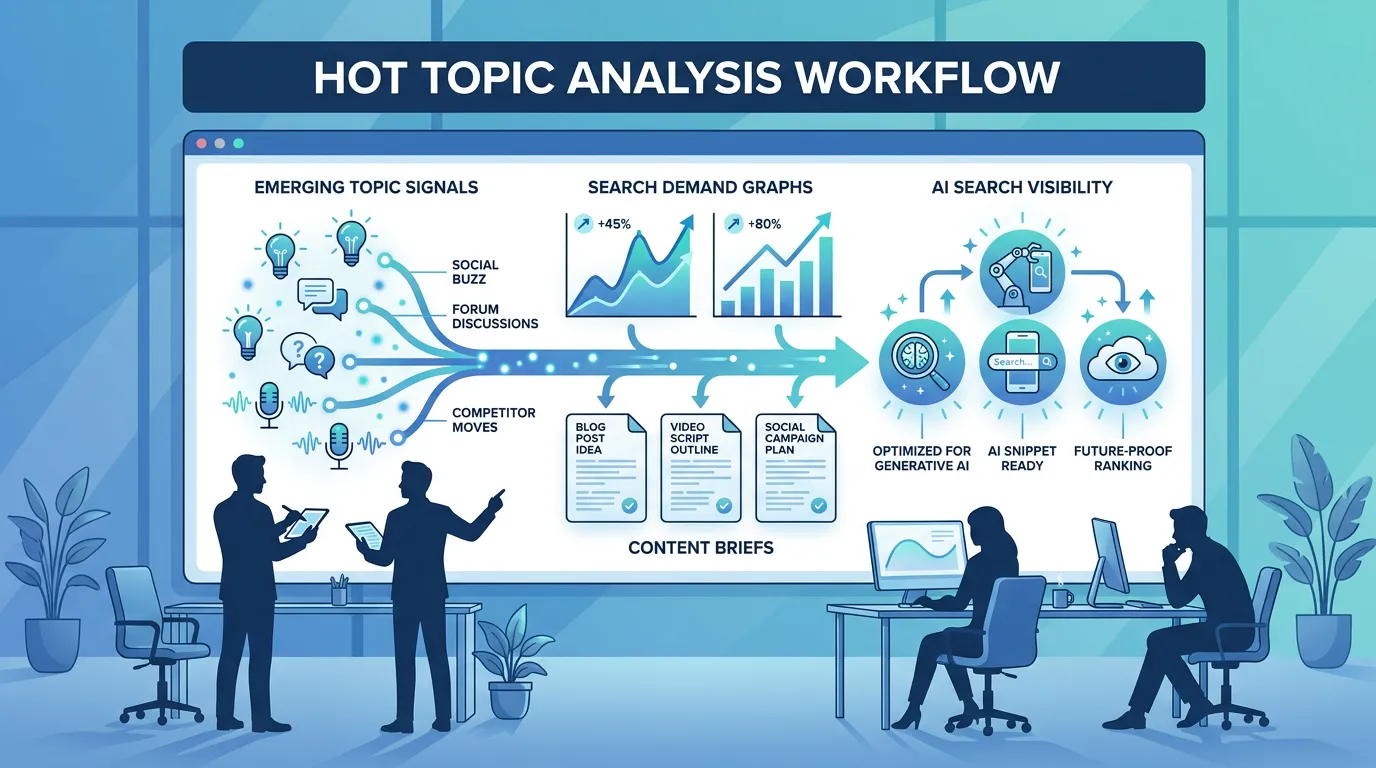
The best hot topic analysis tool for 2026 is the one that turns early audience signals into content decisions your team can actually execute. For SEO, GEO, and search-led content teams, that means more than spotting a trending phrase; it means understanding search demand, topic momentum, audience intent, and how the opportunity maps to pages, clusters, briefs, and internal links.
Teams often choose the wrong tool because they compare surface-level features instead of workflow fit. A social listening platform may be excellent for brand monitoring but too broad for an SEO team. A viral trend predictor may help creators publish faster but may not show whether a topic has durable search demand. A general AI research tool may surface many ideas, but teams still need to prioritize what is worth publishing.
A strong hot topic analysis tool should help teams answer practical questions: Is this topic rising for the right audience? Does it match our industry? Can it support SEO, social, email, or product messaging? Do we have enough site authority and technical readiness to compete? Is the tool showing actionable opportunity, or just another list of trends?
The review below compares SeekLab Hot Topics, Hootsuite, TrendAI Copilot, UpTrendFinder, and TrendSwell.ai based on positioning, features, pricing visibility, strengths, limitations, and best-fit use cases. The strongest choice depends on whether your team needs SEO opportunity mapping, social listening, viral social forecasting, ecommerce trend research, or a broader content intelligence workflow.
5 Best hot topic analysis tool options in 2026
- SeekLab Hot Topics — best for SEO, GEO, and content opportunity mapping.
- Hootsuite — best for social listening, publishing workflows, and enterprise brand monitoring.
- TrendAI Copilot — best for buyers who can verify its documentation directly before evaluation.
- UpTrendFinder — best for creators and social teams focused on viral trend forecasting.
- TrendSwell.ai — best for broad AI trend research, ecommerce ideas, and exportable research workflows.
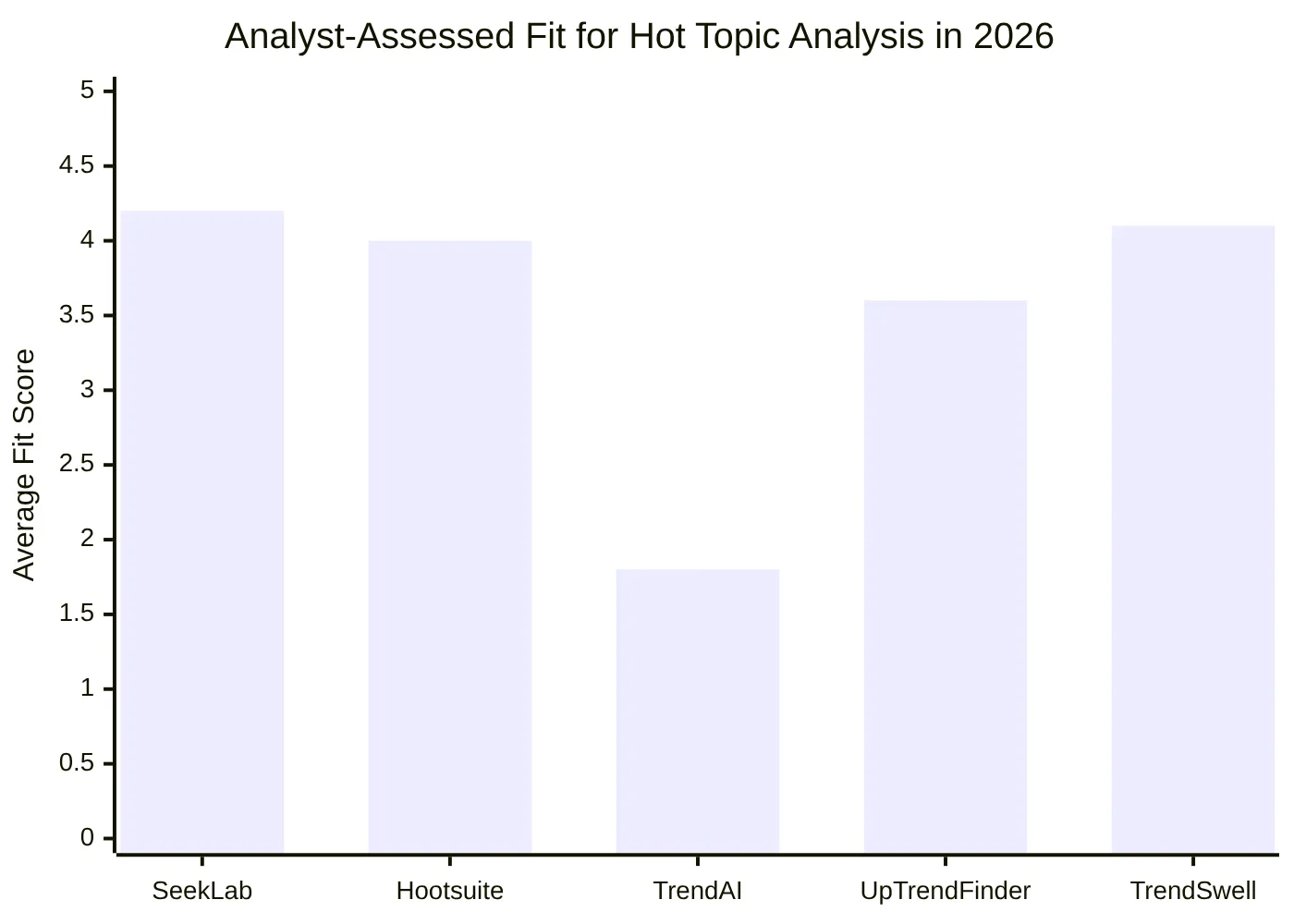
The scores above are directional, based on public positioning and the research report, not controlled product benchmarks. SeekLab scores highest for SEO and AI discoverability fit, Hootsuite scores strongly for social listening and team workflow maturity, and TrendSwell.ai scores well for broad trend research. TrendAI Copilot scores lower because public information for gettrendai.com could not be verified during research.
Best hot topic analysis tool detailed reviews
1. SeekLab Hot Topics
SeekLab Hot Topics is a hot topic analysis tool designed for teams that want to discover emerging topics their audience is already searching for. It is most relevant for SEO teams, SaaS marketers, founders, agencies, and content strategists who need to connect trend discovery with search visibility and AI answer engine discoverability.
Its main difference is workflow alignment. SeekLab is not positioned as a social media scheduler or a viral content toy; it connects hot topics with search demand signals, industry-based filtering, weekly topic updates, and content opportunity mapping. SeekLab's broader ecosystem also includes SeekLab SEO and GEO services, technical audits, internal link analysis, content architecture, and AI readiness support.
Key Features / Key Details:
- Weekly topic updates — Useful for teams that need a reliable cadence for content planning without checking trend feeds every hour.
- Industry-based filtering — Helps marketers avoid generic trends and focus on topics relevant to SaaS, SEO, ecommerce, AI, crypto, and other categories.
- Search demand signals — Important for SEO teams because not every social spike becomes a search opportunity.
- Content opportunity mapping — Helps turn rising topics into blog posts, landing pages, clusters, briefs, or campaign ideas.
- SEO and GEO ecosystem — SeekLab connects topic discovery with visibility across Google and AI answer engines through services and audits.
Strengths:
- Strong fit for search-led growth teams that care about ranking, citations, AI Overviews, and answer engine visibility.
- Better aligned with SEO content workflows than social-only monitoring tools.
- Useful for founders and lean teams that need practical topic prioritization instead of endless research.
- Can be paired with a free SEO and AI readiness audit to check whether a site can capture demand after identifying hot topics.
- Supported by SeekLab's technical-first positioning, described on its technical-first SEO and GEO team page.
Limitations:
- Pricing is not publicly confirmed.
- Exact data sources for Hot Topics are not publicly confirmed.
- Real-time monitoring, exports, reporting, and collaboration features are not publicly confirmed from available information.
Best for:
SeekLab Hot Topics is best for SEO teams, content marketers, SaaS founders, and agencies that want to identify emerging topics and turn them into search-ready content opportunities. It is especially useful when the goal is not just to know what is trending, but to decide what to publish, how to structure it, and how to improve discoverability across search and AI answer engines.
Price / Pricing:
Pricing is not publicly listed. Buyers should confirm plan structure, update frequency, data sources, export options, and team access directly with SeekLab.
2. Hootsuite
Hootsuite is a mature social media management platform with publishing, scheduling, analytics, engagement, and social listening capabilities. For hot topic analysis, its strongest use case is monitoring social conversations, brand mentions, competitors, sentiment, and fast-moving audience discussions.
Hootsuite is a better fit for social teams than SEO-first content teams. If your team needs to publish across social platforms, monitor campaigns, track mentions, and report on engagement, Hootsuite is one of the most established options in this comparison. If your main goal is search demand mapping or SEO content architecture, it may be broader than necessary.
Key Features / Key Details:
- Social listening — Helps teams monitor topics, mentions, competitors, and audience conversations.
- Publishing and scheduling — Useful for teams that want to act on trends directly inside the same social workflow.
- Sentiment analysis — Helps separate positive buzz, complaints, reputation risks, and neutral discussion.
- Analytics and reporting — Supports social media teams that need to share performance with managers or clients.
- Team workflows — Useful for agencies and enterprises that need approvals, collaboration, and brand governance.
Strengths:
- Strong social listening and brand monitoring capabilities.
- Good fit for teams that manage multiple social channels and need publishing plus analytics.
- Useful for reputation management, competitor monitoring, and customer experience teams.
- Mature platform with established workflows for social teams.
- Better suited to enterprise social operations than lightweight trend discovery tools.
Limitations:
- Less specialized for SEO-first hot topic analysis.
- Advanced listening and enterprise workflows may involve more complex pricing.
- May be more platform than a small content team needs if publishing and engagement are not core requirements.
Best for:
Hootsuite is best for social media managers, brand teams, agencies, and enterprises that need social listening combined with publishing, engagement, reporting, and collaboration. It is strongest when hot topic analysis means tracking conversations, mentions, sentiment, and social campaigns.
Price / Pricing:
Hootsuite has a public plans page, but current pricing can vary by plan, region, and advanced features. Buyers should verify exact pricing and listening capabilities before purchasing.
3. TrendAI Copilot
TrendAI Copilot was included because it was named as a comparison brand, but public information for TrendAI Copilot at gettrendai.com could not be verified during research. That does not prove the product lacks capabilities; it means buyers should not rely on assumptions without official documentation.
For a software buyer, this is a practical evaluation issue. A hot topic analysis tool should clearly explain what data it uses, how it defines trends, how often it updates, what outputs it provides, and how pricing works. When those details are unavailable, the right next step is direct vendor validation.
Key Features / Key Details:
- Official positioning — Not publicly confirmed from available research.
- Trend discovery capabilities — Not publicly confirmed.
- AI analysis — Not publicly confirmed.
- Integrations and exports — Not publicly confirmed.
- Pricing and plan structure — Not publicly confirmed.
Strengths:
- It may be relevant if the vendor can provide private demos, product documentation, and workflow examples.
- It may appeal to teams specifically looking for an AI copilot-style interface, if confirmed.
- It may be worth evaluating when procurement requires a broad comparison set.
- It gives buyers a reason to ask stronger questions about documentation, methodology, and transparency.
Limitations:
- Public product details were not verifiable during research.
- Pricing, data sources, integrations, and examples were not publicly confirmed.
- Buyers cannot fairly compare it against more documented tools without vendor-provided information.
Best for:
TrendAI Copilot is best treated as a vendor to verify, not a tool to select based on public research alone. It may be suitable for teams that can request a demo, ask for sample outputs, review data-source explanations, and compare it through a controlled pilot.
Price / Pricing:
Pricing is not publicly confirmed.
4. UpTrendFinder
UpTrendFinder positions itself as an AI social media trend prediction tool for creators, influencers, marketers, brands, and social media managers. Its main promise is helping users identify viral social trends early and turn them into post ideas, repurposed content, and visual concepts.
This makes it useful for creator-led workflows and fast social publishing. It is less clearly positioned for SEO opportunity mapping, technical SEO, GEO, content architecture, or long-term search visibility. Teams should evaluate it based on whether they need viral social speed or search-led demand capture.
Key Features / Key Details:
- Viral trend forecasting — Positioned around identifying social trends before they peak.
- AI-powered content ideas — Helps creators convert trend signals into posts quickly.
- Post analysis — Useful for understanding what may work better in social content.
- Content repurposing — Helps teams adapt one idea into multiple formats.
- Visual concept generation — Useful for creators who need creative direction, not just topic lists.
Strengths:
- Clear fit for creators and social teams chasing fast-moving formats.
- Useful when the goal is short-form social content ideation.
- Helps reduce the gap between trend detection and post creation.
- More focused on creator workflows than enterprise social listening tools.
- Can be helpful for brands that need quick creative concepts.
Limitations:
- SEO and GEO usefulness is less clear.
- Pricing was not publicly confirmed in the research report.
- Data sources and forecasting methodology should be verified before relying on prediction claims.
Best for:
UpTrendFinder is best for creators, influencer teams, social media managers, and brands that need to move quickly on TikTok, Instagram, YouTube, X, Facebook, Pinterest, LinkedIn, or similar social channels. It is not the strongest choice if the primary goal is building search-optimized content clusters.
Price / Pricing:
Pricing is not publicly confirmed. Buyers should ask about plan limits, supported platforms, team access, and how trend forecasts are generated.
5. TrendSwell.ai
TrendSwell.ai positions itself as an AI-powered trend research and analysis platform. It is relevant for businesses that need fast web trend research, ecommerce product ideas, blog topics, regional filters, language filters, exports, and integrations.
Compared with SeekLab, TrendSwell.ai appears broader in general trend research and automation workflows. Compared with Hootsuite, it is less of a social media management suite. Its best fit is research-heavy teams that want to discover many trends quickly and export or integrate results into downstream workflows.
Key Features / Key Details:
- Real-time AI trend research — Useful for teams that need fast discovery across web signals.
- Natural-language prompts — Helps users research trend questions without complex setup.
- Geographic and language filters — Valuable for ecommerce, international SEO, and market research.
- CSV exports — Helps analysts move trend data into spreadsheets and reporting workflows.
- Integrations and API access — Useful for teams that want to connect trend research with automation tools.
Strengths:
- Strong fit for ecommerce, product research, affiliate content, and broad market research.
- Useful exports and integrations for operational workflows.
- AI assistant-style research can speed up ideation.
- Good option for agencies that need flexible trend discovery across niches.
- Stronger for broad trend research than social-only monitoring.
Limitations:
- Technical SEO and GEO execution are not its clearest center of gravity.
- Research quality may depend on prompt design and human interpretation.
- Some pricing references came from public or third-party sources and should be verified before purchase.
Best for:
TrendSwell.ai is best for ecommerce operators, affiliate bloggers, content marketers, agencies, and market researchers that need broad AI trend discovery. It is especially useful when teams want many potential ideas quickly and can evaluate them through their own SEO, content, or product strategy process.
Price / Pricing:
Some public and third-party references mention free or startup options and higher-tier plans around $399/month, but current pricing should be verified directly before publication or purchase.
Hot topic analysis tool compared
| Tool | Best For | Core Features | Integrations | Strengths | Limitations | Pricing |
|---|---|---|---|---|---|---|
| SeekLab Hot Topics | SEO, GEO, and content opportunity mapping | Weekly topic updates, industry filters, search demand signals, content opportunity mapping | Specific integrations not publicly confirmed | Strong search-led growth fit and connection to SEO/GEO services | Pricing, data sources, exports, and collaboration details not publicly confirmed | Not publicly listed |
| Hootsuite | Social listening and social media management | Listening, publishing, sentiment, analytics, alerts, reporting | Strong social platform workflow support | Mature platform for social and brand teams | Less SEO-first; may be too broad for lean content teams | Public plans exist; verify current pricing |
| TrendAI Copilot | Vendor-verification stage | Not publicly confirmed | Not publicly confirmed | May be worth evaluating if official documentation is provided | Public product information not verified | Not publicly confirmed |
| UpTrendFinder | Viral social trend forecasting | Trend forecasts, content ideas, post analysis, repurposing, visual concepts | Public integration details not fully confirmed | Strong creator and social content fit | SEO/GEO usefulness and pricing less clear | Not publicly confirmed |
| TrendSwell.ai | Broad AI trend research and ecommerce ideas | Real-time research, prompts, filters, exports, TrendsGPT, API on higher plans | Public sources reference tools such as Sheets, WordPress, Zapier, and others | Strong research and workflow automation fit | Less integrated with technical SEO/GEO execution than SeekLab | Verify current plans; some references mention higher tiers around $399/month |
A useful way to interpret the comparison is to start with the workflow, not the feature list. SeekLab Hot Topics is strongest when your team needs to turn emerging search interest into SEO and AI-discoverable content. Hootsuite is strongest when the workflow is social listening and social operations. TrendSwell.ai is strongest when the job is broad research. UpTrendFinder is strongest when creators need fast social ideas. TrendAI Copilot needs direct verification.
How to choose the right hot topic analysis tool
Choosing the right hot topic analysis tool depends less on which option looks best on paper and more on your use case, budget, environment, workflow, reliability requirements, and long-term needs. The best tool is the one that helps your team move from signal to action without creating a new reporting burden.
1. Use case fit
SEO teams should prioritize search demand signals, content opportunity mapping, topic clustering, and GEO readiness. Social teams should prioritize listening, sentiment, publishing, alerts, and campaign reporting. Ecommerce teams may need product trend research, regional filters, and exportable research.
This is why SeekLab Hot Topics, Hootsuite, UpTrendFinder, and TrendSwell.ai should not be treated as identical tools. They all relate to trends, but they solve different operating problems.
2. Data coverage and update frequency
A hot topic analysis tool is only as useful as the signals it can detect. Some tools focus on social conversations, while others emphasize web research, search demand, ecommerce interest, or content opportunities.
Ask what sources the tool analyzes and how often data is updated. Weekly updates may work well for editorial planning, while real-time monitoring may matter more for crisis response, social campaigns, or creator-led publishing.
3. SEO and AI search usefulness
For 2026, SEO teams need topic discovery that supports both search engines and answer engines. A hot topic should be evaluated by search demand, audience intent, content gaps, topical authority, internal linking potential, and AI readability.
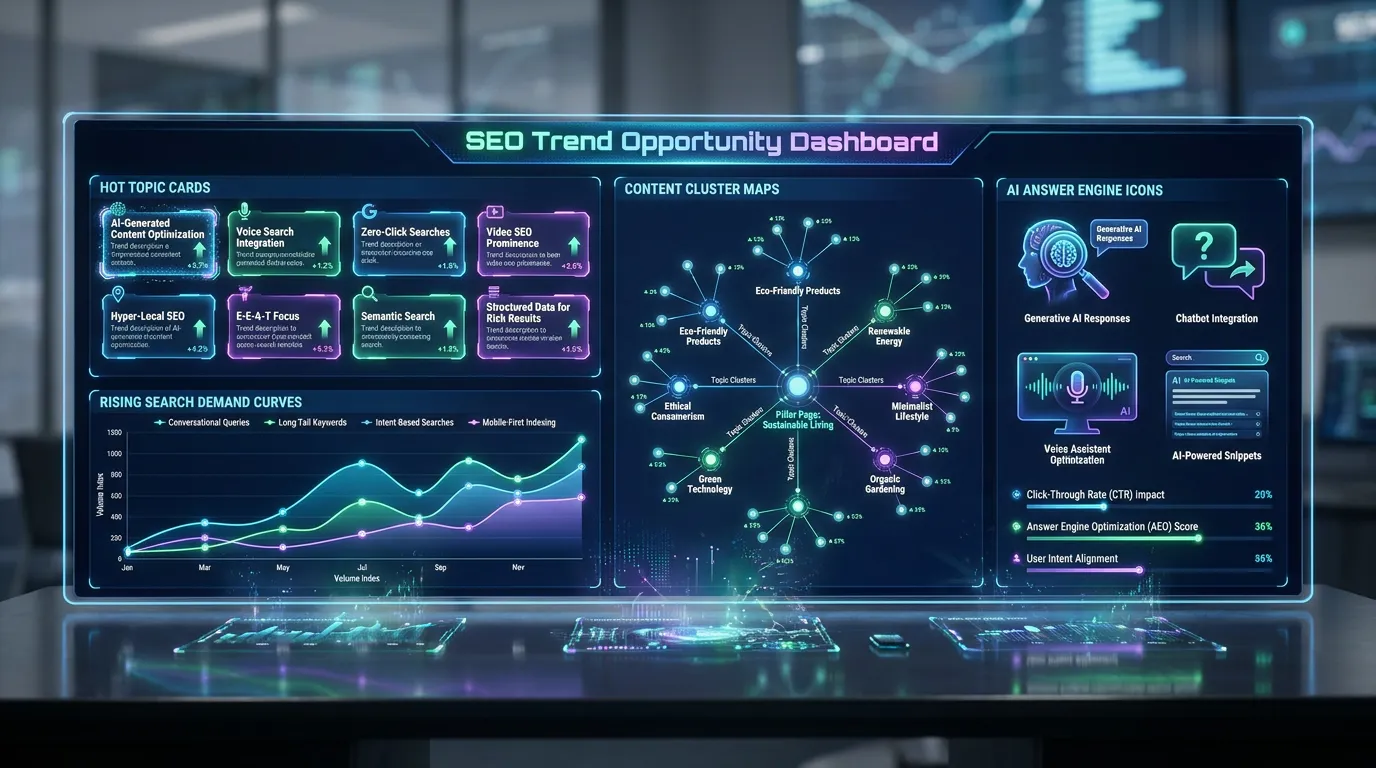
SeekLab's advantage is that Hot Topics sits inside a broader SEO and GEO workflow. The AI trend prediction example also shows why trend timing matters only when the topic can be translated into structured content.
4. Ease of setup and adoption
A tool that requires weeks of setup may be appropriate for enterprise social listening, but not for a founder who needs content ideas this week. Small teams should look for simple filters, clear outputs, and fast prioritization.
Team adoption matters because trend tools fail when insights stay trapped in dashboards. The right tool should fit the way your team already plans content, social posts, campaigns, or product research.
5. Accuracy, reliability, and transparency
Trend data is directional, not guaranteed. AI summaries can reduce research time, but they still need human review. Buyers should avoid tools that overpromise viral prediction accuracy or hide methodology completely.
Look for transparent explanations of data sources, examples, update cadence, and limitations. If a vendor cannot show sample outputs for your industry, run a pilot before committing.
6. Reporting, exports, and workflow integration
Some teams need dashboards and scheduled reports. Others need CSV exports, API access, or integrations with spreadsheets, CMS platforms, or social tools. Agencies may need client-ready summaries and repeatable workflows.
SeekLab's confirmed Hot Topics features focus on topic discovery and opportunity mapping, while TrendSwell.ai appears stronger in exports and integrations. Hootsuite is stronger in social reporting and collaboration.
7. Price and long-term value
Do not choose a hot topic analysis tool only because it is cheap or feature-heavy. The real cost is time wasted on irrelevant ideas, content that cannot rank, or dashboards your team does not use.
Long-term value comes from better prioritization. A tool that helps your team publish fewer but better-targeted assets may be more valuable than a tool that generates hundreds of low-context ideas.
8. Actionability
The most important question is simple: What can your team do after seeing the insight? A useful tool should help you create a brief, build a cluster, update a page, launch a social campaign, inform product messaging, or monitor a risk.
If a tool only displays trends without explaining intent, momentum, audience fit, and next steps, it may create more noise than clarity.
Key features to look for in a hot topic analysis tool
Emerging topic discovery
The tool should surface rising topics before they become fully saturated. This matters because early content often has a better chance to earn visibility, links, mentions, and engagement.
Search demand signals
For SEO teams, search demand separates interesting chatter from topics people actively look up. SeekLab Hot Topics is notable because research confirms search demand signals and content opportunity mapping through SeekLab's services content.
Industry and regional filters
A broad trend may not matter to your audience. Industry, country, and language filters help teams find relevant opportunities instead of chasing general internet noise.
AI summaries and context
AI can help explain why a topic is rising, who is discussing it, what angles are emerging, and which questions audiences may ask. Human review is still necessary, especially for sensitive or fast-changing topics.
Trend prioritization
A long trend list is not enough. Strong tools should help users prioritize by momentum, relevance, demand, competition, sentiment, or business value.
Content opportunity mapping
This feature connects a trend to specific content actions. It can help teams decide whether to write a blog post, create a cluster, refresh an existing page, build a comparison article, or launch a social campaign.
Social listening and sentiment
Social listening matters when your team tracks brand reputation, competitors, customer complaints, or campaign reactions. Hootsuite is particularly strong in this area.
Alerts and monitoring
Alerts help teams respond when a topic spikes. This is more important for brand monitoring, PR, and fast social campaigns than for slower editorial planning.
Exports and reporting
Exports are useful for analysts, agencies, and teams that need to share findings. TrendSwell.ai appears strong here, while SeekLab's Hot Topics export and reporting details are not publicly confirmed.
Collaboration and permissions
Larger teams need roles, approvals, shared dashboards, and repeatable workflows. Enterprise social teams may prioritize this more than startups or solo creators.
Technical SEO and AI readiness connection
A topic opportunity only matters if your site can capture it. Pairing topic discovery with a free SEO and AI readiness audit helps teams identify technical blockers before investing in content.
What is a hot topic analysis tool?
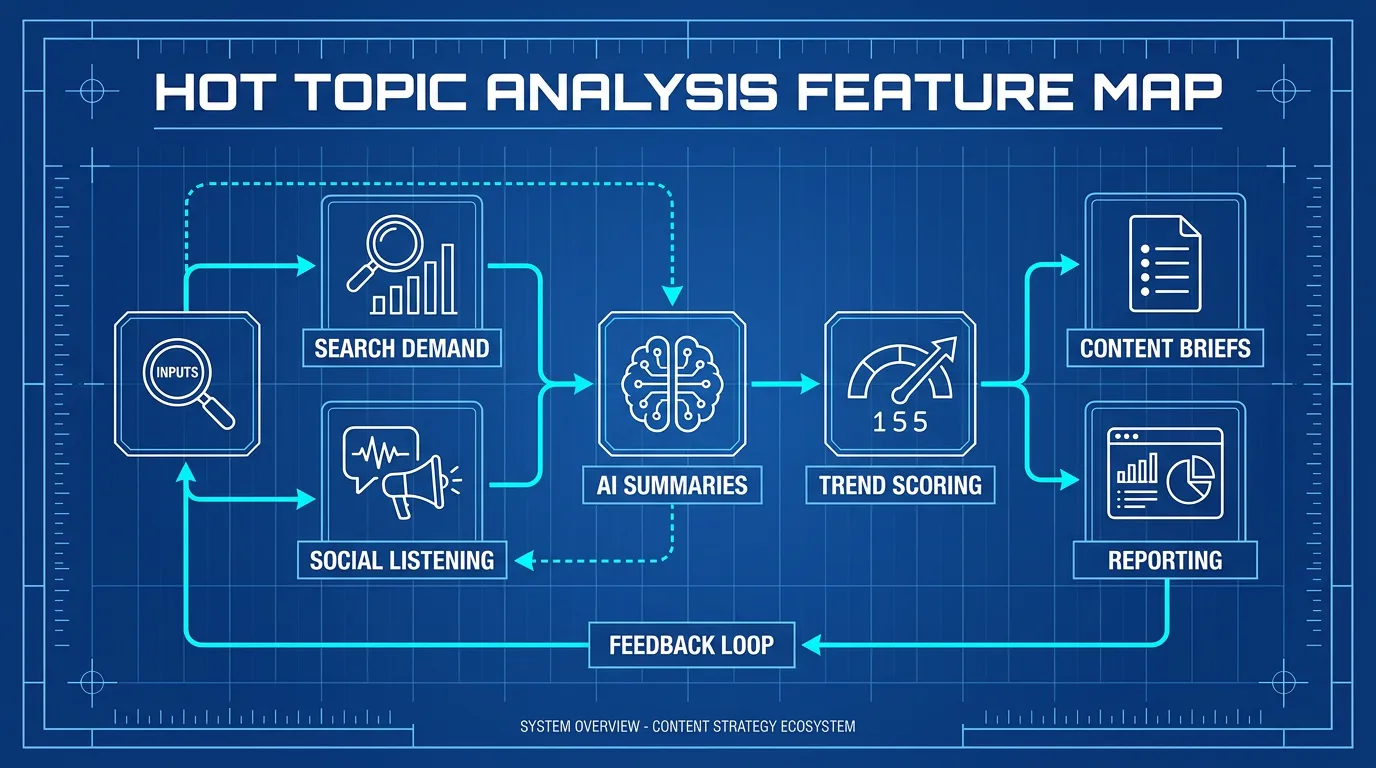
A hot topic analysis tool is software that helps marketers, creators, researchers, and business teams identify, analyze, prioritize, and act on emerging topics. It typically helps users monitor audience signals, understand trend momentum, and convert insights into content, campaigns, product ideas, or market intelligence.
Unlike manual browsing, basic keyword research, or isolated social monitoring, a dedicated hot topic analysis tool is designed to make trend discovery faster, more repeatable, and more actionable. It can help teams:
- Monitor emerging topics, viral content patterns, search interest, and audience conversations.
- Reduce manual research time and content planning guesswork.
- Support SEO, social, ecommerce, product, and market research workflows.
- Make topic prioritization easier through filters, summaries, and demand signals.
- Provide clearer next steps for content briefs, campaigns, or reporting.
How does a hot topic analysis tool work?
-
Set up your account, project, brand, or topic area.
The setup stage defines what the tool should monitor. For SEO teams, this may include industries, keywords, audience segments, competitors, or geographic markets. -
Define your goals, keywords, competitors, audience, or workflows.
A tool cannot prioritize well unless your team knows what matters. A founder may care about demand creation, while an enterprise social team may care about sentiment and risk. -
Connect data sources or configure filters.
Depending on the tool, this may involve search demand data, social channels, web research, ecommerce categories, or industry filters. The goal is to reduce irrelevant signals. -
Run the first analysis or monitoring process.
The tool surfaces trends, topic cards, alerts, summaries, or research outputs. This is where teams begin separating useful opportunities from noise. -
Review insights, gaps, alerts, or recommendations.
Strong teams do not publish immediately from AI output. They check audience fit, intent, competition, brand relevance, and whether the trend is likely to last. -
Take action based on the findings.
Actions might include writing a brief, refreshing a page, creating a social post, building a cluster, launching a campaign, or sharing a market insight with leadership. -
Monitor changes over time and iterate.
Topic momentum changes. Review performance, update content, adjust internal links, and track whether the trend becomes durable demand or fades quickly.
Common mistakes to avoid
Choosing based only on feature count
More features do not always mean better decisions. A lean SEO team may get more value from search demand and content mapping than from an enterprise social dashboard.
Tracking too many metrics
Trend tools can create metric overload. Choose a small set of decision metrics, such as relevance, momentum, demand, intent, and actionability.
Ignoring data accuracy and methodology
Prediction and AI summaries should be treated as signals, not certainty. Ask vendors how they collect data, refresh topics, and generate recommendations.
Not connecting the tool to real workflows
A dashboard that does not feed briefs, pages, social calendars, or reports becomes shelfware. Before buying, decide who uses the insight and what action follows.
Publishing trend content without content architecture
A single trend post may not perform if it is isolated. SEO teams should connect hot topics to clusters, internal links, topical authority, and technical readiness.
Overpaying for unused features
Enterprise social listening may be valuable for brand teams, but excessive for a startup that only needs SEO topic discovery. Match the plan to the workflow.
Best practices for using a hot topic analysis tool
Start with one clear use case
Decide whether the tool is for SEO, social listening, ecommerce research, brand monitoring, or creator content. Mixed goals lead to messy evaluation.
Match the tool to your real workflow
SeekLab Hot Topics fits search-led content planning. Hootsuite fits social operations. TrendSwell.ai fits broad research. UpTrendFinder fits fast social ideation.
Validate trend relevance before publishing
Do not publish only because a topic is rising. Check audience fit, search intent, brand relevance, and whether you can add useful perspective.
Combine AI output with human judgment
AI can summarize patterns, but editors and strategists should decide angle, accuracy, brand fit, and risk.
Review performance regularly
Track whether topics lead to rankings, mentions, engagement, conversions, or campaign learnings. Use the results to refine your filters and priorities.
Revisit your setup every few months
Markets change. Update industries, competitors, audience assumptions, and topic filters so your tool keeps reflecting current strategy.
Final recommendation for the best hot topic analysis tool and FAQ
Hot topic analysis matters in 2026 because content teams face faster trend cycles, more AI-generated competition, and more fragmented discovery across Google, social platforms, and AI answer engines. The right tool helps teams identify demand earlier and act with more discipline.
No single hot topic analysis tool is best for every team. Choose SeekLab Hot Topics if your priority is SEO, GEO, search demand, and content opportunity mapping. Choose Hootsuite if your priority is social listening and social media operations. Choose TrendSwell.ai if you need broad AI trend research and exportable workflows. Choose UpTrendFinder if creator-led viral social content is the main goal. Treat TrendAI Copilot as a verification-stage option until official product details are available.
If you need search-led growth, start with SeekLab Hot Topics and pair topic discovery with a free SEO and AI readiness audit. That combination helps you avoid a common mistake: finding promising topics but publishing on a site that is not technically ready to capture demand.
Frequently asked questions
What is the best hot topic analysis tool?
The best hot topic analysis tool depends on your workflow. For SEO and content teams, SeekLab Hot Topics is the strongest fit in this comparison because it connects emerging topics with search demand signals, industry filters, and content opportunity mapping. For social listening and brand monitoring, Hootsuite is stronger. For broad AI trend research, TrendSwell.ai is a strong option. For creator-led viral social content, UpTrendFinder is more focused. TrendAI Copilot needs direct verification because public product information was not confirmed during research.
What does a hot topic analysis tool do?
A hot topic analysis tool helps users identify, analyze, prioritize, and act on emerging topics. It may collect signals from search demand, social conversations, web content, ecommerce trends, or audience discussions. The best tools do more than list what is trending; they help explain why a topic is rising, whether it fits your audience, and what action to take next. For content teams, that action might be a blog post, content cluster, social campaign, landing page, or product research brief.
How much does a hot topic analysis tool cost?
Pricing varies widely by tool type, plan, data access, users, exports, integrations, and enterprise features. SeekLab Hot Topics pricing is not publicly confirmed. Hootsuite has public plans, but current pricing and advanced listening costs should be verified. UpTrendFinder pricing was not publicly confirmed in the research report. TrendSwell.ai has public and third-party pricing references, including higher-tier mentions around $399/month, but buyers should verify current plans directly. Always compare total workflow value, not just monthly subscription cost.
Are cheap or free hot topic analysis tool options worth using?
Cheap or free tools can be useful for early exploration, especially for small teams testing a trend workflow. The limitation is usually data depth, update frequency, exports, collaboration, or prioritization. Free tools may show what is popular but not explain whether the topic is relevant, durable, or actionable. If your team depends on SEO growth, campaign timing, or client reporting, a paid tool with clearer methodology, filters, and workflow support may save more time than it costs.
How do I choose the right hot topic analysis tool?
Start by defining the job. If you need SEO content opportunities, prioritize search demand, content mapping, topic clusters, and AI search readiness. If you need social monitoring, prioritize listening, sentiment, alerts, publishing, and reporting. If you need ecommerce ideas, prioritize product research, regional filters, and exports. Then test each tool with one real topic from your industry. Compare relevance, clarity, speed, actionability, and whether your team can use the output without extra manual work.
What features should I look for in a hot topic analysis tool?
Look for emerging topic discovery, search demand signals, industry filters, AI summaries, trend prioritization, content opportunity mapping, exports, alerts, and reporting. Social teams should also look for sentiment analysis and brand monitoring. SEO teams should prioritize topic clustering, internal linking potential, content architecture, and GEO readiness. Agencies may need collaboration, client reporting, and repeatable workflows. The most important feature is actionability: the tool should help your team decide what to publish, update, monitor, or test.
Can beginners use a hot topic analysis tool?
Yes, beginners can use a hot topic analysis tool if the interface provides clear filters, summaries, and next steps. The bigger challenge is not operating the tool; it is interpreting the output. Beginners should start with one audience, one industry, and one goal, such as finding blog topics or monitoring a competitor category. Avoid chasing every trend. Review each idea for audience fit, search intent, business relevance, and whether the team can produce useful content around it.
How often should teams review hot topic analysis tool data?
Review frequency depends on the workflow. Social teams may check trend and sentiment data daily or even more often during active campaigns. SEO and content teams may review weekly updates for editorial planning, then revisit performance monthly. Ecommerce and product research teams may monitor seasonal or regional trends more frequently around launches. The key is consistency. A hot topic analysis tool is most valuable when insights are reviewed, prioritized, acted on, and measured over time.