SEO Audit Checklist 2026: 13 Steps to Audit Your Website
Expert reviewed

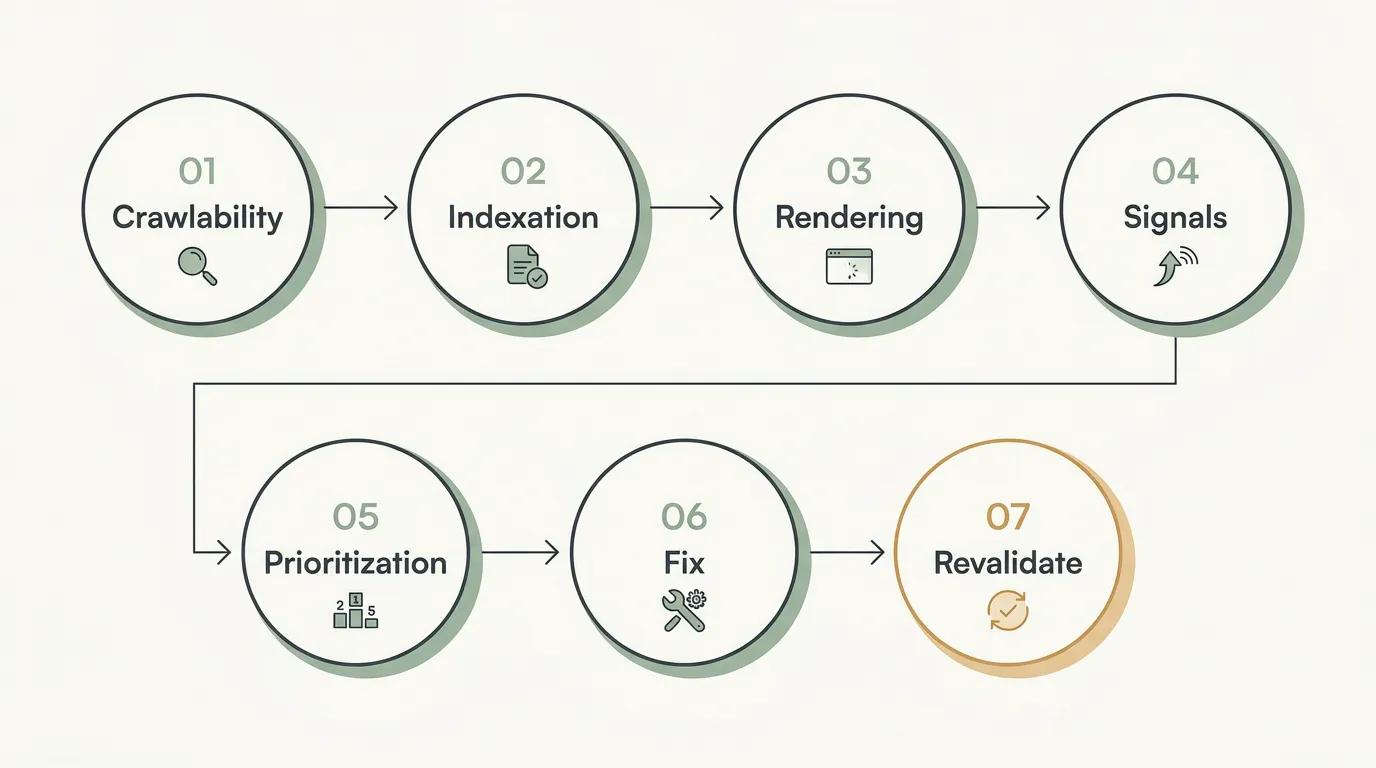
An SEO audit checklist is a practical sequence for checking whether important pages can be discovered, crawled, rendered, indexed, understood, and supported by the right internal signals. Start with access and indexation, then review architecture, rendering, performance, structured data, international setup, and on-page foundations before prioritizing and validating fixes.
Use this guide as a working website audit checklist. Record affected URLs and evidence as you go; do not turn every tool warning into a development task.
If you need the broader explanation first, read what a technical SEO audit includes and how it works.
SEO Audit Checklist: What to Check First
| Order | Audit area | First question | Useful evidence |
|---|---|---|---|
| 1 | Crawl access | Can search engines reach the pages that matter? | Crawl, robots.txt, response codes |
| 2 | Indexation | Are the intended canonical pages indexed? | Search Console, URL Inspection |
| 3 | XML sitemaps | Do submitted files contain only intended URLs? | Sitemap files, Search Console |
| 4 | Canonicalization | Do duplicate URLs agree on one preferred version? | Canonicals, redirects, internal links |
| 5 | Architecture | Can users and crawlers reach priority pages logically? | Crawl depth, internal-link graph |
| 6 | Rendering | Is critical content present after rendering? | Source HTML, rendered HTML, browser tests |
| 7 | Performance | Do priority templates provide a stable mobile experience? | Field data, PageSpeed Insights |
| 8 | Structured data | Is valid markup consistent with visible content? | Rich Results Test, rendered HTML |
| 9 | International SEO | Do localized pages send compatible signals? | Hreflang, canonicals, locale URLs |
| 10 | Technical hygiene | Are HTTPS and server responses consistent? | Browser and crawler evidence |
| 11 | On-page foundations | Does each important page clearly satisfy its intent? | Titles, headings, content, internal links |
| 12 | Prioritization | Which confirmed problems affect strategic pages? | Severity, scale, impact, dependencies |
| 13 | Revalidation | Did the deployed fix produce the intended result? | Recrawl, inspection, monitoring |
1. Confirm Search Engines Can Access the Site
Start by checking whether priority URLs and the resources needed to render them are accessible.
- Open
/robots.txtand confirm that important sections are not blocked. - Check page-level
noindexdirectives andX-Robots-Tagheaders. - Confirm that navigation and important internal links use crawlable URLs.
- Review 3xx, 4xx, and 5xx responses on important pages.
- Find redirect chains and loops.
- Check whether CSS, JavaScript, images, or APIs required for critical content are blocked.
Do not use robots.txt as a substitute for noindex. Google explains that a blocked page can still appear by URL and that a crawler must access a page to read its noindex directive. See Google's guidance on robots.txt and blocking indexing with noindex.
If access is broken, fix confirmed blocks and server failures on priority templates before working through lower-impact metadata warnings. For a deeper troubleshooting workflow, use SeekLab's guide to fixing crawl errors and improving site crawlability.
2. Check Indexation
Indexation checks should compare what the site intends with what Google reports and selects.
- Identify the important pages that should be indexed.
- Review the Search Console Page Indexing report for unexpected exclusions.
- Inspect representative URLs rather than assuming one status applies to an entire template.
- Check accidental
noindex, soft 404s, canonical conflicts, and redirect errors. - Compare indexed URLs with canonical and sitemap inventories.
- Separate intended exclusions from problems affecting commercial or strategic pages.
Use the Page Indexing report and URL Inspection for Google-specific evidence. A crawler can show whether a URL is technically indexable, but it cannot confirm Google's current indexing decision.
If a priority URL is missing, diagnose the specific cause before requesting indexing. SeekLab's guide to investigating pages that are not indexed covers the specialist workflow.
3. Review XML Sitemaps
An XML sitemap should describe the intended indexable URL set, not every URL the CMS can generate.
- Confirm that the sitemap and any sitemap index resolve successfully.
- Include canonical, indexable URLs that return a successful response.
- Remove redirected, broken, blocked, duplicate, or
noindexURLs. - Check that locale-specific sitemaps use the current URL structure.
- Confirm the submitted sitemap location in Search Console.
- Compare sitemap URLs with the crawl and CMS inventory.
Google's sitemap guidance makes clear that submission helps discovery but does not guarantee crawling or indexing.
If the sitemap is polluted, correct the CMS or generation rule rather than deleting individual URLs from the file after every release.
4. Check Canonicalization and Duplicate URLs
Canonical checks are most useful when redirects, internal links, sitemaps, and declared canonicals are reviewed together.
- Confirm self-referencing canonicals on intended primary URLs.
- Find canonicals pointing to redirects, errors, blocked pages, or
noindexpages. - Review parameter URLs, pagination, filters, print views, and tracking variants.
- Check HTTP/HTTPS, www/non-www, case, and trailing-slash consistency where relevant.
- Compare canonicals with internal-link and sitemap destinations.
- Check whether language variants canonicalize to the correct same-language page.
Google treats redirects, rel="canonical", and sitemap inclusion as signals of different strength. Its canonicalization guidance also recommends linking internally to canonical URLs.
If signals conflict, define the intended URL for the affected pattern and align the template, redirects, sitemap, hreflang, and internal links around it.
5. Review Site Architecture and Internal Linking
The goal is not to force every page within an arbitrary number of clicks. It is to make important pages easy to discover in a logical user journey.
- Find orphan pages by comparing crawl data with sitemaps, CMS exports, analytics, and Search Console.
- Review click depth for priority product, service, category, and conversion pages.
- Repair broken internal links and links that pass through unnecessary redirects.
- Confirm that important pages receive links from relevant hubs and supporting content.
- Use descriptive anchor text that accurately represents the destination.
- Check breadcrumbs, pagination, related-content modules, and language navigation.
- Confirm that commercial pages receive internal support from relevant informational content.
Google recommends crawlable <a> elements with href attributes for dependable link discovery. See its link best practices and SeekLab's practical guide to internal linking for SEO.
If a page is orphaned, first decide whether it should be indexed and retained. Link valuable pages, improve weak pages before promoting them, and consolidate or retire duplicates instead of adding links indiscriminately.
6. Check JavaScript Rendering
JavaScript is not automatically an SEO problem. The check is whether critical content and signals are delivered consistently.
- Compare initial source HTML with rendered HTML on representative templates.
- Confirm that primary copy, headings, links, canonicals, and robots directives are present and stable.
- Test menus, filters, tabs, pagination, and client-side routes.
- Check whether lazy-loaded content appears without requiring user interaction.
- Confirm that structured data remains present and accurate after rendering.
- Review failed resource and API requests that affect meaningful content.
Use Google's JavaScript SEO basics as the technical reference. SeekLab's JavaScript SEO and indexing guide covers deeper rendering diagnosis.
If rendered output is incomplete, fix the shared delivery or template problem and test representative URLs before rolling the change across the site.
7. Review Core Web Vitals and Performance
Prioritize real-user experience on important mobile templates rather than chasing a perfect score on one page.
- Review Largest Contentful Paint, Interaction to Next Paint, and Cumulative Layout Shift.
- Distinguish field data from lab diagnostics.
- Test the templates that support organic traffic and conversions.
- Identify oversized media, slow server responses, long JavaScript tasks, and layout shifts.
- Check mobile navigation, forms, tables, and content readability.
- Separate shared template causes from isolated page problems.
The Web Vitals documentation explains the current metrics. Passing Core Web Vitals does not guarantee rankings, and failing a lab test does not by itself establish the business priority of a fix.
If performance is weak, document the affected template, measured evidence, likely cause, expected outcome, and test conditions before creating development tickets.
8. Check Structured Data
Structured data should describe visible page content accurately and use a relevant supported type.
- Validate the rendered markup and required properties.
- Confirm that the schema describes the current canonical page.
- Compare markup with visible names, dates, prices, ratings, FAQs, and other facts.
- Check template duplication and conflicting entity identifiers.
- Review errors and warnings without assuming every warning is urgent.
- Confirm that markup remains present after JavaScript rendering.
Google's structured data guidelines state that valid markup does not guarantee a rich result and that marked-up information should represent visible content.
If markup is misleading or unsupported, correct or remove it. Do not add schema types merely to increase the number of marked-up pages.
9. Review International SEO
For multilingual or multi-regional sites, check the relationship among URLs, canonicals, hreflang, navigation, and localized content.
- Confirm that each intended language or regional version has a unique crawlable URL.
- Validate language and language-region codes.
- Check reciprocal hreflang references, including self-references where used.
- Confirm that each alternate resolves and is indexable.
- Keep canonicals compatible with the language version represented by the page.
- Review language switchers and internal links between equivalents.
- Test whether automatic geographic redirects block crawlers or users from accessing another locale.
- Check that sitemaps and templates use the same current locale URLs.
Use Google's guidance for localized page versions. For planning beyond the technical checks, see SeekLab's multilingual SEO strategy guide.
In SeekLab's free-audit taxonomy, “International SEO & GEO” means geographic and regional SEO, not Generative Engine Optimization.
10. Check Security and Technical Hygiene
This section covers delivery issues relevant to crawling and user trust. It is not a cybersecurity audit.
- Confirm that intended pages and resources load over HTTPS.
- Check certificates on required hosts and subdomains.
- Redirect HTTP URLs consistently to the preferred HTTPS versions.
- Find mixed-content resources and insecure internal links.
- Review broken pages, redirect loops, and recurring server errors.
- Test obvious browser warnings on priority journeys.
If the audit exposes broader application, infrastructure, or security risks, route them to the appropriate specialists rather than presenting SEO tooling as a security assessment.
11. Review On-Page SEO Foundations
Keep this pass focused on whether important pages communicate one clear purpose.
- Check for missing, duplicated, or misleading title tags.
- Review meta descriptions on strategic pages.
- Confirm one clear primary heading and a logical H2/H3 structure.
- Identify thin, obsolete, or duplicated pages.
- Compare page content with the intended search intent.
- Check whether key information is visible and easy to extract.
- Add useful contextual links to related pages and next steps.
- Identify multiple pages competing for the same primary intent.
If several URLs target the same intent, choose the page that should own it and decide whether the others should be differentiated, consolidated, redirected, or removed from indexation.
12. Prioritize the Findings
A useful audit produces an ordered implementation plan, not a count of warnings.
| Prioritization factor | Question to ask |
|---|---|
| Strategic pages | Does the issue affect a page tied to leads, revenue, product discovery, or a priority audience? |
| Severity | Does it block discovery, access, rendering, index eligibility, or a critical journey? |
| Scale | Is one shared rule affecting many relevant URLs? |
| Root cause | Can one template or configuration change resolve the pattern? |
| Business impact | What user or commercial outcome is constrained? |
| Dependencies | Must another team or system change first? |
| Implementation risk | Could the proposed fix damage working URLs or signals? |
Record the evidence, affected pattern, recommended owner, acceptance criteria, and validation method for each material issue. Keep unverified alerts and low-impact hygiene in a backlog until evidence supports action.
13. Revalidate After Fixes
An issue is not resolved merely because code was deployed.
- Recrawl the affected URL set.
- Inspect representative pages in production.
- Confirm response codes, redirects, directives, canonicals, and sitemap entries.
- Retest source and rendered HTML.
- Validate structured data and hreflang where affected.
- Check mobile behavior and performance under the same test conditions.
- Monitor Search Console and analytics for regressions.
- Record whether the acceptance criteria were met.
If validation fails, reopen the root-cause analysis rather than adding another workaround on top of the original problem.
Automated Scan vs Manual Review
| Task | Automated scan | Manual review |
|---|---|---|
| Find repeated technical patterns | Strong starting point | Validates whether the pattern is material |
| Check many status codes and links | Efficient at scale | Investigates business-critical exceptions |
| Detect common directive or metadata issues | Useful | Confirms intent and template context |
| Decide what should be fixed first | Limited | Required for impact, dependencies, and risk |
| Diagnose complex rendering or international problems | Can surface symptoms | Usually needed for root cause and safe implementation |
The two approaches are complementary. A fast automated scan can establish a baseline; deeper review is useful when teams need evidence, interpretation, and implementation priorities.
Free Technical SEO Audit
- Runs in minutes
- No signup required
- Up to 3 free reports
SeekLab's free audit is a quick automated scan covering around 30 checks across nine categories. It is separate from the broader, human-reviewed Search & AI Audit, which supports deeper diagnosis and prioritization.
FAQ
What Is an SEO Audit Checklist?
An SEO audit checklist is an ordered list of technical, structural, and on-page checks used to find problems that may affect crawling, rendering, indexation, search interpretation, or important user journeys. It should record evidence and next actions, not just mark items as passed or failed.
What Should You Check First in a Technical SEO Audit?
Start with priority pages and confirm access, response codes, robots rules, indexation directives, canonical signals, and Search Console evidence. A blocked or unintentionally excluded strategic page normally deserves attention before minor metadata warnings on low-value URLs.
How Often Should You Run an SEO Audit?
There is no universal schedule. Run focused checks after redesigns, migrations, framework changes, international launches, large content imports, or template releases. Stable sites can combine ongoing monitoring with periodic deeper reviews of priority pages.
Can an Automated Tool Replace a Manual SEO Audit?
No. Automated tools are effective for consistent scanning and pattern detection, but they do not fully understand commercial priorities, intentional exceptions, implementation dependencies, or the risk of a proposed fix. Manual review adds validation, context, and prioritization.
How Long Does an SEO Audit Take?
A basic automated scan can run in minutes. A deeper audit depends on the site's size, technology, markets, data access, and the number of templates requiring validation. Investigation and prioritization often take longer than the crawl itself.
Which SEO Audit Issues Should Be Fixed First?
Fix confirmed blockers on strategic pages first, followed by shared problems affecting many important URLs. Prioritize using severity, scale, business impact, evidence, dependencies, and implementation risk rather than the order in which a tool reports issues.
What Should You Do After Completing an SEO Audit?
Convert validated findings into owned tasks with acceptance criteria. After implementation, recrawl and inspect affected pages, confirm that intended signals changed, and monitor Search Console and business outcomes for regressions or delayed effects.
The purpose of this checklist is not to produce a warning-free dashboard. It is to help teams identify material problems, fix them in a defensible order, and verify that important pages work as intended.