Best Free Website Audit Tools in 2026 — No Demo Call Required
Expert reviewed

A free website audit tool should give you a usable first diagnosis without forcing a demo call, but the best choice depends on whether you need a fast public scan, verified search data, a deeper technical crawl, or human-reviewed prioritization.
The useful distinction in 2026 is not only "free vs paid." It is "free website audit tool no signup" vs "free after verification" vs "free trial" vs "free report with expert review." A no-signup checker can quickly flag page titles, headings, speed issues, and basic on-page problems. Verified tools can show indexing, crawl, and performance data that public scanners cannot access. A human-reviewed audit is most useful when the tool finds too many warnings and your team needs to know what actually affects traffic, inquiries, and market expansion.
For independent websites, official company sites, exporter websites, and multilingual brand sites, the right workflow is simple: use a quick scanner for the first look, validate important pages in Google Search Console, run a deeper crawl if you own the site, then prioritize fixes by business impact. A missing meta description on a low-value page should not get the same attention as an indexing issue on a revenue-critical product page.
How a free website audit tool should be judged before you trust the score
A free website audit tool is useful only when it helps you make a better decision. A score alone does not tell you whether your website can be crawled properly, whether priority pages are indexed, whether Core Web Vitals problems affect key templates, or whether your content is strong enough to convert serious buyers.
For a marketing manager or independent developer, the practical question is: "What can I do with this report tomorrow?" A report that lists 200 issues without severity, affected URLs, business context, or implementation guidance often creates more work than clarity.
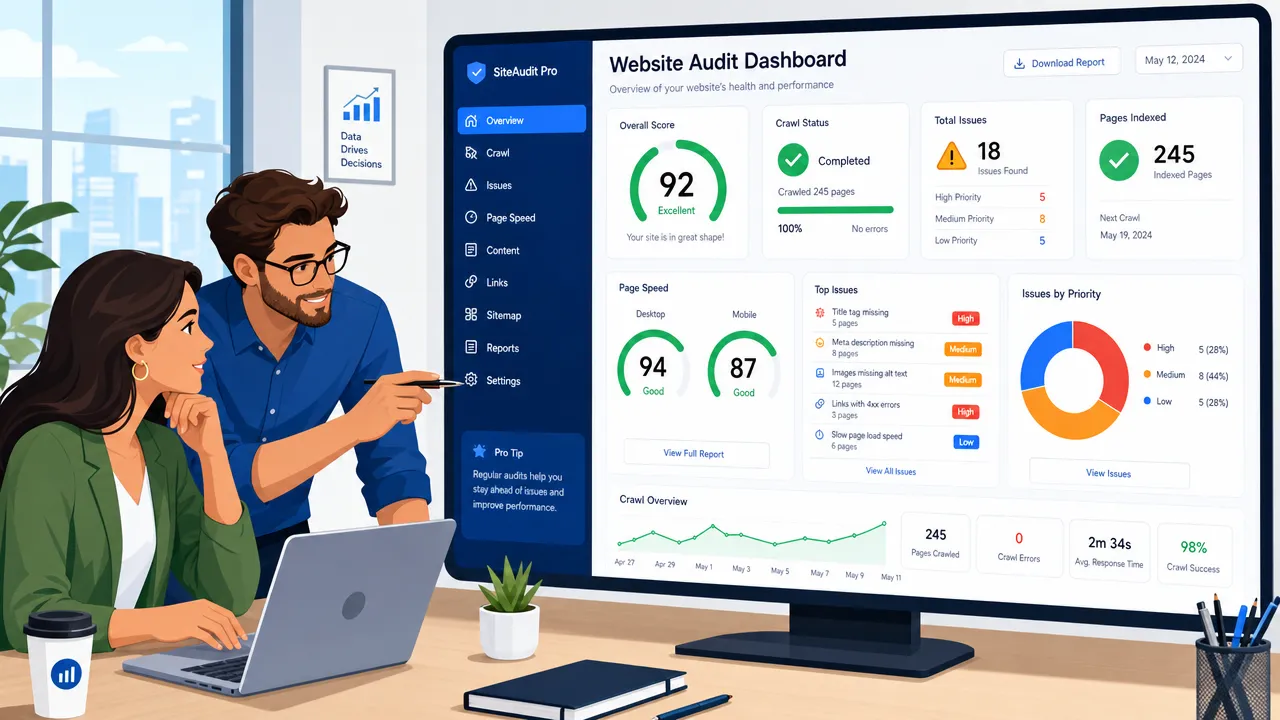
Use these criteria before taking a free report at face value:
| Evaluation point | What to check | Why it matters |
|---|---|---|
| Access friction | No signup, signup required, site verification, trial, or demo call | Searchers want an audit now, not a sales process before seeing any result. |
| Audit depth | One-page scan, limited crawl, verified data, or full-site crawl | A public URL scan cannot see the same data as a verified-owner audit. |
| Technical coverage | Crawlability, indexing, Core Web Vitals, robots.txt, sitemap.xml, schema, JavaScript rendering | These issues can stop pages from being discovered, understood, or ranked. |
| Content review | Headings, duplicate content, search intent, semantic structure, internal links | Technical health does not fix weak page purpose or poor buyer alignment. |
| Business usefulness | Severity, affected URLs, priority pages, conversion path impact | Not every warning deserves developer time. |
| International fit | Country pages, multilingual structure, hreflang, regional internal links | Cross-border sites often fail because search engines cannot understand market targeting. |
A free site audit tool online can be a good first filter, especially before asking a developer to investigate. But it should not become the strategy. A scanner can identify symptoms. It usually cannot decide whether a product category page in English, a German landing page, or a blog article targeting early-stage readers should be fixed first.
The general pattern: quick scanners are strong for immediate checks, but weaker for verified indexing data and business prioritization. For that reason, a good audit workflow often combines more than one source.
Quick comparison of the best free website audit tool options in 2026
The best free website audit tool depends on the job. There is no single winner for every website because the access model and diagnostic depth differ sharply.
| Tool | Best for | Free access type | No signup? | Demo call required? | Main limitation |
|---|---|---|---|---|---|
| SEOptimer | Fast public website analysis | Free homepage audit, with trial for deeper access | Yes for initial homepage audit | No evidence of required demo | Public checks are less deep than verified or full crawl data. |
| Backlinko Free SEO Checker | Quick on-page SEO review | Free public checker | Positioned as fast and free; live flow should be rechecked | No evidence of required demo | Better for page-level checks than full-site technical auditing. |
| Google Search Console | Verified Google indexing and performance data | Free for verified website owners | No, Google account and verification required | No | Not a one-click full-site scanner or business-priority roadmap. |
| Ahrefs Webmaster Tools | Verified-owner technical audit and link context | Free for verified websites | No, signup and verification required | No evidence of required demo | Free crawl credits may not be enough for large sites. |
| Semrush SEO Checker and Site Audit | Broad SEO platform entry point | Free checker; deeper access varies | Public checker starts with domain, full access may require account | No evidence of required demo | Free limits and account requirements can vary by product flow. |
| Sitechecker | Crawl monitoring and technical issue tracking | Free trial with signup | No for full access | No evidence of required demo | Trial access is not the same as no-signup access. |
| SE Ranking | Prioritized, fix-ready technical crawls | 14-day full-access trial, no credit card; included in every paid plan | No — free account required, no card | No | Full free access is time-boxed to the trial. |
| SeekLab.io free audit report | Broad technical, on-page, and international SEO diagnosis | Three free audit reports, no signup | Yes — no signup for the first three reports | No | Free access is capped at three reports before an account or plan is needed. |
| Keywords Everywhere Website Health Checker | Complete site health snapshot: authority, links, traffic, and on-page audit in one run | Free full report, no credit card | Yes | No | On-page audit focuses on the homepage rather than a full crawl. |
SEOptimer, Backlinko, and Keywords Everywhere's Website Health Checker are useful if you want a lightweight SEO check without creating an account, with Keywords Everywhere adding authority, backlink, and traffic data to the on-page review. They work well for quick surface scans before a redesign discussion, stakeholder review, or developer handoff.
Google Search Console is different. It is free, but it requires ownership verification. That setup is worth it because it shows real search performance, indexing status, URL inspection data, Core Web Vitals reports, sitemap status, manual actions, security issues, and structured data enhancements. Google documents these capabilities through Search Console and Google Search Central.
Ahrefs Webmaster Tools is also strong for verified owners. It includes Site Audit, Site Explorer, and Web Analytics for verified sites, with officially stated free crawl credits. Semrush and Sitechecker are better understood as broader SEO platforms: powerful for ongoing workflows, but deeper audits may require account setup, trial access, or changing free limits.
If you want a faster way to get a genuinely thorough website audit without going through onboarding calls or complicated setup, a website audit from SeekLab.io is one of the strongest options available right now. You can simply enter your website and receive a detailed analysis covering technical SEO issues, indexing risks, AI visibility signals, site structure, and high-impact growth blockers — without needing to contact anyone first.
Unlike many instant audit tools that only surface basic metrics, SeekLab.io is designed to help teams quickly identify which problems actually matter so they can prioritize fixes instead of wasting time on low-impact SEO noise.
What "free website audit tool" really means: no signup, trial, or verification
The phrase free website audit tool covers several different product models. Confusing these models leads to bad expectations, especially for teams that need a report quickly and do not want to sit through a sales call.
Free no-signup scanners
A no-signup scanner usually lets you enter a public URL and receive an immediate report. This is the lowest-friction option. It is useful for checking a homepage, landing page, blog post, or product page before deeper work begins.
The limitation is access. A public scanner cannot see your private Search Console data, server logs, historical query trends, authenticated pages, or internal business priorities. It may also miss issues that only appear after rendering JavaScript or crawling a full section of the site.
For a small B2B exporter website, this means a no-signup scan may catch a missing H1, oversized image, or weak meta title. It may not reveal that your Spanish product pages are poorly connected internally, that your sitemap excludes important URLs, or that your inquiry page is not linked from high-traffic articles.
Free account-based tools
Some tools begin with a domain input but require an account for saved projects, exports, scheduled crawls, or more complete reports. This is not necessarily bad. It simply means the tool is not a true no-signup audit experience.
Account-based tools are better when you need repeat checks. For example, after a developer fixes redirects or template-level title duplication, a saved project can help verify whether the issue is resolved across multiple URLs.
Free trials
A free trial can give access to deeper crawling, issue tracking, reporting, or monitoring. Sitechecker is a good example of this category based on the research report. It can be useful if your team is ready to audit and implement within a short period.
The risk is operational. Many teams start a trial, generate a large report, and then have no clear owner for technical fixes, content rewrites, internal link updates, or validation. A trial creates value only when the website team has time to act.
Free verified-owner tools
Google Search Console and Ahrefs Webmaster Tools sit in this category. They require setup and verification, but they are often more valuable than a public scan because they work with owner-level data.
Google Search Console is essential for understanding how Google sees your website. It supports URL inspection, sitemap reporting, Core Web Vitals diagnostics, structured data enhancement reporting, and indexing review. For technical details, Google provides official documentation for URL Inspection, Core Web Vitals reports, sitemaps, robots.txt, structured data, and JavaScript SEO basics.
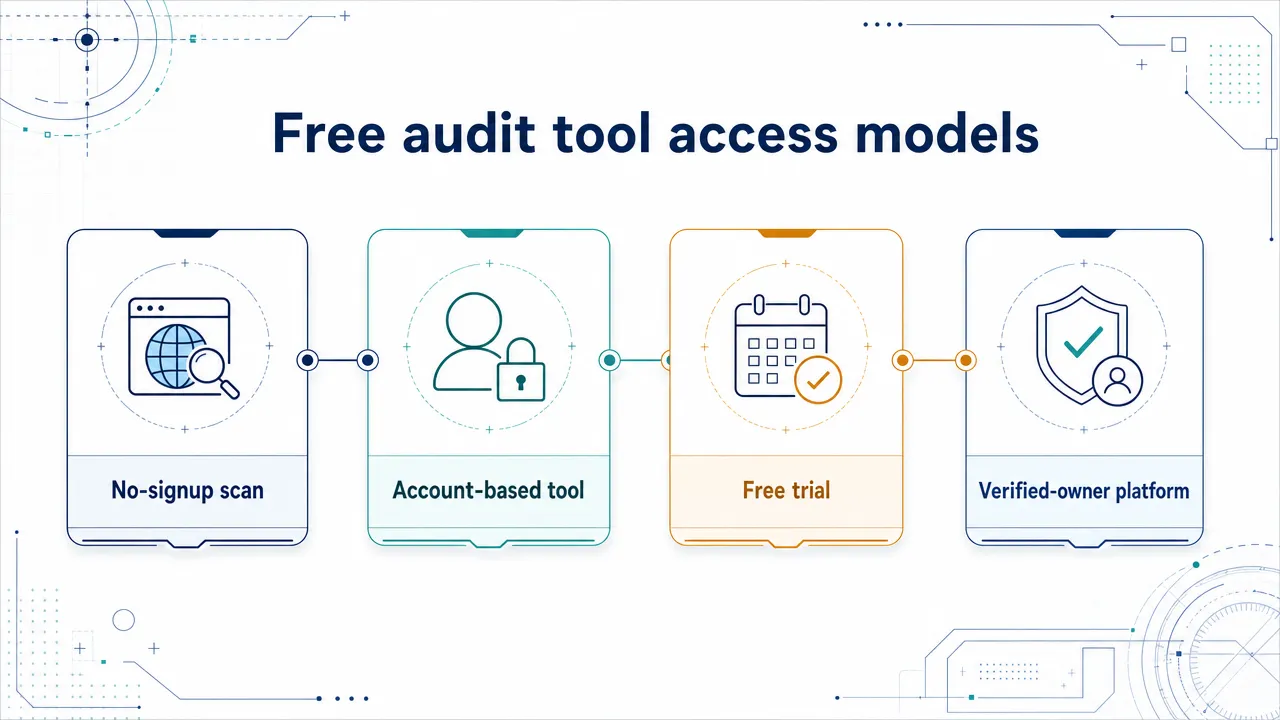
The simplest rule is this: use no-signup scanners for speed, verified-owner tools for reliable site data, and human review for prioritization. That combination prevents two common mistakes: ignoring serious technical problems because the homepage score looks fine, or wasting developer time on harmless warnings.
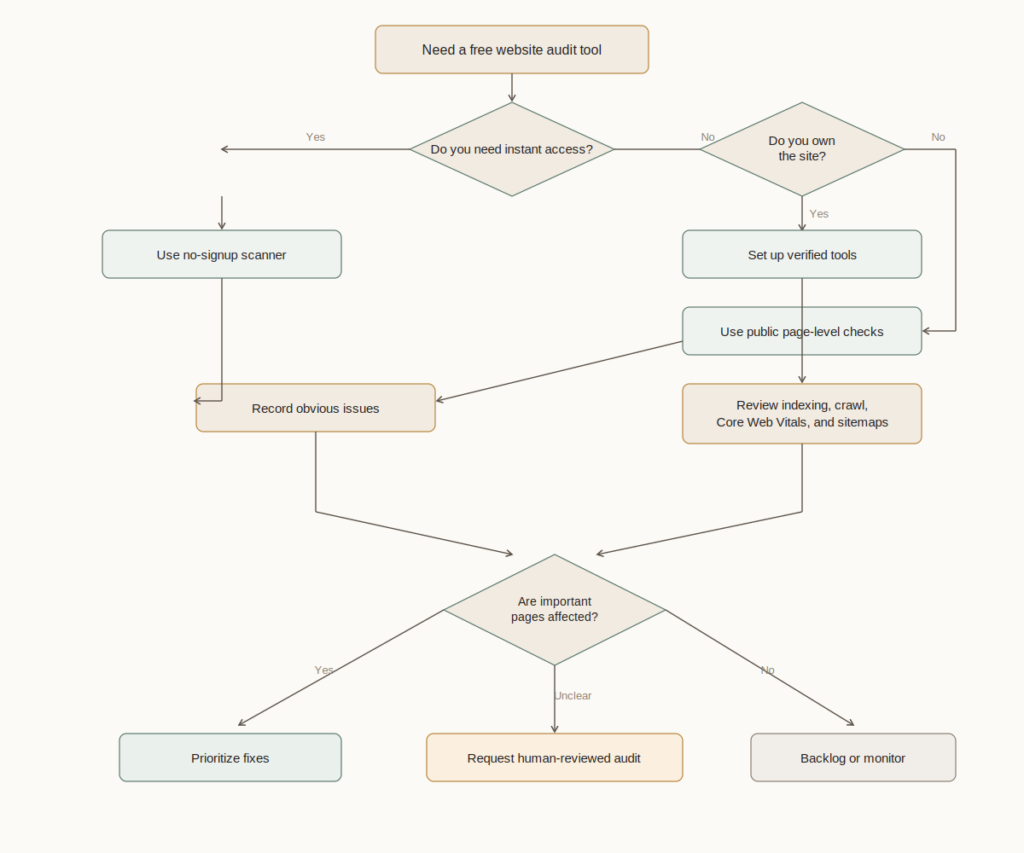
Best free website audit tool reviews by use case
A practical list should rank tools by use case, not by one universal "best." A founder checking a five-page website has different needs from a developer managing a multilingual catalog with thousands of URLs.
SEOptimer: best for a quick no-signup scan
SEOptimer is one of the strongest matches for a free website audit tool no signup query because its homepage audit is positioned around immediate website analysis. It is useful for a fast read on on-page factors, technical checks, performance signals, and report-style recommendations.
Its best use case is early triage. A manager can run a homepage or key landing page and quickly see whether there are obvious problems. The report may help start a conversation with a developer or SEO consultant.
The limitation is depth. A homepage scan does not replace verified indexing data, a full crawl, JavaScript rendering review, or international SEO analysis. For a multilingual company site, the first scan may look clean while language alternates, internal links, or country-specific pages still have structural issues.
Backlinko Free SEO Checker: best for beginner-friendly page review
Backlinko's checker is positioned as a fast free SEO checker with page-level recommendations. It is a good starting point for content marketers and small website owners who want plain-language feedback without learning a full SEO platform.
Its practical value is simplicity. It can help identify on-page weaknesses such as title usage, content structure, and basic optimization opportunities. That makes it useful before publishing a new article or revising a service page.
The limitation is that it should not be treated as a deep technical audit. Page-level checks do not replace a crawl, Search Console validation, Core Web Vitals diagnosis, or detailed internal link review.
Google Search Console: best for verified Google data
Google Search Console is not a typical free site audit tool online, but every serious website owner should use it. It shows how Google reports search performance, indexing, URL inspection, Core Web Vitals, sitemaps, structured data enhancements, manual actions, and security issues.
The strongest use case is validation. A third-party scanner may say a page is indexable, but Search Console can show whether Google has indexed it, when it was last crawled, and whether there are canonical or coverage issues.
For official company websites and exporters, country and query data are especially useful. A website may receive impressions from the wrong markets, rank for low-intent informational terms, or fail to generate visibility for commercial product categories. Search Console helps reveal that gap, even though it does not write the strategy for you.
Ahrefs Webmaster Tools: best for verified-owner technical auditing
Ahrefs Webmaster Tools is valuable for site owners who can verify their domain. It provides access to Site Audit, Site Explorer, and Web Analytics for verified sites. The research report notes an official free limit of 5,000 crawl credits per verified project per month.
Its strongest use case is deeper technical and link-related diagnosis. It can help identify technical and on-page issues at scale, while also giving context around backlinks and organic visibility.
The limitation is that crawled issues still require judgment. A large list of warnings does not automatically reveal which fixes will improve revenue pages, country targeting, or inquiry generation.
Semrush SEO Checker and Site Audit: best broad platform entry point
Semrush offers free checker and Site Audit positioning, with official pages describing over 140 technical site health and SEO issues. It can be useful for teams that may later need keyword research, competitor analysis, backlink review, and broader reporting in one platform.
Its advantage is breadth. It can connect audit findings with broader SEO workflows, which helps marketers who do not want isolated diagnostics.
The limitation is access clarity. Free limits, account requirements, and deeper platform features can vary by product flow. Treat its public checker as a starting point, not a guarantee that every audit workflow is available without signup.
Sitechecker: best for trial-based crawling and monitoring
Sitechecker is useful for teams willing to create an account for a more structured audit and monitoring workflow. Its product pages promote crawlability checks, website crawling, on-page SEO checking, affected URL lists, and technical issue detection.
Its best use case is ongoing tracking. If your site has recurring redirect problems, duplicate content, broken links, or indexing issues, a crawler-style platform can be more useful than a one-page scan.
The limitation is signup. Sitechecker fits the "free trial, no demo call" category better than the pure no-signup category.
SE Ranking: best for prioritized, fix-oriented technical crawls
SE Ranking's Website Audit crawls a site against 115+ checks across 13 categories, including security, crawling and indexing, redirects, sitemaps, meta tags, content, localization, speed, JavaScript, CSS, links, and mobile optimization. It returns every issue with a severity level, step-by-step fix instructions, and the affected URLs, and it renders client-side JavaScript to catch problems that HTML-only crawls miss.
Its strongest use case is fix-oriented technical work at scale. The tool scales from a single URL to 2M pages per project, and its Crawl Comparison view puts two audits side by side to show what changed — useful for proving progress to a client or stakeholder. The same audit data is reachable through an API and MCP server for automated tracking, and it sits inside a platform that also tracks AI-search visibility.
The limitation is access. There is no public no-signup scan: a 14-day trial with no credit card gives full tool access, after which the audit is included in every paid plan. New audits also take time to show Core Web Vitals data, which is collected over the weeks following a crawl.
Keywords Everywhere Website Health Checker: best for a complete site health snapshot in one free report
Keywords Everywhere's Website Health Checker answers a question most free scanners only partly cover: how healthy is this website overall? One domain input returns four reports in a single run: authority and spam risk, backlink profile, estimated organic traffic, and a full on-page audit of the homepage. There is no signup, no verification, and no credit card required.
That combination is what sets it apart. The authority section draws on Moz data, including Domain Authority, spam score, Page Rank, backlink and linking-domain counts, and a monthly Domain Authority trend line that shows whether the site is gaining or losing strength over time. Traffic is estimated from actual Google rankings. The on-page audit scores the homepage across content, technical, performance, mobile, social, and off-page checks, then ranks the fixes by severity, so the first items on the list are the ones worth a developer's time.
Its best use case is the first diagnosis. A marketing manager can see in one report whether the site carries spam risk, whether authority is trending in the right direction, how much organic traffic it likely earns, and which homepage issues to fix first. It is also practical for comparing a site against competitors before a link-building or redesign decision. Reports can be shared through a link, and every section exports to CSV, Excel, or Google Sheets for stakeholder reviews.
The limitation is depth of crawl. The on-page audit focuses on the homepage, so pair it with Google Search Console for verified indexing data and a full crawler for large or multilingual sites.
SeekLab.io free audit report: best for broad technical and international SEO coverage, no signup required
SeekLab.io's free audit report is not gated behind a demo call or a paid account. Unlike most tools on this list, it does not require signup, verification, or a trial to get started — you get three free reports with no signup at all.
The audit is organized into nine categories covering roughly 30 individual checks: SEO & Accessibility (broken links, HTTP/HTTPS compliance, redirects, crawlability), On-Page Structure (title tags, heading structure, meta descriptions, content duplication), Technical SEO Foundation (status codes, DNS and server health, page size and performance, encoding), Resources & Media (image optimization, JS/CSS integrity, internal link depth), Indexing & Sitemap (sitemap validation, robots.txt, indexability, orphan pages), International SEO & GEO (hreflang implementation, language consistency, regional targeting), URL & Structure (URL optimization, canonical checks, formatting issues), Security & Compliance (SSL/HTTPS validation, mixed content, security protocols), and Advanced Issues (broken pages, external resource errors, structured error reporting).
That breadth matters for independent websites and cross-border businesses because growth usually fails at the intersection of issues, not one isolated warning. A site may have acceptable page speed but broken hreflang tags quietly hiding it from the wrong-language audience. It may have a clean sitemap but orphaned pages that never get crawled at all.
SeekLab.io helps brands build search visibility by making sites easier for search engines and real users to understand and access, from crawlability and indexing through to international targeting and security compliance. The focus is not fixing everything at once. The focus is surfacing which issues actually block growth so a team can prioritize instead of working through warnings in an arbitrary order.
For teams that need broader support beyond the free technical audit, SeekLab.io also offers a full content and technical SEO audit, carried out manually by the team rather than generated automatically. That version is human-reviewed and covers content strategy alongside technical findings, but it is not instant: it starts with a short form where you leave your details, followed by a call to go through findings and next steps. That's a different tradeoff than the free instant tool — more depth and business context, at the cost of the "no demo call" convenience. Learn more about SeekLab.io's services, including content topic selection, industry-tailored blog creation, structured page planning, visually useful images, internal linking, JSON-LD recommendations, and monthly data review. Its presence across Singapore, Shanghai, and Dubai supports brands working across Asia-Pacific, the United States, Europe, and international markets; more context is available through SeekLab.io's international team.
What a free website audit tool often misses after the first scan
A free website audit tool can find many real problems. It can flag broken links, missing titles, duplicate metadata, slow pages, redirect chains, blocked resources, weak headings, missing alt text, and sitemap issues. Those checks are worth running.
The missing layer is business interpretation. Most scanners do not know which pages drive inquiries, which country pages matter most, which product categories have the best margin, or which content topics attract buyers instead of casual readers.
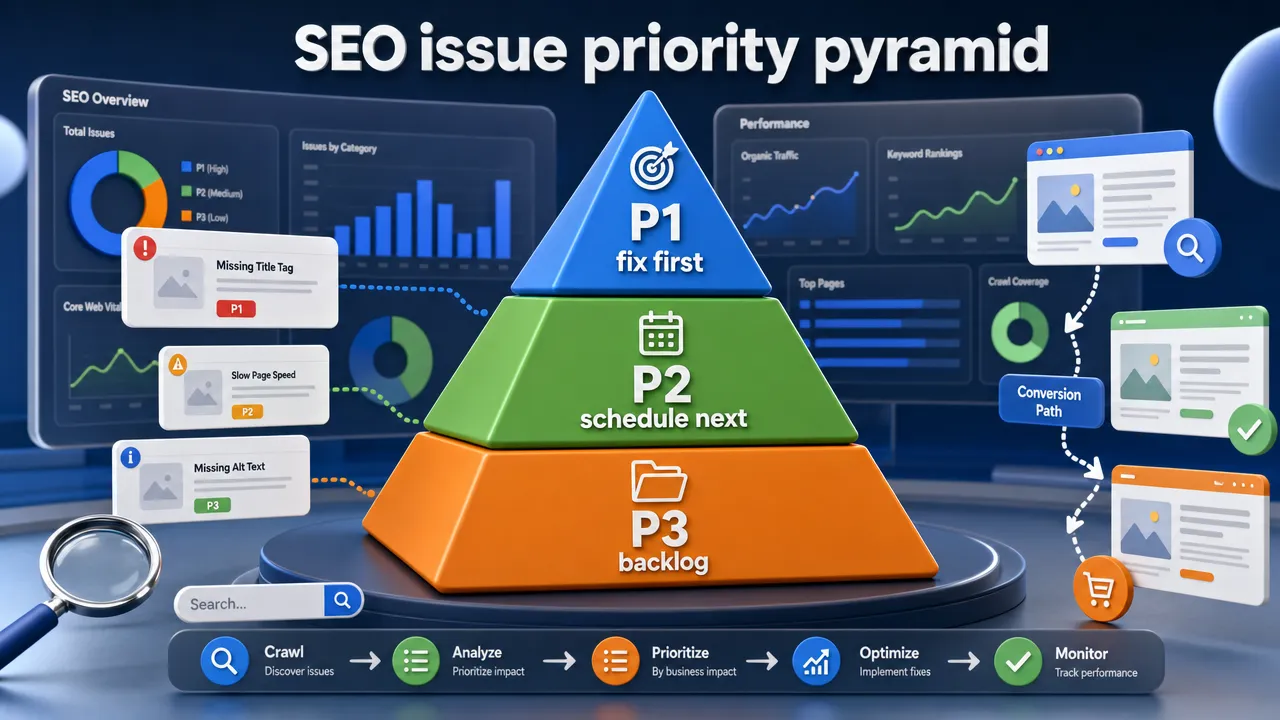
A realistic audit should separate findings into priority levels:
| Priority | Fix type | Examples | Practical decision |
|---|---|---|---|
| P1: Fix first | Growth-blocking technical or conversion issues | Important pages not indexed, blocked crawling, broken revenue-page templates, severe mobile performance issues, missing internal links to money pages | Fix before cosmetic SEO work. Validate in Search Console or live tests. |
| P2: Schedule next | Template, content, structure, and market improvements | Weak category copy, inconsistent headings, missing schema, thin country pages, poor internal link paths, image optimization problems | Plan into sprints because these issues compound across the site. |
| P3: Backlog or ignore | Low-impact warnings | Minor metadata issues on low-value pages, harmless formatting warnings, isolated image alt gaps | Do not let these distract the team from pages that affect leads. |
This is where many SEO projects lose time. A developer may spend days cleaning low-impact warnings because the audit tool marks them red. Meanwhile, the product pages that buyers actually visit remain thin, slow, poorly linked, or unclear.
JavaScript-heavy websites need extra caution. Some tools can detect obvious issues, but many do not deeply compare source HTML, rendered HTML, internal link availability, canonicals, structured data, and crawlable content. If your site relies heavily on client-side rendering, review JavaScript SEO and indexing checks before assuming a scanner has seen the same page that users see.
Content quality is another blind spot. A tool can count words and headings. It cannot reliably judge whether a B2B product page explains buyer objections, installation scenarios, certification needs, industry use cases, or regional requirements. It also cannot fully assess whether images, diagrams, tables, and application visuals help a buyer understand the offer.
For teams building a 2026 audit process, SeekLab.io's SEO audit checklist is a useful companion because it frames auditing as a sequence: crawlability, indexability, performance, content structure, internal links, schema, international setup, and prioritization.
Free website audit tool FAQs
What is the best free website audit tool?
There is no single best tool for every site. SEOptimer and Backlinko are strong for quick public checks. Google Search Console is essential for verified Google data. Ahrefs Webmaster Tools is strong for verified-owner audits. Semrush and Sitechecker are useful for broader platform-style checks. SE Ranking is a strong option for prioritized, fix-ready technical crawls with severity-ranked issues. SeekLab.io is a strong option when you want broad technical, on-page, and international SEO coverage without any signup at all.
Is there a free website audit tool no signup required?
Yes, some tools provide initial no-signup scans, especially SEOptimer's homepage audit and Backlinko's free checker positioning. SeekLab.io also offers three free audit reports with no signup required, covering technical SEO, on-page structure, indexing, and international SEO in one report. Be careful with the wording, though. No signup for an initial scan does not always mean no signup for exports, saved projects, monitoring, or deeper crawls.
What is the best free site audit tool online?
For a browser-based quick audit, SEOptimer, Backlinko, Semrush's public checker, and Sitechecker are reasonable starting points. For deeper verified data, use Google Search Console and Ahrefs Webmaster Tools if you own the site and can verify it.
Is Google Search Console enough for a website audit?
No. Google Search Console is essential, but it is not a complete audit by itself. It provides verified data on performance, indexing, URL inspection, Core Web Vitals, sitemaps, structured data enhancements, manual actions, and security issues. It does not replace a full crawl, content-quality review, internal link audit, JavaScript rendering review, or business-priority roadmap.
Are free website audit scores reliable?
They are reliable for spotting many symptoms, not for setting final priorities. A high score can still hide weak conversion paths, poor internal links, thin commercial pages, or multilingual structure problems. A low score can also include many warnings that do not affect important pages.
What should I check first after getting a free audit report?
Check whether important pages are crawlable, indexable, internally linked, mobile-friendly, fast enough, using correct canonicals, and aligned with search intent. Prioritize revenue-critical pages before fixing minor warnings on archive pages, tags, or low-value blog posts.
Do free audit tools check Core Web Vitals?
Many tools include performance or Core Web Vitals checks. Google Search Console provides a dedicated Core Web Vitals report for verified properties. Use those reports to identify affected templates, then validate important URLs individually before assigning development work.
Can a free audit tool find JavaScript SEO problems?
Some tools can detect obvious rendering or resource problems, but JavaScript-heavy websites often need deeper review. Compare source HTML, rendered HTML, crawlable internal links, canonicals, structured data, and Google URL Inspection results before assuming the page is fully accessible.
When should I request a human-reviewed audit?
Request one when the free instant tools aren't enough — important pages are not indexed, rankings do not produce inquiries, the site is multilingual, JavaScript affects content visibility, or your team needs help deciding what to fix first with real business context. Unlike the free instant audits covered above, a human-reviewed audit is not automated: SeekLab.io's full content and technical SEO audit starts with a short form and a follow-up call, and is worth it specifically when you need a person, not just a report, to help prioritize.