Orphan Pages: Why Your Best Content Is Invisible to Google (And How to Fix It
Expert reviewed

Orphan pages make valuable content invisible to Google by removing the internal paths that help crawlers and users discover, understand, and trust a page. A page can sit in your CMS, appear in an XML sitemap, or receive the occasional visit from an old campaign link, but if no internal page links to it, it is disconnected from the website structure that supports crawling, indexing, rankings, and inquiries.
The practical answer is not "add links everywhere." The right fix depends on whether the orphan page should rank, whether the content is strong enough, whether it has technical blockers, and whether it supports a real business path. In a serious SEO content audit, some orphan pages should be linked from relevant hubs, some should be improved first, and others should be merged, redirected, noindexed, archived, or deleted.
For independent websites, official company websites, exporter sites, product catalogs, and multilingual websites, orphan pages often explain why useful content is published but does not improve Google visibility. The issue usually sits between technical SEO and content operations: pages go live, but no one connects them to navigation, product categories, resource hubs, language versions, or buyer journeys.
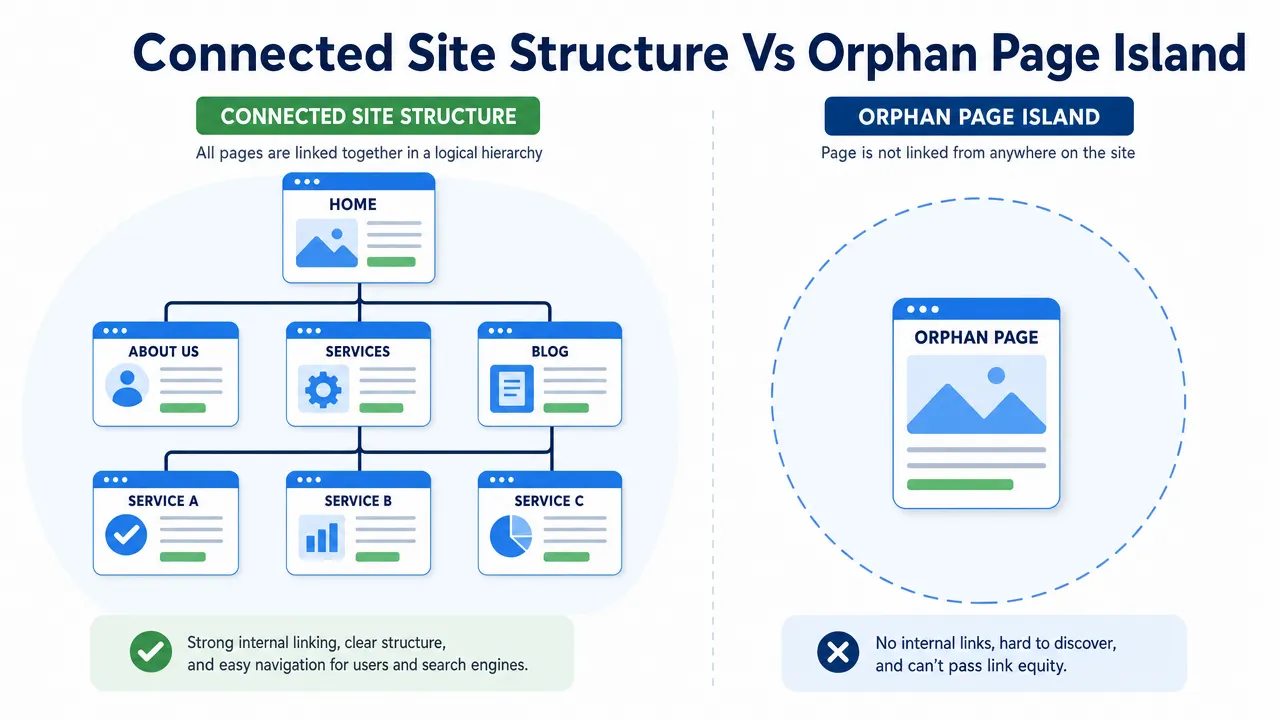
How orphan pages become invisible to Google even when they are published
An orphan page is a webpage that exists on your site but has no internal links pointing to it from other pages on the same domain. In a crawler report, it usually appears as a valid URL with a 200 status code, but with zero discovered inbound internal links.
That definition sounds simple, but the business impact is easy to underestimate. A blog article can be well written and still be disconnected from the blog archive. A product page can be in the sitemap but missing from its category. A localized page can exist under /fr/ or /de/ while the local navigation never links to it. In each case, the page is technically live but structurally weak.
Google can still discover orphan pages through XML sitemaps, external links, historical crawl data, Google Search Console signals, or direct URL discovery. The risk is not that Google is completely incapable of seeing the URL. The risk is that the page has weak discovery paths, weak internal context, and no internal link equity from related pages. Google states in its link best practices that every page you care about should have a link from at least one other page on your site.
What orphan pages look like in a real audit
A common audit pattern looks like this: the homepage crawl finds the main navigation, service pages, blog categories, and recent articles. Then the sitemap export shows many more URLs than the crawl found. Google Search Console shows impressions for a few legacy URLs. Analytics shows visits to campaign landing pages. The CMS export shows published pages that never appeared in the crawl.
That gap is where orphan pages usually hide.
| Page situation | Is it an orphan page? | Practical interpretation |
|---|---|---|
| Page appears in XML sitemap but no internal page links to it | Yes | A sitemap helps discovery, but it does not create site structure. |
| Page has an external backlink but no internal links | Yes | Another website found it, but your own site does not support it. |
| Page is only reachable through internal search | Usually yes | Site search is not a reliable crawlable architecture. |
Page is linked with a normal HTML <a href> link |
No | It has at least one internal link, though it may still be weakly linked. |
| Page is linked only from a noindexed page | Risky | It is not a pure orphan, but the discovery path is poor. |
| Page is linked only through JavaScript click behavior | Potentially | Important links should be crawlable anchor links. |
Why orphan pages are different from content not indexed
Orphan pages can contribute to content not indexed problems, but they are not the only cause. A page may fail to index because of a noindex tag, robots.txt block, canonical conflict, duplicate content, soft 404 pattern, weak content, or rendering issue.
The distinction matters because the fix changes. If a page is orphaned but also noindexed, adding internal links does not solve the indexing directive. If a page canonicalizes to another URL, internal links should usually point to the canonical version. If a page is thin or outdated, linking to it may send more attention to content that should be improved or removed.
Google's sitemap documentation is clear that sitemaps help Google discover URLs, but they do not guarantee crawling, indexing, or ranking. A sitemap says, "this URL exists." Internal links say, "this URL belongs in this topic, product path, or buyer journey."
For deeper indexing troubleshooting, SeekLab.io's article Pages Not Indexed? Solve Google Errors 2026 explains how to separate important indexing problems from normal index noise.
Why orphan pages appear in real website operations
Orphan pages usually come from workflow gaps, not from one obvious technical mistake. Someone publishes a page, imports a catalog, removes a category, launches a campaign, translates a page, or changes navigation. The URL remains live, but the site structure no longer points to it.
A realistic case-study pattern is a B2B export website with a main English site, a product catalog, several country folders, and a blog. The marketing team publishes industry guides. The product team imports product detail pages. The regional team translates a few service pages. After a redesign, old category links are removed. Nothing looks broken on the surface, but the audit shows high-intent URLs sitting outside normal crawl paths.
Common orphan pages causes by team and workflow
| Cause | What happens | SEO risk | Business risk | Typical fix |
|---|---|---|---|---|
| Blog publishing without link review | New posts go live but old related articles and hubs are not updated. | Weak crawl paths and topic signals. | Content spend produces little organic return. | Add links from related posts, hubs, and service pages. |
| Product catalog imports | Product URLs exist but some have no category assignment. | Product pages may be hard to crawl and understand. | Buyers cannot browse to high-intent product pages. | Rebuild category links and breadcrumbs. |
| Website redesigns | Menus, footers, or old hubs are removed. | Previously linked pages become isolated. | Legacy pages with value lose support. | Compare pre- and post-redesign URL inventories. |
| Campaign landing pages | Event, PPC, or email pages stay live after promotion ends. | Low-context URLs may remain indexed. | Users find outdated CTAs or offers. | Redirect, update, noindex, or archive. |
| JavaScript navigation | Links look clickable but are not crawlable anchor links. | Crawlers may not reliably discover destinations. | Modern-looking pages hide important content paths. | Use crawlable <a href> links for key URLs. |
| Multilingual publishing | Translated pages exist but local hubs do not link to them. | Localized pages may be poorly discovered. | Regional search demand does not turn into inquiries. | Add local navigation, language hubs, and reciprocal links. |
Orphan pages in multilingual sites
Multilingual websites create extra orphan page risk because each locale can behave like a separate website. An English page may be well linked, while the French, German, Arabic, or Chinese version has no links from the local category, local blog, or local service page.
Hreflang does not replace internal linking. Google's documentation on localized versions explains how language and regional equivalents can be identified, but a localized page still needs crawlable internal links inside its own language structure.
For export businesses targeting markets across the United States, Europe, APAC, and the Middle East, this is commercially important. A market-specific product page that exists but cannot be browsed from the local product category is unlikely to support regional discovery or inquiry generation.
How to find orphan pages with a practical SEO content audit
A normal website crawl cannot find every orphan page because the crawler follows links. If a page has no internal links, a homepage-based crawl may never reach it. That is why orphan page detection requires URL source comparison, not just a crawler export.
A practical SEO content audit should compare the crawlable URL list against all known URL sources: XML sitemaps, Google Search Console URLs, analytics landing pages, CMS exports, backlinks, server logs, product feeds, campaign pages, and multilingual sitemaps.
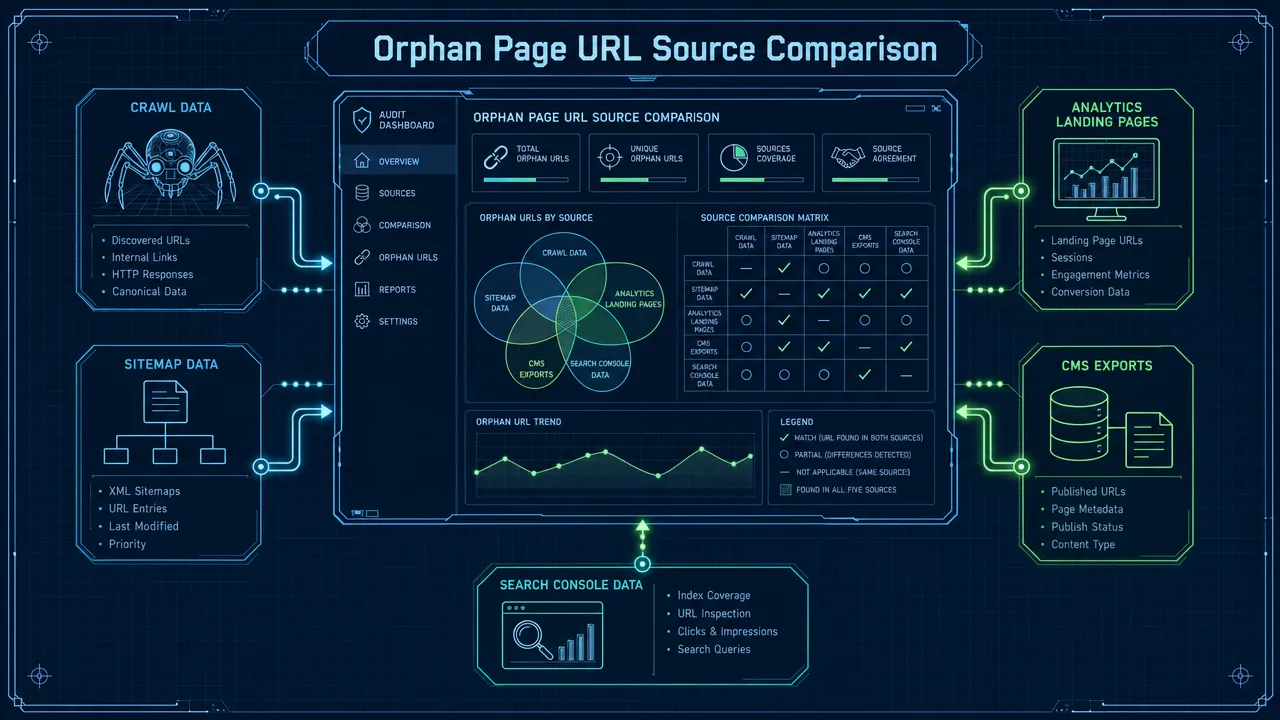
Orphan pages audit workflow
Data sources that expose orphan pages
| Source | What it reveals | Why it matters |
|---|---|---|
| Crawl data | URLs reachable through internal links | This is your linked architecture baseline. |
| XML sitemap | URLs submitted for discovery | Finds sitemap-only pages. |
| Google Search Console | URLs Google knows, crawled, indexed, or excluded | Shows known URLs outside the current crawl path. |
| Analytics landing pages | URLs receiving visits | Finds pages reached through ads, email, social, bookmarks, or old links. |
| CMS export | All published URLs | Finds live pages hidden from navigation. |
| Backlink data | URLs with external links | Identifies orphan pages that may have authority value. |
| Server logs | URLs requested by crawlers and users | Useful for large or complex websites. |
| Campaign records | Event, PPC, email, and seasonal URLs | Helps decide whether a page should stay live. |
The key step is normalization. Remove tracking parameters where appropriate, standardize trailing slashes, handle uppercase and lowercase variants, identify canonical URLs, and separate redirected or noindexed pages. Without this cleanup, the orphan page list becomes noisy and hard for developers or editors to act on.
SeekLab.io's SEO Audit Checklist 2026: A Step-by-Step Website Audit Guide covers the broader audit context, including crawlability, indexation, Core Web Vitals, internal links, content quality, schema, JavaScript, and international SEO. Orphan pages should be treated as part of that full diagnostic picture, not as a standalone spreadsheet exercise.
If your team wants help comparing crawl data, sitemap entries, Search Console patterns, analytics landing pages, and CMS exports, you can get a free audit report from SeekLab.io.
How to prioritize orphan pages before fixing internal linking issues
The most expensive orphan page mistake is fixing the wrong pages. A high-intent service page with strong search demand deserves attention. A duplicate tag archive does not. An expired trade show page may need a redirect, not a new internal link. A thin blog post may need consolidation before it earns a place in the structure.
Prioritization keeps the audit tied to growth. SeekLab.io's approach is not to fix everything. The goal is to identify which pages truly affect visibility, credibility, and inquiry potential, then deprioritize low-impact noise.
Orphan pages prioritization criteria
| Criterion | What to check | Decision implication |
|---|---|---|
| Indexability | 200 status, not blocked, not noindexed, canonical strategy is clear | Do not link until blockers are resolved. |
| Business value | Supports leads, RFQs, demos, downloads, product discovery, or credibility | High-value pages move up the list. |
| Search demand | Has impressions, query relevance, or long-tail opportunity | Link and optimize pages that match real demand. |
| Content quality | Original, useful, current, complete, and aligned with intent | Improve weak pages before linking. |
| Conversion path | Clear CTA, next step, form, product path, or contact route | Visibility without conversion support wastes traffic. |
| Backlink value | Has external links from relevant sources | Preserve or redirect carefully. |
| Topical fit | Belongs to a product category, service hub, topic cluster, or local market | Link from the most relevant source pages. |
| Duplication risk | Overlaps with stronger URLs | Merge, canonicalize, or redirect instead of linking. |
| Market relevance | Supports a priority country, language, or region | Link from local hubs and equivalents. |
Which orphan pages should be fixed first
Fix orphan pages first when they are indexable, commercially relevant, and useful enough to deserve more visibility. Examples include product pages with search demand, service pages tied to high-intent queries, country-specific landing pages for active markets, strong guides with backlinks, and resource pages that support sales conversations.
Delay the fix when the page has potential but needs work. A thin article may need better examples, clearer structure, updated facts, visuals, internal links, and a stronger CTA. A product page may need specifications, use cases, schema, images, and category context. A localized page may need more than translation; it may need local proof points and links to local inquiry paths.
Do not force links to orphan pages that should not rank. Expired campaign pages, duplicate archives, internal policy pages, test URLs, parameter pages, and outdated seasonal offers can create SEO noise. Some should be noindexed, some redirected, and some deleted from the public site.
Orphan pages action matrix
| Page type | Recommended action | Why |
|---|---|---|
| Strong service page with no internal links | Add contextual links, hub links, breadcrumbs, and relevant navigation | It supports search demand and conversion. |
| Product page missing category path | Restore category links and breadcrumbs | Buyers and crawlers need a browse path. |
| Strong guide with backlinks | Update, link from related hubs, and preserve URL if possible | It may already have authority value. |
| Thin blog post with overlap | Merge into a stronger article or rewrite | Linking weak content adds noise. |
| Expired campaign page | Redirect, noindex, archive, or update as evergreen | Old CTAs can damage trust. |
| Localized market page | Add local navigation, language hub links, and equivalent page links | Translation alone does not create structure. |
| JavaScript-only linked page | Replace critical interactions with crawlable links | Visual navigation is not enough. |
How to fix orphan pages and improve Google visibility without creating SEO noise
To fix orphan pages properly, start with the decision: should this page exist, should it be indexed, and should users be able to find it from normal browsing paths? Only after that should you add internal links.
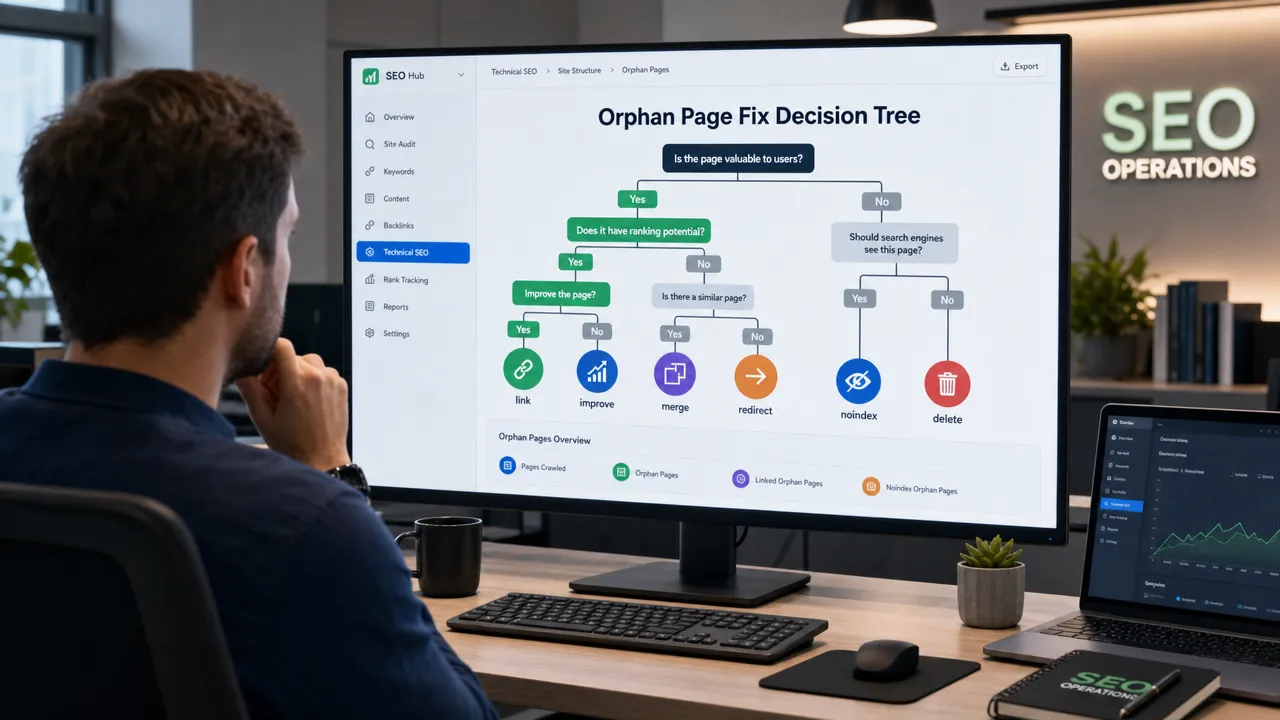
Internal links for orphan pages should come from relevant pages
The best source pages are not always the highest-traffic pages. Relevance matters first. A blog post about crawl diagnostics is a good source for a page about technical SEO audits. A product category page is a good source for a product detail page. A local service hub is a good source for a localized service page.
Strong internal link sources usually have:
- Topical relevance to the destination page.
- Indexable status and crawlability.
- Existing impressions, traffic, or backlinks.
- A natural place to mention the destination.
- A user journey reason for the link.
- Reasonable click depth from important site sections.
SeekLab.io's Internal Linking SEO Best Practices for 2026 gives a deeper framework for choosing source pages, using descriptive anchors, reducing click depth, and connecting topic clusters without overlinking.
Anchor text for orphan pages should be clear, not repetitive
Google's link guidance recommends descriptive anchor text that helps users and search engines understand the destination. That does not mean repeating the same exact keyword across every internal link. It means writing anchors that match the page and the user reason for clicking.
| Weak anchor | Better anchor | Why it works better |
|---|---|---|
| Click here | technical crawl diagnostics guide | The destination is clear. |
| Learn more | product category architecture checklist | The topic is specific. |
| Read this | multilingual SEO structure review | The user knows what to expect. |
| More info | JavaScript rendering audit steps | The anchor describes the task. |
| Service | full-site SEO audit process | The link has commercial context. |
Technical fixes for orphan pages
Some orphan pages cannot be fixed with links alone. Check technical blockers before investing editorial time.
Important checks include:
- The page returns a valid 200 status code.
- The page is not blocked by robots.txt.
- The page does not have an accidental noindex directive.
- Canonical tags point to the correct preferred URL.
- Important content and links are visible in rendered HTML.
- Navigation uses crawlable
<a href>links. - The XML sitemap contains canonical, indexable, useful URLs.
- Redirects point to the best current equivalent page.
For JavaScript-heavy websites, visual links can be misleading. A button may look like navigation to users but fail to behave like a crawlable link. SeekLab.io's Technical JavaScript SEO & Indexing Solutions covers how rendering, hydration, internal links, canonical tags, and structured data can affect indexability.
Process fixes stop future orphan pages
The best orphan page fix is a publishing process that prevents the issue from returning. Every new article should receive at least one relevant internal link from an existing page and link out to related older content where useful. Every product import should validate category assignment. Every redesign should compare old and new crawl paths. Every multilingual release should include local navigation and equivalent page links.
A simple process works better than a large rulebook:
| Workflow moment | Required check |
|---|---|
| New blog post | Link from at least one relevant older article or hub. |
| New product page | Confirm category, breadcrumb, and related product links. |
| New service page | Link from service hub, related guides, and conversion paths. |
| Campaign launch | Decide whether the page is temporary or evergreen. |
| Campaign end | Redirect, update, noindex, or archive. |
| Site redesign | Compare pre- and post-launch crawl exports. |
| Multilingual rollout | Crawl each locale separately and check local internal links. |
| Monthly review | Compare new CMS URLs against crawlable URLs. |
How SeekLab.io audits orphan pages for search visibility and business outcomes
SeekLab.io handles orphan pages as a growth and site structure problem, not just a technical warning. A crawler can say "zero inlinks." It cannot decide whether the page should be linked, rewritten, merged, redirected, localized, or removed from the index strategy. That decision requires technical SEO judgment, content quality review, business context, and an understanding of how buyers move through the website.
SeekLab.io helps brands build search visibility and discoverability through high-quality content production and technical optimization. The work focuses on making websites easier for search engines, answer-style systems, and real users to understand by improving content structure, information clarity, page architecture, internal linking, and site readiness. The priority is not low-quality content or manipulative tactics; it is trustworthy content assets and a stronger technical foundation for long-term organic growth.
For orphan pages, that usually means:
- Full-site crawling and structured URL inventory analysis.
- Indexing, crawling, rendering, and JavaScript compatibility checks.
- Sitemap.xml and robots.txt validation.
- Internal link equity and semantic structure analysis.
- Review of product, service, blog, resource, and multilingual architecture.
- Identification of pages that matter for leads, RFQs, credibility, or regional visibility.
- Clear recommendations for link, improve, merge, redirect, noindex, archive, or delete decisions.
- Monthly data review and performance reporting for priority fixes.
The practical value is prioritization. Many teams receive technical audit exports with hundreds of warnings and no clear order. SeekLab.io focuses on what truly impacts growth and what can be deprioritized, then provides actionable solutions and technical guidance. Some simple technical issues can be resolved for clients free of charge, and customized content support can include structured layouts, images, tables, internal links, and monthly review.
If your important content is published but still invisible to Google, contact us for a focused review of your crawl paths, sitemap quality, internal linking issues, indexing patterns, and content structure.
Orphan pages FAQs
What is an orphan page in SEO?
An orphan page is a page on your website with no internal links pointing to it from other pages on the same site. It may still appear in a sitemap, CMS, analytics report, or Google Search Console.
Are orphan pages always bad?
No. Some pages are intentionally isolated, such as thank-you pages, internal-use pages, expired campaigns, or PPC-only landing pages. Orphan pages become a problem when they should support search traffic, users, or conversions.
Can Google index orphan pages?
Yes, Google can index orphan pages if it discovers them through sitemaps, backlinks, or other signals. Indexing is not guaranteed, and the page may still have weak internal context.
Can orphan pages cause content not indexed problems?
They can contribute to content not indexed issues, especially when combined with weak content, duplicate signals, canonical problems, noindex directives, robots.txt blocks, or rendering problems.
How do you find orphan pages?
Compare crawlable URLs against XML sitemap URLs, Google Search Console URLs, analytics landing pages, CMS exports, backlink data, logs, and campaign records. A crawl alone is not enough.
How do you decide how to fix orphan pages?
Classify each page by business value, search demand, content quality, indexability, backlink value, topical fit, and conversion role. Then choose link, improve, merge, redirect, noindex, archive, or delete.
Should sitemap-only pages be treated as orphan pages?
Yes, if no internal page links to them. A sitemap helps discovery, but it does not create contextual internal signals or user paths.
How often should orphan pages be audited?
Quarterly is reasonable for active websites. Audit immediately after redesigns, migrations, product imports, campaign launches, or multilingual expansion. Large publishing or catalog sites may need monthly checks.