Orphan Pages: How to Find and Fix Pages With No Internal Links
Expert reviewed

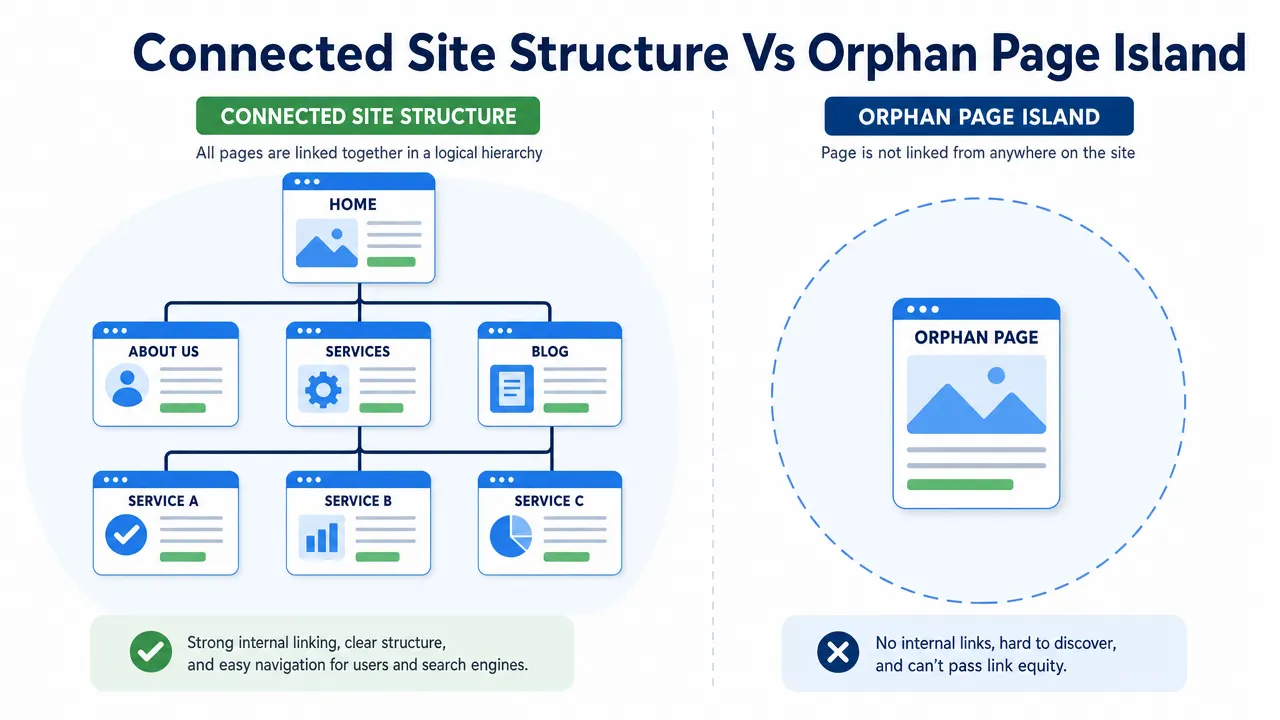
An orphan page is a live page with no internal links pointing to it from elsewhere on the same website. Google may still discover the URL through an XML sitemap, an external backlink, historical crawl data, Search Console, or another source. The problem is that the page sits outside the site’s normal structure, with weak discovery paths, limited topical context, little internal link equity, and no clear route for users.
The right fix is not simply to add links everywhere. First decide whether the page deserves to exist and be indexed. Useful service, product, market, and editorial pages may need stronger contextual links. Thin, duplicated, expired, or obsolete pages may be better improved, merged, redirected, noindexed, archived, or deleted.
This guide explains how to find orphan pages, decide which ones matter, and reconnect valuable content without creating more SEO noise.
What is an orphan page?
An orphan page is a URL that exists on your site but receives no crawlable internal links from other pages on the same domain. In an audit, it often appears as a valid 200-status URL in a sitemap, CMS export, analytics report, backlink index, or Search Console—but not in a crawl started from the homepage.
That distinction matters. A page does not become part of the website’s information architecture merely because it appears in an XML sitemap. Internal links tell crawlers and users how the page relates to a topic, product category, service, market, or buyer journey. Google’s link best practices recommend linking every page you care about from at least one other page on your site.
Common orphan-page situations
| Page situation | Orphan page? | Practical interpretation |
|---|---|---|
| Listed in an XML sitemap but not linked internally | Yes | The sitemap may support discovery, but it does not create site structure. |
| Has an external backlink but no internal links | Yes | Another website supports the page, but your own site does not. |
| Reachable only through internal site search | Usually | Site search is not a dependable crawl path or browsing structure. |
Linked with a normal HTML <a href> element | No | It has an internal path, although that path may still be weak. |
| Linked only from a noindexed page | Not strictly, but risky | The only discovery path is poor and may not support the page well. |
| Reachable only through JavaScript click behaviour | Potentially | Important destinations should use crawlable anchor links. |
Orphan pages are not the same as pages that are not indexed
Orphaning can contribute to an indexing problem, but it is only one possible cause. A page may also be excluded because of a noindex directive, robots.txt block, canonical conflict, duplicate or thin content, soft 404 signals, or rendering problems.
The fix depends on the cause. Adding links will not override a noindex directive. If a URL canonicalizes to another page, internal links should normally point to the canonical version. If the content is outdated or duplicated, strengthening its internal links may only reinforce the wrong URL.
Google’s sitemap documentation explains that a sitemap helps Google discover URLs but does not guarantee crawling, indexing, or ranking. For a broader diagnostic process, see Pages Not Indexed? How to Solve Google Indexing Errors.
How to find orphan pages
A normal site crawl cannot find every orphan page because the crawler follows links. If a page has no internal links, a crawl beginning at the homepage may never reach it. Finding orphan pages therefore requires comparing the crawlable site architecture with every other reliable source of known URLs.
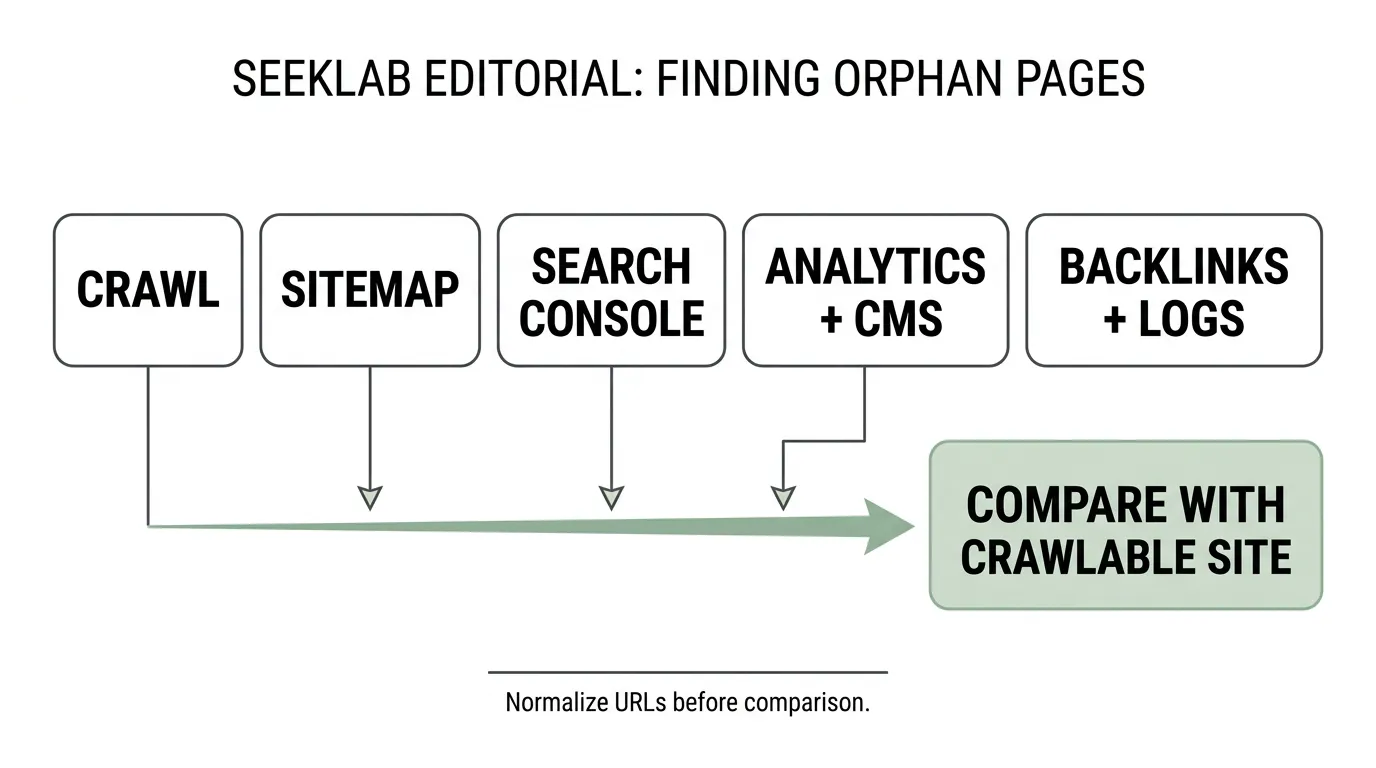
1. Crawl the website from its normal entry points
Use a crawler to establish the baseline: URLs that can be reached through navigation, categories, hubs, breadcrumbs, contextual links, and other crawlable HTML links. This is the linked architecture against which other URL sets should be compared.
2. Collect URLs from other sources
| Source | What it reveals | Why it matters |
|---|---|---|
| Website crawl | URLs reachable through internal links | Establishes the current linked-architecture baseline. |
| XML sitemap | URLs submitted for discovery | Exposes sitemap-only pages. |
| Google Search Console | URLs Google knows, has crawled, indexed, or excluded | Finds known URLs outside the current crawl path. |
| Analytics | Landing pages that have received visits | Surfaces pages reached through campaigns, social posts, bookmarks, or old links. |
| CMS export | All published URLs | Finds live pages omitted from navigation and hubs. |
| Backlink data | URLs receiving external links | Identifies isolated pages that may carry authority or referral value. |
| Server logs | URLs requested by crawlers and users | Adds evidence for large or complex websites. |
| Campaign records | Event, PPC, email, and seasonal URLs | Helps classify temporary and legacy pages. |
Product feeds and separate language sitemaps may also be relevant for ecommerce, catalog, and multilingual sites.
3. Normalize the URL lists
Raw exports contain noise. Before comparing them:
- Remove tracking parameters where appropriate.
- Standardize trailing slashes and hostname variants.
- Resolve uppercase and lowercase inconsistencies.
- Identify canonical URLs.
- Separate redirects, errors, blocked URLs, and noindexed pages.
- Remove duplicates created by filters, parameters, or alternate protocols.
Without normalization, developers and editors receive a long list that mixes genuine orphan pages with URL variants and technical clutter.
4. Compare known URLs with the crawlable architecture
Any indexable URL present in another trusted source but absent from the crawl is a candidate for review. It is not automatically a page that should be linked. The comparison produces an investigation list; business value, content quality, technical status, and intended use determine the action.
The complete SEO audit checklist places orphan-page analysis within the wider crawlability, indexation, content, JavaScript, and international SEO review.
Decide whether an orphan page should be fixed
Before adding links, answer three questions:
- Should the page exist? Confirm that it has a current purpose and is not an obsolete campaign, duplicate archive, test URL, or superseded page.
- Should the page be indexed? Check its status, directives, canonical target, content quality, and search intent.
- Should users reach it through normal browsing? If the page supports discovery, evaluation, conversion, or an important task, it needs an appropriate place in the site structure.
Prioritization criteria
| Criterion | What to check | Decision implication |
|---|---|---|
| Indexability | 200 status, crawl permissions, index directive, and canonical target | Resolve blockers before strengthening links. |
| Business value | Contribution to leads, sales, downloads, product discovery, or trust | High-value pages move up the queue. |
| Search demand | Relevant impressions, queries, or realistic long-tail opportunity | Preserve and support pages that answer genuine demand. |
| Content quality | Originality, usefulness, accuracy, completeness, and intent match | Improve weak pages before linking prominently. |
| Conversion role | Clear next step, CTA, product path, or contact route | Visibility should connect to a useful user outcome. |
| Backlink value | Relevant external links and referral traffic | Preserve value carefully when merging or redirecting. |
| Topical fit | Logical relationship to a hub, category, service, or market | Determines where internal links should originate. |
| Duplication | Overlap with stronger URLs | Merge, canonicalize, or redirect instead of supporting both. |
Fix pages first when they are indexable, useful, and commercially or editorially important. Delay linking if the page needs substantive improvement. Do not manufacture internal links for content that should be retired.
Traffic alone should not decide the queue. A new service page may have no historical visits but still support a priority offer, while an old campaign page may receive residual traffic without serving a current purpose. Review search impressions, backlinks, assisted conversions, and the page’s intended role together. If a valuable orphan page already earns backlinks or ranks for relevant queries, preserve its URL where possible and reconnect it carefully. If two pages answer the same intent, consolidation is usually more useful than building parallel internal-link paths.
Orphan-page action matrix
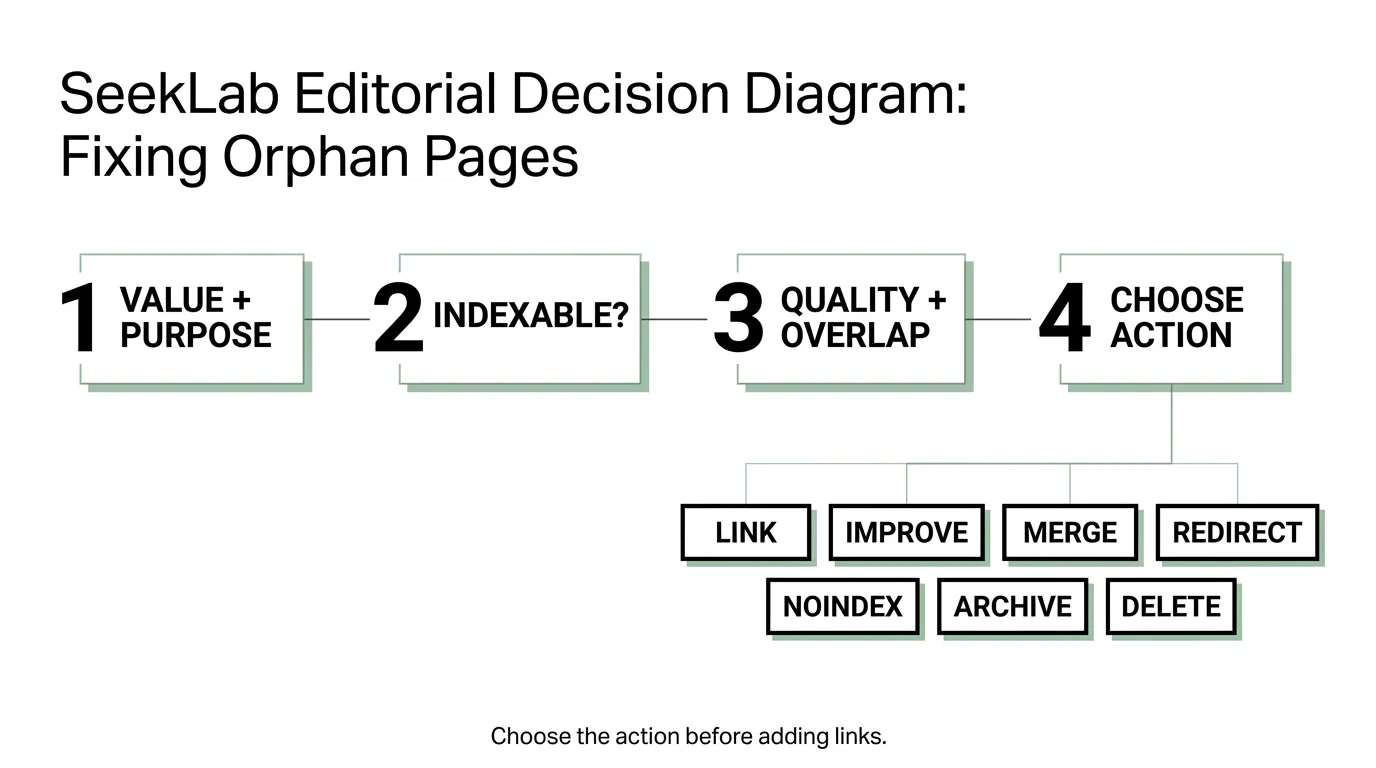
| Page condition | Recommended action | Why |
|---|---|---|
| Strong, indexable service or product page | Link from relevant hubs, categories, guides, navigation, and breadcrumbs | It supports search demand and a clear user task. |
| Useful page with weak or outdated content | Improve, then link | Stronger discovery should not amplify an incomplete answer. |
| Thin page overlapping a stronger URL | Merge useful material into the stronger page | Consolidation reduces duplication and preserves useful content. |
| Superseded page with a clear replacement | Redirect to the closest relevant equivalent | Users and signals reach the current destination. |
| Page needed for users but not for organic search | Noindex and keep appropriate access paths | Not every functional page belongs in search results. |
| Expired content retained for records | Archive with clear status and limited prominence | Preserves context without treating it as current content. |
| Test, duplicate, or valueless page with no replacement | Delete and return the appropriate status | Removes clutter instead of creating artificial links. |
Redirects should be relevant and one-to-one where possible. Do not redirect unrelated orphan pages to the homepage simply to avoid a 404 response.
How to fix valuable orphan pages
Add links from genuinely relevant pages
The best source page is not automatically the page with the most traffic. Relevance and user need come first. A technical SEO guide may naturally link to a crawl-diagnostics page. A product category should link to relevant product details. A market hub should connect users to the appropriate local service or content page.
Useful internal-link placements include:
- Contextual links inside related copy.
- Topic, resource, service, or product hubs.
- Category and subcategory pages.
- Breadcrumbs and parent-child navigation.
- Related-content modules with crawlable links.
- Links that move users from informational content to an appropriate commercial next step.
Avoid isolated footer-link dumps and unrelated links added only to change an audit score. See Internal Linking SEO Best Practices for a fuller approach to source-page selection, click depth, hubs, and topic clusters.
Use descriptive, varied anchor text
Anchor text should explain the destination naturally. It does not need to repeat the same exact-match keyword across the site.
| Weak anchor | Clearer anchor |
|---|---|
| Click here | technical crawl diagnostics guide |
| Learn more | product category architecture checklist |
| Read this | multilingual site-structure review |
| More information | JavaScript rendering audit steps |
| Service | full-site SEO audit process |
Check technical blockers before linking
Confirm that:
- The page returns a valid 200 status.
- Robots.txt does not block required crawling.
- There is no accidental
noindexdirective. - Canonical tags identify the intended URL.
- Important content and links appear in rendered HTML.
- Navigation uses crawlable
<a href>links. - The XML sitemap contains canonical, useful, indexable URLs.
- Existing redirects lead to the closest current equivalent.
For JavaScript-heavy websites, a visible button may not produce a dependable crawlable link. Technical JavaScript SEO and Indexing Solutions explains how rendering, hydration, links, canonicals, and structured data can affect discovery and indexing.
Place the page in a coherent journey
One new link may remove the strict orphan label without solving the underlying problem. Important pages should sit in a structure users can understand: hub to detail, category to product, guide to service, or market page to the relevant local conversion route.
Different markets and language versions should also be reviewed independently. A well-linked English page does not compensate for a translated equivalent that is absent from its local navigation and content hubs. Hreflang identifies alternate versions; it does not replace internal links. Google’s guidance on localized versions is useful alongside an international SEO structure review.
Why orphan pages appear
Orphan pages usually result from publishing and maintenance gaps rather than one technical failure.
| Cause | What happens | Typical response |
|---|---|---|
| Blog publishing without link review | A new post is published, but related content and hubs are not updated. | Add relevant inbound links as part of publication. |
| Product or catalog imports | URLs exist without the right category assignment. | Restore category links and breadcrumbs. |
| Website redesign | Menus, footers, hubs, or sections are removed. | Compare pre- and post-launch URL inventories and crawl paths. |
| Campaign landing pages | Temporary pages remain live after the campaign ends. | Update, redirect, noindex, archive, or remove them. |
| JavaScript navigation | Elements look clickable but do not use crawlable anchors. | Use <a href> links for important destinations. |
| Multilingual publishing | Translated pages exist outside the local site structure. | Add local navigation, hubs, and relevant cross-links. |
| Content consolidation | Links to retained URLs are accidentally removed. | Update every internal source to the final canonical page. |
How to prevent new orphan pages
Prevention belongs in publishing, development, and redesign workflows—not in an annual cleanup spreadsheet.
| Workflow moment | Required check |
|---|---|
| New article | Link from at least one relevant existing page or hub, and link to useful older content. |
| New product page | Confirm category, breadcrumb, and related-product paths. |
| New service page | Connect the page to its service hub, supporting guides, and appropriate conversion paths. |
| Campaign launch | Decide whether the page is temporary, reusable, or evergreen. |
| Campaign end | Update, redirect, noindex, archive, or remove the page. |
| Site redesign | Compare pre- and post-launch crawls and URL inventories. |
| Multilingual release | Crawl each language version and verify local internal links. |
| Recurring review | Compare newly published CMS URLs with crawlable URLs. |
Content templates and release checklists should require an owner, intended indexation state, parent hub or category, at least one relevant inbound link, and a defined user next step. This makes internal linking part of publishing rather than an afterthought.
How SeekLab approaches orphan-page audits
A crawler can report zero inlinks, but it cannot decide whether a page should be linked, improved, merged, redirected, noindexed, archived, or removed. SeekLab combines URL-source comparison with technical checks, content quality, search demand, business value, and site architecture so teams can prioritize the pages that affect visibility and user journeys.
The result is a practical action list rather than another undifferentiated export. It can also reveal wider crawl, indexation, JavaScript, multilingual, or content-structure issues behind the orphan-page pattern.
Not sure whether important pages are disconnected from your site structure? Run the free SeekLab audit to identify crawl, indexing, and internal-linking issues. For a deeper manual review, explore SeekLab’s SEO and GEO services.
FAQ
What is an orphan page in SEO?
An orphan page is a page with no internal links pointing to it from other pages on the same website. It may still appear in a sitemap, CMS, analytics platform, backlink index, or Google Search Console.
Can Google find and index an orphan page?
Yes. Google may discover an orphan page through an XML sitemap, external backlink, historical crawl data, or another source. Discovery and indexing are not guaranteed, and the page still lacks the internal context and user path provided by relevant links.
Are orphan pages always bad?
No. Thank-you pages, temporary campaign pages, internal-use pages, and other functional URLs may be intentionally isolated or excluded from search. The problem is an important page that should support discovery, users, or conversions but sits outside the site structure.
How do you find orphan pages?
Compare URLs discovered in a normal site crawl with XML sitemaps, Search Console, analytics, CMS exports, backlink data, server logs, and campaign records. Normalize the URL sets before identifying candidates.
Should every orphan page receive an internal link?
No. Review its purpose, indexability, quality, search demand, duplication, backlinks, and business value. The correct action may be to link, improve, merge, redirect, noindex, archive, or delete it.
Are sitemap-only pages orphan pages?
Yes, if no internal page links to them. A sitemap can help discovery, but it does not establish topical relationships or a browsing path.
How often should orphan pages be audited?
Quarterly is a reasonable baseline for an active site. Review them after redesigns, migrations, large imports, campaign changes, or multilingual launches. High-volume publishing and ecommerce sites may need monthly checks.