How to Read an SEO Audit Report: Findings, Impact, Owners and Next Steps
Expert reviewed

An SEO audit report should tell your team what to fix first, why it matters, who owns the work, and how to confirm the result. It is not a warning list to clear in order.
Read the report in this sequence: confirm the evidence, identify affected priority pages and markets, find the likely root cause, assess business impact, assign one accountable owner, and define validation before development begins. This process turns SEO audit findings into an executable SEO action plan.
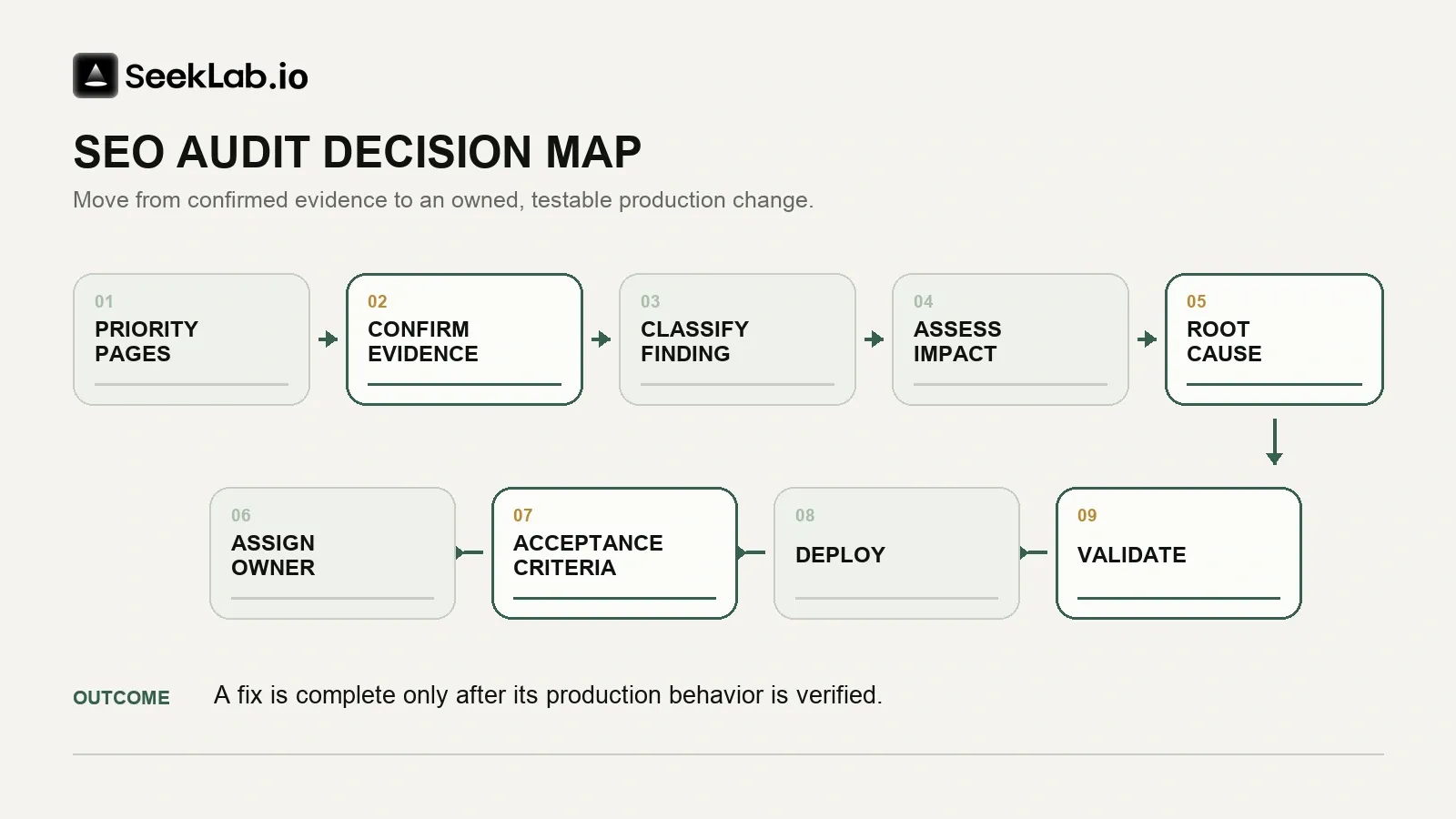
Start an SEO audit report with priority pages and evidence
Do not start with the total number of errors. A report with 800 warnings may contain no urgent business risk. One unintended noindex directive on every service page can be more damaging than hundreds of duplicate meta descriptions on old archive posts.
First, identify the pages that support business goals:
- Service, product, and category pages.
- Country and language pages for priority markets.
- Organic landing pages that generate qualified inquiries.
- Pages supporting quote requests, demos, contact forms, or ecommerce actions.
- Content hubs that route visitors toward commercial pages.
Then classify each finding into one of four groups.
| Finding type | Meaning | Typical action |
|---|---|---|
| Blocker | Prevents priority pages from being crawled, rendered, indexed, or used | Escalate quickly |
| Risk | May create loss during a release, migration, or expansion | Schedule controlled remediation |
| Opportunity | Can improve relevance, navigation, content usefulness, or conversion paths | Scope as a planned project |
| Noise or exception | Intentional, low-value, isolated, or unverified alert | Record and monitor |
A technical SEO audit should include crawler data, but a crawler alone cannot confirm Google's indexing decision. Use representative URLs, rendered HTML, response headers, XML sitemap records, and Search Console evidence before approving a high-priority task. Google's documentation distinguishes crawling, rendering, and indexing because each stage can fail for a different reason.
An "Excluded" status is not automatically a defect. Confirmation, account, filtered, or retired campaign URLs may be intentionally excluded; investigate when a valuable canonical page is missing unexpectedly.
If you need a baseline before applying this framework, SeekLab's free automated audit provides three free reports without signup, completes in minutes, and checks roughly 30 technical and search signals across nine categories. Use it to surface findings for review—not as a substitute for confirming evidence, diagnosing root causes, or deciding priority.
The practical sequence is simple: run the automated baseline, review its findings with the framework below, confirm scope and priority, then escalate complex or strategic issues for deeper expert review. See Automated SEO Audit vs Expert SEO Audit for a closer comparison of those roles.
A useful 13-step audit checklist can help your team compare an audit report against the checks that should happen before recommendations are prioritized.
Interpret SEO audit report findings by root cause
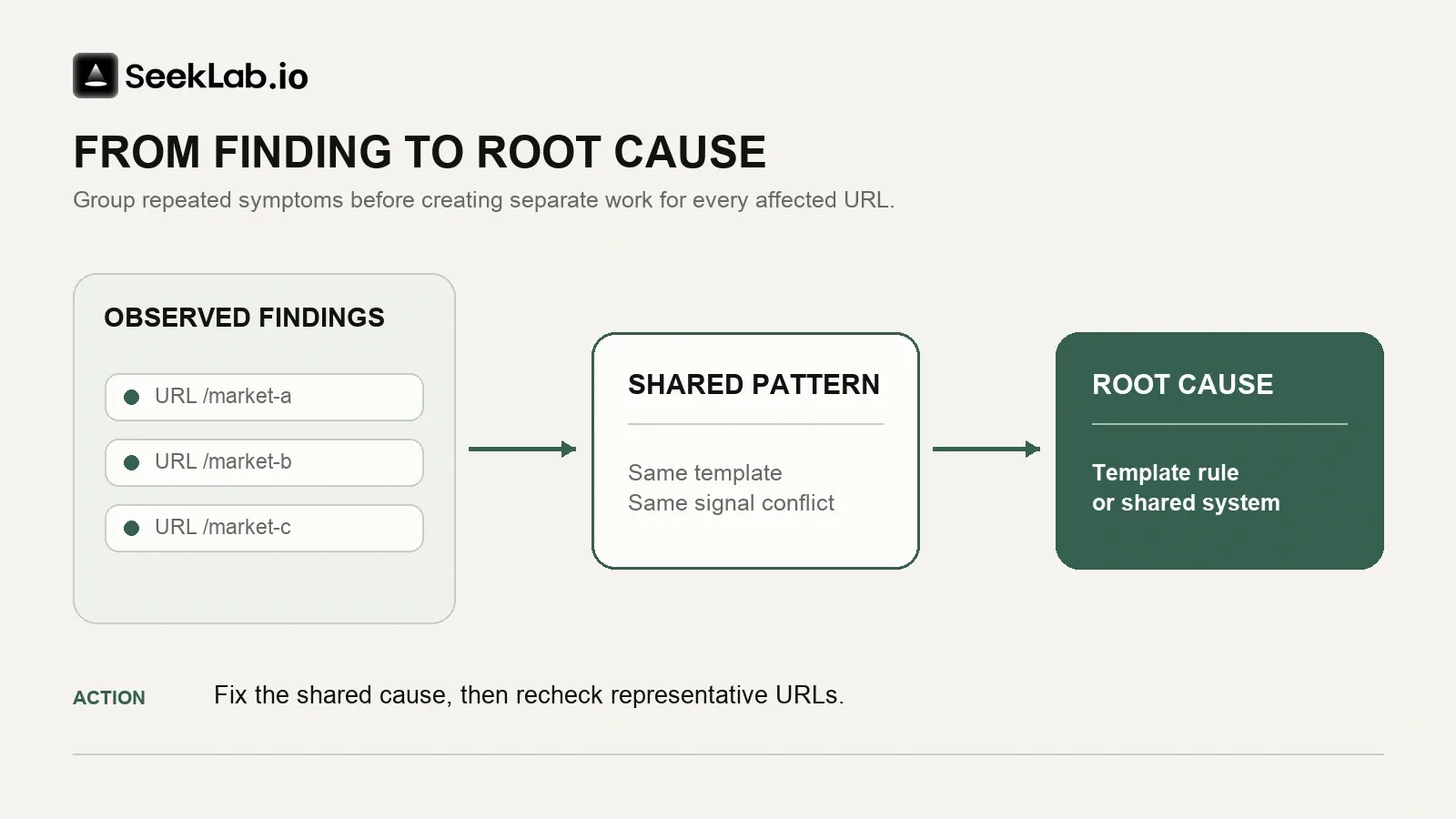
A report becomes useful when it separates the symptom from the cause. "Many pages are excluded" is a symptom. An accidental template-level noindex rule, weak internal discovery, conflicting canonicals, or thin duplicate pages may be the root cause.
Use the table below to interpret common SEO audit findings.
| Audit area | What to verify | First business question | Likely owner |
|---|---|---|---|
| Crawling and indexing | Robots rules, noindex directives, response codes, Search Console, sitemaps | Are priority pages unexpectedly unavailable for indexing? | SEO lead and developer |
| Canonicals and duplicate URLs | Canonical tags, redirects, internal links, sitemap URLs | Which URL should represent this page intent? | Developer with SEO input |
| JavaScript rendering | Source HTML, rendered HTML, failed resources, crawlable links | Does search receive the core content and links users see? | Front-end developer |
| Redirects and broken pages | 3xx chains, 4xx pages, 5xx errors, internal links | Is a high-value user journey broken? | Developer or platform owner |
| Performance and mobile | Field data, template-level causes, forms, navigation | Does the affected template support traffic or inquiries? | Engineering and UX |
| Internal links and architecture | Orphan pages, click depth, anchor text, hub pages | Can users and crawlers reach strategic pages logically? | SEO or content lead |
| Content and intent | Query relevance, page overlap, proof, visual assets, next steps | Does the page answer a real buyer need? | Marketing or content lead |
| Structured data | Rendered markup, visible content, supported types | Is the markup accurate and relevant? | Developer with SEO input |
| International setup | Locale URLs, hreflang, canonicals, localized copy | Are market versions technically aligned and commercially useful? | International marketing and development |
| Measurement | Events, forms, CRM handoff, country-level reporting | Can the team measure qualified outcomes? | Analytics lead |
Check crawlability, indexing, and canonical signals
An indexability issue deserves immediate attention when it affects strategic templates. Check the following signals together:
- The page returns a successful server response.
- The page is not blocked from crawling when access is required.
- The page does not contain an unintended noindex directive.
- The canonical points to the intended primary URL.
- Internal links point to that primary URL.
- The XML sitemap contains that primary URL if it should be indexed.
Google treats redirects, canonical tags, and sitemap inclusion as signals with different strengths. Conflicting signals create ambiguity. A localized German service page that canonicalizes to an English URL, while hreflang points back to German, is not a small markup issue. It is a market-level implementation conflict.
Check rendering before changing content
A browser can display a complete page while search systems receive incomplete content, links, metadata, or schema. This is common on JavaScript-heavy sites where critical elements depend on client-side execution or user interaction.
Check a representative page from each template:
- Compare source HTML with rendered HTML.
- Confirm primary copy, headings, internal links, canonicals, and directives remain present.
- Test lazy-loaded content without requiring clicks or scrolling behavior that search systems may not reproduce.
- Review failed API, JavaScript, CSS, or image requests.
- Test client-side routes, filters, pagination, and locale selectors.
Use a JavaScript rendering troubleshooting guide when an audit identifies a gap between browser-visible content and crawlable output. Do not request a full platform rewrite until the affected template, root cause, and commercial scope are clear.
Read performance findings with field data first
Core Web Vitals findings should be read as user-experience evidence, not as a promise of ranking gains. Google's published targets are Largest Contentful Paint within 2.5 seconds, Interaction to Next Paint below 200 milliseconds, and Cumulative Layout Shift below 0.1 at the 75th percentile.
Field data shows what real visitors experience. Lab tools help diagnose likely causes such as oversized images, slow server response, render-blocking files, long JavaScript tasks, or layout shifts.
Prioritize a weak mobile product, service, or lead-generation template before chasing a perfect test score on a low-traffic article. Confirm that a proposed performance change does not break analytics, consent flows, image quality, forms, or product functionality.
Treat content and architecture findings as commercial work
A technically healthy site can still underperform because pages target weak topics, answer the wrong intent, repeat similar content, or bury commercial pages behind disconnected articles.
A strong content recommendation should identify:
- The target audience, search need, and page that should own the topic.
- Content that should be improved, merged, redirected, retained, or excluded.
- Internal links needed to connect educational content with relevant product or service pages.
- Missing proof, examples, visuals, or market-specific details.
- The next action a qualified visitor should be able to take.
Use an internal-linking implementation guide to review orphaned pages, weak hubs, vague anchors, and broken paths between informational content and commercial pages. A link should help a real user continue their research, not exist only to satisfy a crawl metric.
Prioritize SEO audit report work by impact, not volume
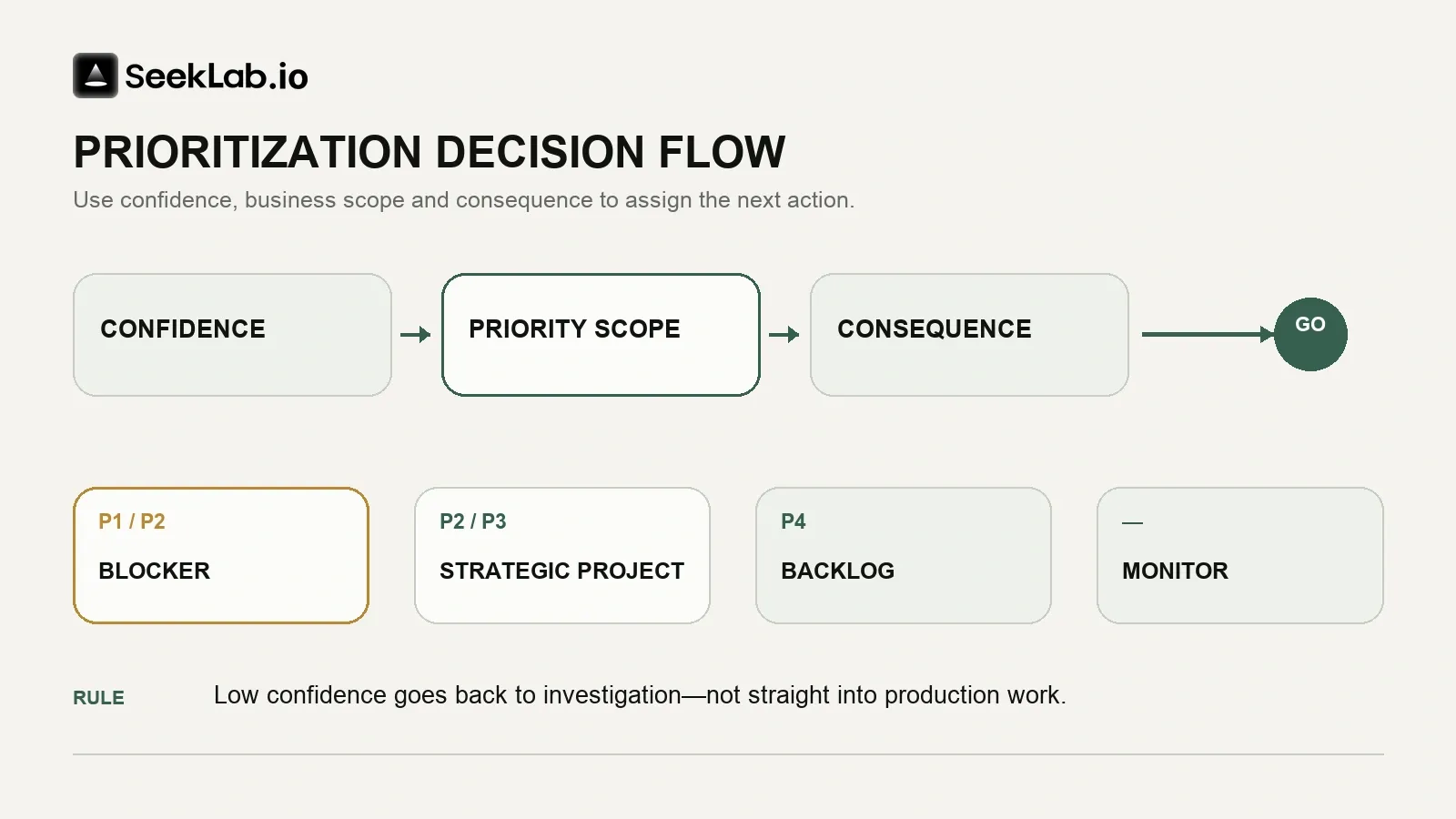
Rank confirmed problems by business consequence, technical severity, scale, confidence, effort, and risk—not by the number of warnings.
Use these five questions before creating a development or content ticket:
- Is the finding confirmed in production, and what shared cause or URL pattern does it affect?
- Does the scope include a priority page, market, template, or conversion path?
- Does it block crawling, rendering, indexing, user completion, or measurement?
- What is the risk of delay, and which teams, systems, or release windows are required?
- How will the team prove the issue is resolved?
| Priority class | Use when | Example |
|---|---|---|
| P1 | A confirmed blocker affects strategic pages or a critical journey | A service-page template adds noindex in production |
| P2 | A material issue needs coordinated implementation | Primary internal links disappear after JavaScript rendering |
| P3 | A strategic project needs cross-functional planning | Rebuild multilingual information architecture and localized content paths |
| P4 | A valid improvement has limited commercial impact | Update descriptions on low-value historical posts |
| Monitor | The finding is intentional, low confidence, or low value | A retired campaign URL returning 404 with no meaningful traffic |
A practical SEO audit impact decision is often simple. A broken contact form on a high-traffic service page is more urgent than a heading-order warning on 200 blog posts. A canonical conflict across every country directory is more urgent than a missing image alt attribute on one archived page.
Use a prioritization model that makes trade-offs visible:
| Factor | High score means |
|---|---|
| Business impact | Leads, sales, product discovery, or a priority market is constrained |
| SEO impact | Crawling, rendering, indexing, or interpretation is directly affected |
| Scale | A shared rule affects many relevant URLs |
| Conversion relevance | The issue interrupts a form, quote path, product journey, or next step |
| Urgency | Delay increases loss, migration risk, or recovery difficulty |
| Confidence | Multiple sources confirm the finding |
| Effort | Lower effort can improve delivery speed, but does not outweigh a severe defect |
Do not use effort to postpone a serious blocker indefinitely. Use it to plan the release path, tests, rollback method, and resource request.
Assign owners for SEO audit report recommendations
SEO recommendations fail when several teams are involved but nobody is accountable. Each material task needs one accountable owner. Other stakeholders can contribute, approve, or validate, but accountability must remain clear.
| Issue type | Accountable owner | Supporting roles | Validation owner |
|---|---|---|---|
| Robots, directives, canonicals, sitemaps | Engineering lead or CMS owner | SEO lead, content owner | SEO lead |
| Redirects, errors, server behavior | Engineering or infrastructure lead | SEO lead, platform vendor | Engineering and SEO |
| JavaScript rendering | Front-end engineering lead | SEO lead, QA, product owner | SEO and QA |
| Core Web Vitals and mobile usability | Engineering or product lead | UX, analytics, SEO | Engineering and analytics |
| Internal linking and architecture | SEO or content lead | Developer, UX, editor | SEO lead |
| Content consolidation and topic selection | Marketing or content lead | SEO, subject-matter expert | SEO and analytics |
| Structured data | Developer | SEO, content or product data owner | SEO lead |
| Multilingual implementation | Engineering lead | International marketing, localization owner | SEO and market owner |
| Conversion tracking and CRM handoff | Analytics lead | Developer, marketing operations, sales operations | Analytics lead |
Small teams can combine roles. A marketing manager may coordinate the SEO action plan while an external developer implements technical changes. The rule remains the same: one person owns the decision, timeline, and validation follow-up.
External support is most useful when evidence is ambiguous, a problem crosses templates or markets, or prioritization requires technical and commercial context. SeekLab's Search & AI Audit provides human-reviewed diagnosis across technical SEO, content, search, AI visibility, prioritization, and implementation context. It is the deeper review layer, not the same product as the free automated baseline. For teams that also need ongoing implementation, SEO + GEO connects the roadmap to continuing technical, content, and search work. The differences are explained further in Technical SEO Audit vs Search & AI Audit.
Convert SEO audit report findings into an SEO action plan
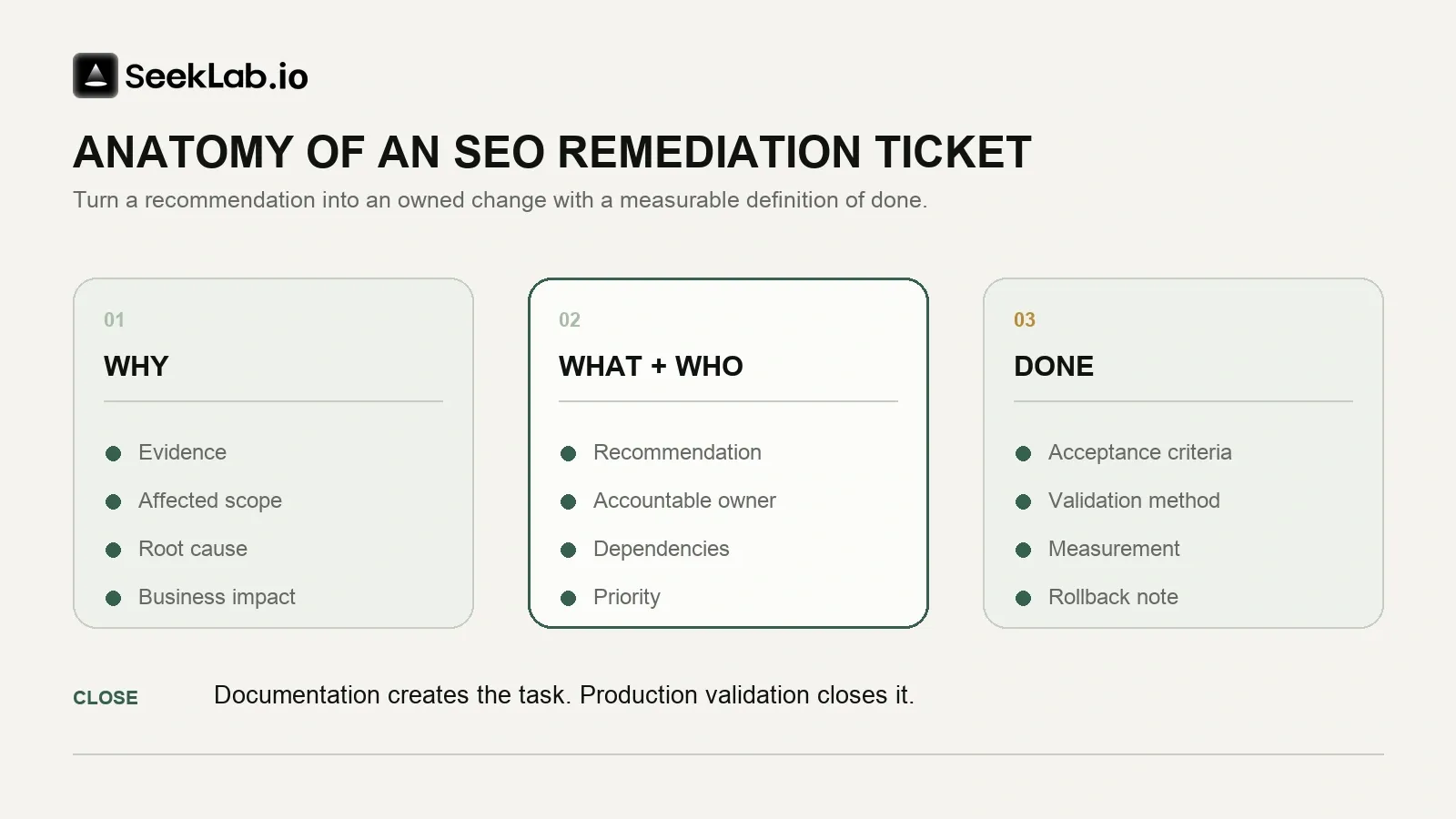
Documentation creates the task. Production validation closes it.
Every ticket in an SEO action plan should include the following fields.
| Ticket field | Required detail |
|---|---|
| Title | Specific action and affected pattern |
| Evidence | URLs, screenshots, crawl records, Search Console data, headers, or rendered HTML |
| Affected scope | Templates, languages, markets, device types, and representative URLs |
| Root cause | Confirmed cause or documented hypothesis |
| Business impact | Priority pages, journeys, leads, market expansion, or operational risk |
| Priority | P1, P2, P3, P4, or monitor, with a reason |
| Accountable owner | One named person or role |
| Dependencies | CMS access, vendor work, release window, legal review, content approval |
| Recommendation | The exact change to make |
| Acceptance criteria | Testable production requirements |
| Validation method | Recrawl, URL inspection, device test, event test, or manual QA |
| Measurement | Index status, traffic quality, form completion, qualified leads, or sales actions |
| Rollback note | Release risks and recovery procedure |
A weak recommendation says: "Improve page speed."
An actionable recommendation says: "Investigate the shared mobile service-page component delaying the largest visible image. The affected template has poor field performance on mobile. Engineering owns the change. Preserve image quality, form behavior, consent tools, and analytics events. Validate with the same template set after deployment, then monitor field data and form completion."
For content-related work, avoid recommendations such as "publish more blog posts." A useful instruction states which audience question is currently underserved, which commercial page it should support, what proof or visual material is missing, and which existing URLs should be consolidated to prevent overlap.
Use a content optimization guide when a report identifies weak search intent, generic content, missing conversion paths, or isolated articles. The best next step is often to improve and connect existing assets before launching a high-volume publishing plan.
Validate SEO audit report fixes and monitor outcomes
Do not close an SEO task because code was deployed. Close it after the team verifies that the intended behavior exists in production.
Use the validation method that matches the change.
| Change | Required validation |
|---|---|
| Directives and canonicals | Check live HTML, headers, rendered output, internal links, and sitemap alignment |
| Redirects and status codes | Test source and destination URLs, crawl the pattern, check tracking continuity |
| Indexing issues | Inspect representative URLs, review Page Indexing data, confirm crawlable internal paths |
| JavaScript changes | Compare source and rendered HTML, test live output, inspect failed resources |
| Structured data | Test rendered markup and confirm it matches visible page content |
| Performance work | Compare field data over time and use lab testing for diagnosis |
| Mobile UX | Test priority templates, navigation, forms, tables, and key actions on real devices |
| Multilingual changes | Check locale URLs, hreflang return links, canonicals, language switching, and market reporting |
| Analytics fixes | Submit test forms or transactions, confirm analytics receipt and CRM handoff |
Measure outcomes in layers:
- Implementation output: The planned code, content, redirect, or configuration was released.
- Technical outcome: The page now returns the correct status, renders core content, exposes links, or passes the required checks.
- Search outcome: Search Console shows changes in crawl behavior, indexing, impressions, clicks, or relevant query patterns over time.
- User outcome: Visitors can complete important actions more reliably on the affected templates.
- Commercial outcome: Qualified inquiries, transactions, sales opportunities, or assisted conversions improve for the affected market or landing-page group.
Google controls crawling and indexing schedules. Search Console reporting also has processing delays. Do not claim that a one-day traffic movement proves the result of a technical change. Record deployment dates, compare like-for-like periods, and check for other releases, seasonality, tracking changes, or market activity.
Before closing the plan, confirm the finding and scope, classify the issue, assign one owner, record dependencies, define acceptance criteria and validation, and choose the outcomes to monitor.
A credible SEO audit report identifies the work most likely to improve site readiness, content usefulness, search accessibility, and conversion paths. Choose the next layer according to what the team needs:
- Need a quick baseline? Run the free automated audit.
- Need help prioritizing or diagnosing complex findings? Use the Search & AI Audit.
- Need ongoing implementation across technical SEO, content, and AI search visibility? Explore SEO + GEO.