Ecommerce Product Page SEO: How to Optimize Product Pages for Search and Sales
Expert reviewed

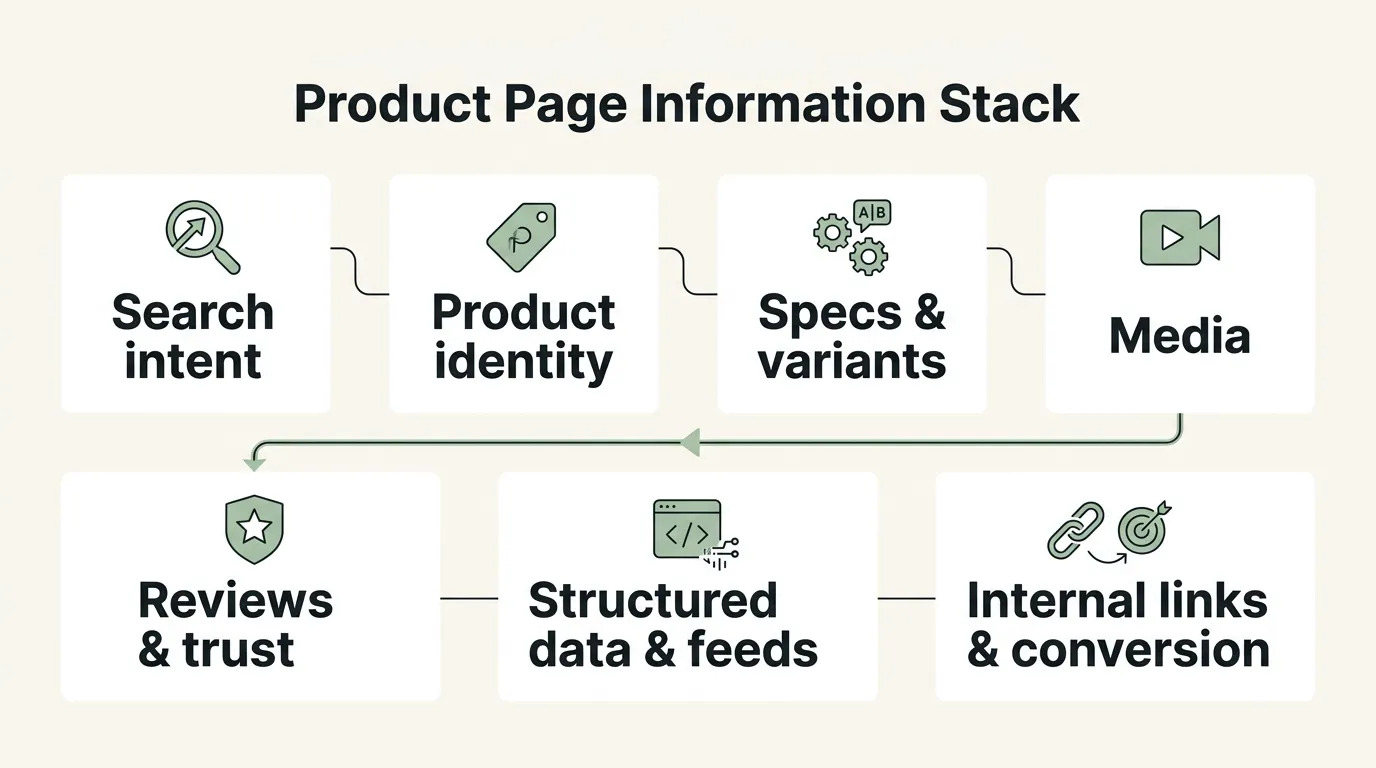
Product pages are the last mile of ecommerce SEO. They must match a specific product need, give search engines reliable product information, and help a shopper decide whether the item is right for them.
A strong product detail page does not need the longest description. It needs accurate, original and well-structured information about the product itself: what it is, which model or variant is shown, who it suits, what it works with, what it costs, whether it is available, and what happens after purchase.
1. Start with the product search intent
Product-page SEO begins with the query a specific product page can satisfy. A category page may be the better result for a broad search such as “men’s running shoes.” A product page becomes more useful when the search narrows to a product, model, size, material, compatibility requirement or other buying detail.
| Search intent | Example pattern | What the product page should clarify |
|---|---|---|
| Exact product | Product name + model | Exact identity, current version, main benefit and availability |
| Model or SKU | Brand + model number or SKU | Identifiers, specifications, compatibility and variant shown |
| Branded product | Brand + product type | Product identity, differentiators and relationship to the brand range |
| Attribute-led | Product + size, material, color or feature | Whether that attribute is available and how it affects the choice |
| Comparison | Product A vs Product B | Meaningful differences, suitable use cases and limitations |
| Alternative | Alternatives to Product A | Comparable options and why a shopper might choose each one |
Do not force every query onto a product page. Broad comparison or category intent often belongs on a category, guide or comparison page, which can then link to the relevant products. That relationship is part of a wider ecommerce SEO strategy; this article stays focused on the individual product page.
2. Build the page around product identity and decision information
The page title, visible product name and opening content should make the item unmistakable. Include the model, part number or SKU when shoppers use it to find or verify the product. Do not add identifiers simply to make the title longer.
Useful product information may include:
- a clear product name and concise description;
- model, SKU, GTIN, MPN or other identifiers where they genuinely apply;
- dimensions, materials, fit, capacity or technical specifications;
- compatibility with devices, parts, sizes or systems;
- available colors, sizes, models, pack sizes and configurations;
- current price, availability and expected delivery information;
- returns, warranty or care information where it affects the decision;
- what is included in the box or purchase;
- who the product is for, along with meaningful limitations;
- differences from closely related products.
Originality comes from useful decision support, not a target word count. Manufacturer copy can supply facts, but it rarely answers every question a shopper has. Add information your team can verify: sizing guidance, fit notes, setup steps, compatible accessories, material differences, care requirements, practical comparisons and limitations.
The strongest content usually sits close to the decision it supports. Put essential identity, price, variant and availability information near the primary buying action. Use specifications, comparison tables, reviews and FAQs further down the page without hiding critical facts inside tabs that fail to render or are difficult to use on mobile.
3. Handle variants without creating confusion
Color, size, model, pack size and configuration variants do not require one universal URL model. The right setup depends on whether each variant has distinct search demand, content, inventory and a stable URL that can represent it accurately.
| Variant setup | When it can work | Main requirements |
|---|---|---|
| One consolidated product page | Variants are minor options and shoppers mainly search for the product family | One clear canonical URL, selectable variants, accurate price and availability, stable product-group information |
| Separate variant URLs | A variant has distinct demand, specifications, imagery or inventory | Each URL must preselect the correct variant and show matching image, price, availability and product data |
| Hybrid product group | A parent product groups crawlable variant URLs | Consistent ProductGroup and variant identifiers, clear canonicals, direct links and self-contained variant data |
Google’s product-variant structured-data guidance supports both single-page and multi-page variant sites. For a single-page setup, Google describes one canonical URL for the overall ProductGroup. In a multi-page setup, every variant page should contain complete, self-contained markup. A variant URL must also select that variant directly rather than loading a generic page that requires another click.
Whichever model you use:
- give the product group and each variant stable identifiers;
- keep variant URLs consistent and crawlable where they are intended to index;
- make canonical tags reflect the chosen URL model;
- show the selected variant’s image, price, availability and attributes;
- keep structured data consistent with the visible selection;
- link variants in a way users and crawlers can follow;
- avoid creating indexable parameter combinations with no distinct product value.
Do not canonicalize every variant to a parent automatically. If a variant has a legitimate standalone page and distinct intent, consolidating it can remove the very URL that answers that search.
4. Use images and media to answer product questions
Product media should help a shopper inspect, size, compare or understand the item. A useful set may include multiple angles, detail shots, an in-use view, a size reference, packaging or included components, and a short demonstration where setup or movement matters.
Write alt text for images that communicate useful visual information. Describe what the image shows and include a relevant product attribute when it is genuinely visible. Decorative thumbnails or repeated views do not need forced keyword-heavy descriptions. Google’s image SEO guidance also emphasizes relevant surrounding text, good image quality and crawlable image resources.
Performance matters because product templates often carry large galleries, video, reviews widgets and third-party scripts. Practical priorities include:
- serve appropriately sized WebP or AVIF assets where supported;
- keep the primary product image sharp without sending a needlessly large file;
- avoid lazy-loading the likely Largest Contentful Paint image;
- lazy-load below-the-fold media;
- reserve width and height so galleries do not shift the layout;
- provide poster images and controlled loading for video;
- keep essential specifications and compatibility facts in HTML, not only inside an image.
On mobile, verify that images remain useful rather than taking over the page, variant controls are easy to operate, and zoom or gallery interactions do not block the buying action.
5. Use reviews and trust signals honestly
Genuine reviews can answer questions that a product description cannot: fit, durability, installation difficulty, real-world compatibility and long-term use. Make review content visible, readable and clearly associated with the product being reviewed.
Use Review or AggregateRating structured data only when the visible page and the markup meet Google’s eligibility rules. Do not mark up ratings that users cannot see, copy ratings from unrelated products, combine reviews across incompatible items, or manufacture reviews for richer search presentation.
Other trust information can be more useful than another badge. Clear delivery expectations, returns, warranty terms, support routes, payment information and business identity can reduce uncertainty when they are accurate and placed near the relevant decision.
6. Keep the page, structured data and product feed consistent
Product structured data helps Google understand product details and can make a page eligible for product snippets or merchant-listing experiences. It does not guarantee a rich result, a ranking or inclusion in a shopping surface.
Google’s current Product structured-data documentation covers properties such as Product, Offer, AggregateRating and Review, with support for variants, shipping and return information where applicable. Merchant listings typically need more complete product and offer data than a basic product snippet.
The most important implementation rule is consistency:
| Product fact | Visible page | Structured data | Merchant Center feed, if used |
|---|---|---|---|
| Product identity | Exact item and selected variant | Matching Product or ProductGroup identifiers | Matching title and identifiers |
| Price and currency | Current purchasable price | Matching Offer price and currency | Matching submitted price and currency |
| Availability | Current stock state and buying action | Matching availability value | Matching availability value |
| Condition | Clear where relevant | Matching item condition | Matching condition |
| Variant | Correct image, attributes and selection | Matching variant properties | Matching variant item and landing URL |
| Shipping and returns | Accurate customer-facing terms | Eligible policy or offer properties where implemented | Matching program/feed settings |
Google recommends combining on-page structured data with a Merchant Center feed for the broadest product-data coverage and better verification. Its Merchant Center consistency guidance also stresses that landing-page information must match submitted product data. Automatic item updates can help with temporary mismatches, but they are not a substitute for keeping the page and feed current.
Use recognized identifiers correctly. Submit a GTIN when one exists; do not invent one. Keep brand, MPN, SKU and other identifiers stable across the page, markup and feed. For fast-changing price or availability, place essential product markup in the initial HTML when possible. Google notes that JavaScript-generated product markup can make shopping crawls less frequent and less reliable for rapidly changing values.
7. Build useful internal paths around the product
A product page should not sit at the end of an isolated URL. Internal links help shoppers continue their decision and help search engines understand the product’s place in the catalog.
Useful patterns include:
- category pages linking to current, indexable products;
- product pages linking back to the relevant category;
- breadcrumbs reflecting the primary catalog path;
- related products that serve a genuinely similar need;
- alternatives when another model, size or price point may be more suitable;
- compatible accessories and replacement parts;
- bundles that are actually available together;
- buying guides, setup guides or comparisons linking to the featured products.
Use descriptive anchor text that explains the destination. Avoid filling every page with the same large block of unrelated product links. If a guide explains product-page structure for emerging shopping systems, the existing article on how AI shopping assistants interpret product pages is a better supporting route than repeating that subject here.
8. Treat out-of-stock and discontinued products by situation
An unavailable product does not always need to disappear from search immediately.
Temporarily out of stock: keep the page live with accurate availability, remove or disable misleading buying actions, and offer a restock notification or relevant alternatives. Keep the page, structured data and product feed aligned.
Seasonal product: retain the stable URL when the product is expected to return. Explain the current status and avoid creating a new URL every season.
Permanently discontinued product: decide whether the page still helps people who search for the model, need specifications or want a valid replacement. A useful archived page can remain available with a clear discontinued notice and a genuine successor or alternative.
Use a 301 redirect only when another page satisfies essentially the same intent, such as a true successor model. Do not redirect every discontinued product to a broad category or the homepage. If the product is permanently gone, has no useful replacement and the page has no continuing value, return a proper 404 or 410 rather than a soft-404 page. Google’s redirect guidance and HTTP status guidance provide the technical baseline.
9. Protect mobile usability and Core Web Vitals at template level
Product-page problems usually repeat across a template, so one fix can improve hundreds of URLs. Focus on the elements that commonly affect Core Web Vitals:
- LCP: optimize the primary product image and avoid delaying it behind unnecessary scripts;
- INP: keep variant selection, image galleries, accordions and add-to-cart interactions responsive;
- CLS: reserve space for images, reviews, price messages, stock notices and injected widgets;
- rendering: provide product identity, essential specifications, price and availability in crawlable output;
- mobile usability: keep controls large enough to use and prevent sticky elements from covering key content.
Test representative templates as well as flagship products. A fast homepage does not prove that a JavaScript-heavy product page works well. A technical SEO audit can identify template-level crawl, rendering and performance issues; product-page strategy still needs a separate review of information quality and buying intent.
10. Make product facts easy for search and shopping systems to interpret
Clear product naming, stable identifiers, explicit attributes, visible comparison information and consistent data give search systems a better chance of interpreting the item correctly. The same clarity also helps a shopper compare products without guessing.
That does not mean one page layout or a block of schema will secure an AI recommendation. Shopping and answer systems use different sources and retrieval methods. Treat structured data, feeds, third-party product coverage and on-page facts as complementary signals, then measure what actually appears for your products and markets.
11. Measure product-page performance by query and outcome
Evaluate important product URLs individually as well as by template. Useful checks include:
- impressions and clicks for exact-product, model, SKU and attribute queries;
- indexed and canonical status for the intended product URL;
- Merchant Center diagnostics and page/feed mismatches;
- visibility of product rich results where eligible;
- landing-page engagement, add-to-cart and purchase or lead outcomes;
- variant selection errors, stock-message accuracy and mobile interaction issues;
- internal-link coverage from categories and relevant guides.
Prioritize pages with meaningful demand, revenue potential, inventory stability or strategic importance. Fix shared template faults first, then improve the product information on pages where better decision support can make a material difference.
Product page SEO FAQs
What is product page SEO?
Product page SEO is the process of making an individual product detail page crawlable, understandable and useful for searches about that specific product, model, SKU, variant or attribute. It combines product information, media, internal links, technical performance and consistent structured data.
Should every product variant have its own URL?
No. Separate variant URLs can be useful when variants have distinct demand, content, imagery or inventory. Minor options can often remain on one product page. The chosen setup should use clear canonicals, stable identifiers and URLs that load the correct selected variant.
How much copy should a product page have?
There is no useful universal word count. Include enough original information to identify the product and answer important buying questions about specifications, compatibility, fit, use, delivery, returns and limitations. Do not add generic copy merely to make the page longer.
Can an out-of-stock product page stay indexed?
Yes, especially when the item is temporarily unavailable, seasonal or still useful to people researching the model. Keep the status accurate and provide a meaningful next step. Permanently discontinued products need a page-by-page decision based on continuing value and whether a genuine replacement exists.
What structured data should an ecommerce product page use?
Use Product with the relevant Offer, availability, identifiers and other supported properties. Add Review or AggregateRating only for valid, visible review content. Product variants may use ProductGroup and variant relationships when the implementation follows Google’s current requirements.
Do reviews improve product-page rankings?
Reviews can add useful first-hand information and help shoppers make decisions, but their presence does not guarantee higher rankings. Keep reviews genuine, visible and correctly associated with the product, and use review markup only when eligible.
Turn product-page findings into a practical plan
SeekLab’s SEO and GEO services can help teams connect product-page search demand, technical implementation and measurable commercial priorities. If you first need a quick technical baseline, run the free technical SEO audit; it is a starting point, not a substitute for a deeper product-page review.