A free SEO audit tool helps you fix issues fast
Expert reviewed

A free SEO audit tool helps you identify visible technical, on-page, performance, and access problems so you can turn a website scan into a prioritized fix list.
Use the tool as a diagnostic step. Do not treat the report as a ranking guarantee. Fix the issues, re-run the scan, and verify important pages with Google Search Console when indexing or crawling is involved.
Run a free SEO audit with SeekLab when you need a fast starting point. Enter your domain, wait for the scan to finish, review the report status, then handle Critical issues before Warning and Notice items.
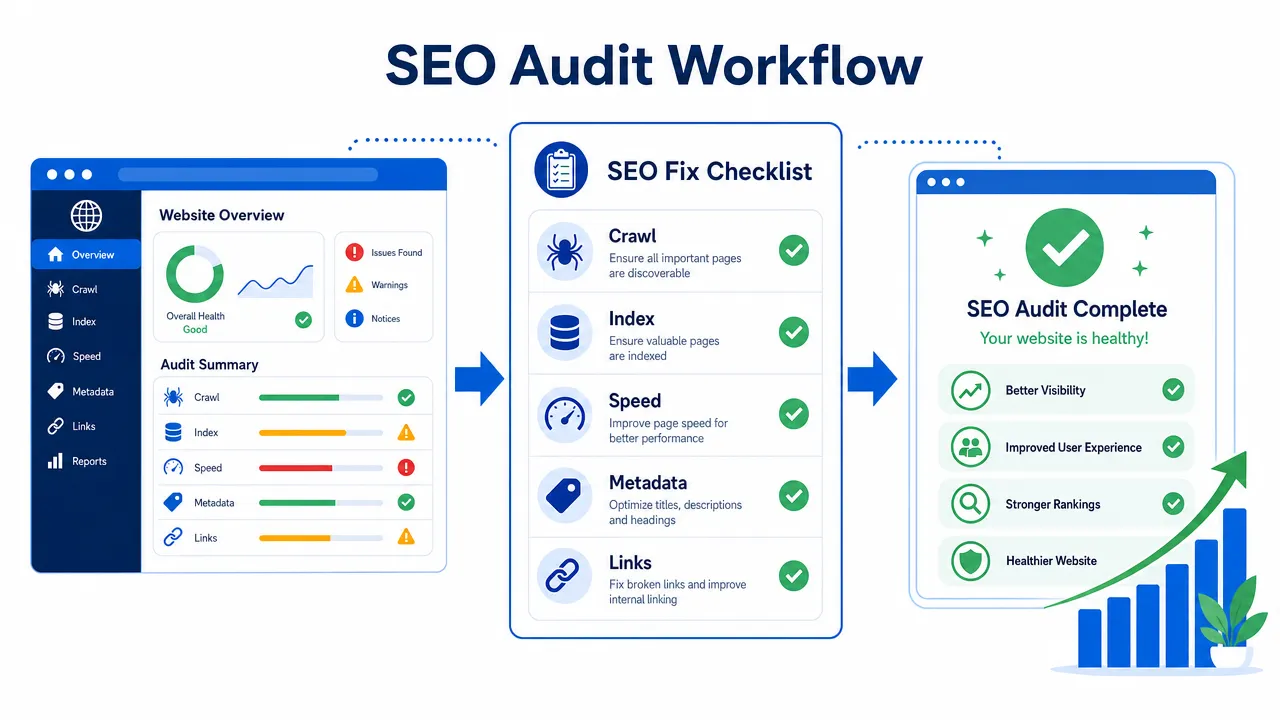
How a free SEO audit tool turns a domain scan into a fix list
A free SEO audit tool checks a website or page for common problems that can affect crawling, indexing, search appearance, usability, and technical health.
The scan result should answer four operational questions:
- Can search engines access important pages?
- Can important pages be indexed?
- Can users and search engines understand the page content?
- Are technical issues creating avoidable friction?
A useful report should group findings by severity. SeekLab materials describe report groups such as Critical, Warning, and Notice. Use those groups as the first sorting layer.
| Severity level | Meaning | Action rule |
|---|---|---|
| Critical | The issue may block access, indexing, rendering, or important user paths. | Fix first. Assign owner immediately. |
| Warning | The issue may reduce clarity, consistency, performance, or page quality. | Fix after Critical items. Group by template or page type. |
| Notice | The issue may be minor, informational, or lower priority. | Log it. Fix when related pages are updated. |
A free SEO audit tool should not replace manual review. It can identify visible issues, but it cannot fully judge business priorities, conversion value, content expertise, or search intent alignment.
Use the report as a task source. Do not fix issues randomly. Sort by severity, impact, affected page count, and implementation effort.
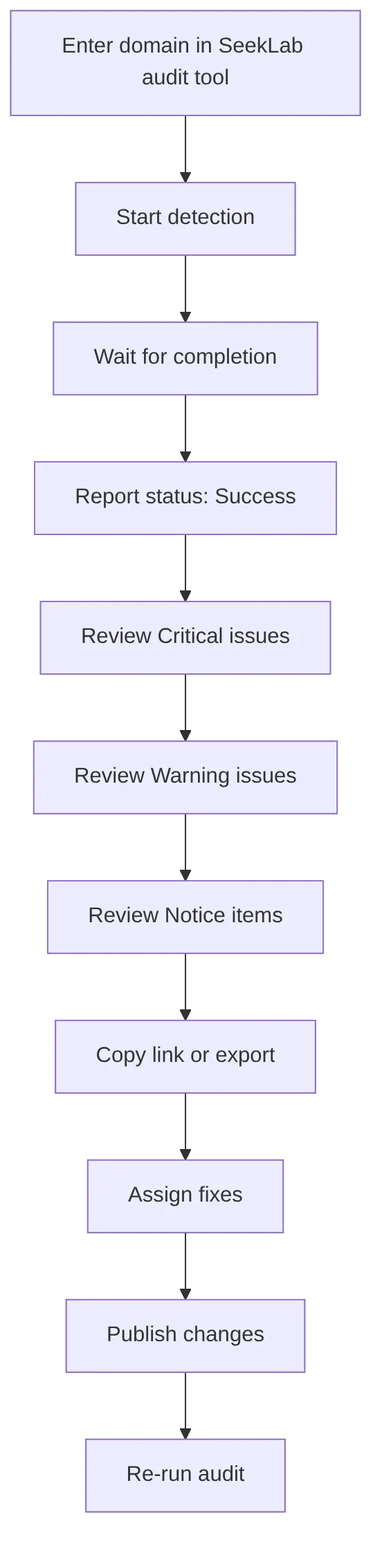
Use this audit-to-fix workflow:
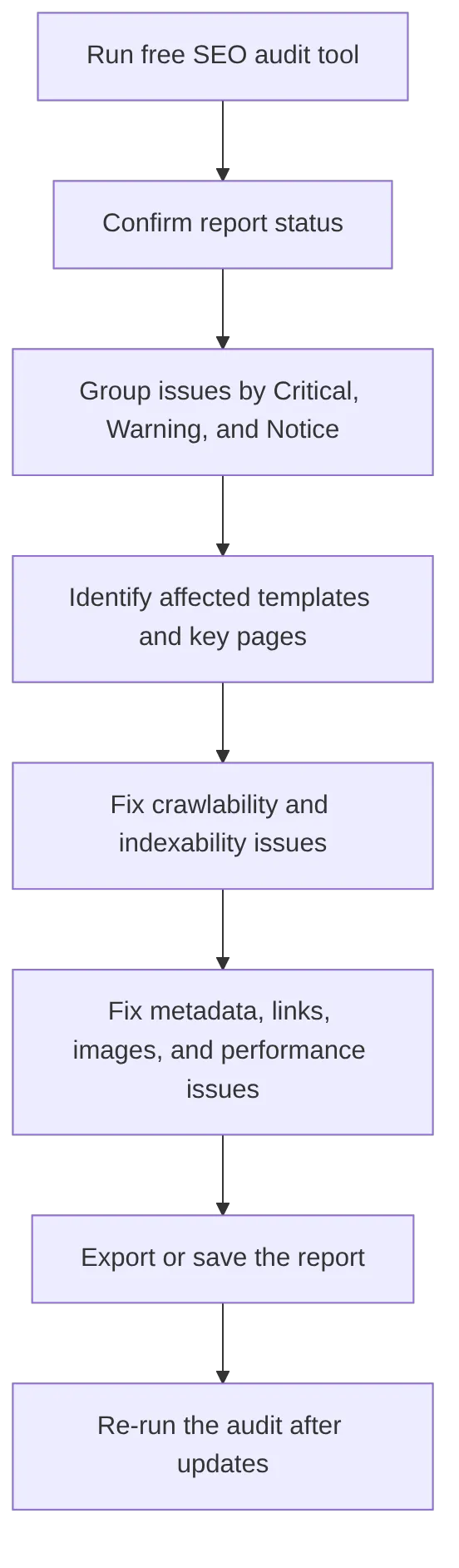
Use official documentation when the report flags search access issues. Google explains crawling and indexing in its crawling and indexing documentation. Use that source when you need to confirm how search engines discover and process pages.
What a free SEO audit tool should check before you make changes
A free SEO audit tool should check the areas that affect access, interpretation, page experience, and technical consistency.
Start with access checks. Then move to page-level improvements.
| Audit area | What the tool checks | Common issue | First fix |
|---|---|---|---|
| Crawlability | Whether bots can discover and fetch pages | Important pages blocked or hard to reach | Fix crawlable links, navigation, robots.txt, and server errors |
| Indexability | Whether pages are eligible for indexing | Accidental noindex or wrong canonical | Remove wrong directives and check canonical targets |
| Metadata | Titles and meta descriptions | Missing, duplicate, vague, or too long tags | Write unique tags for important pages |
| Headings | H1 and heading structure | Missing H2 tags or multiple irrelevant H1s | Use one clear page topic and logical sections |
| Links | Internal, external, broken, and redirected links | Broken internal links or weak anchor text | Update links to live, relevant URLs |
| Images | Alt text, size, and loading signals | Missing alt text or oversized files | Add descriptive alt text and compress images |
| Mobile usability | Mobile layout and content parity | Text too small or content wider than screen | Test templates on mobile devices |
| Speed | Core Web Vitals and page load issues | Large images, heavy JavaScript, layout shifts | Compress images and defer non-critical scripts |
| HTTPS | Secure access and mixed content | HTTP links or mixed resources | Redirect HTTP to HTTPS and update assets |
| Structured data | Schema validity and content match | Invalid JSON-LD or wrong schema type | Validate markup and match visible content |
| Sitemaps | XML sitemap quality | Redirected or blocked URLs in sitemap | Include only canonical, indexable URLs |
| Robots.txt | Crawl rules | Important directories blocked | Remove accidental blocks |
| Redirects | URL forwarding behavior | Chains, loops, irrelevant redirects | Redirect to the closest relevant live page |
Google recommends clear page titles through its title link best practices. Use this source when fixing duplicate, unclear, or overlong title tags.
Google explains snippets and meta descriptions in its snippet documentation. Use this source when the audit flags missing or duplicate meta descriptions.
Google explains image discovery and image context in its Google Images documentation. Use this source when fixing image alt text, file names, or image context.
Google explains Core Web Vitals in its page experience documentation. Use PageSpeed Insights when you need a performance diagnostic outside the audit report.
Use this priority chart when several issue types appear in one report:
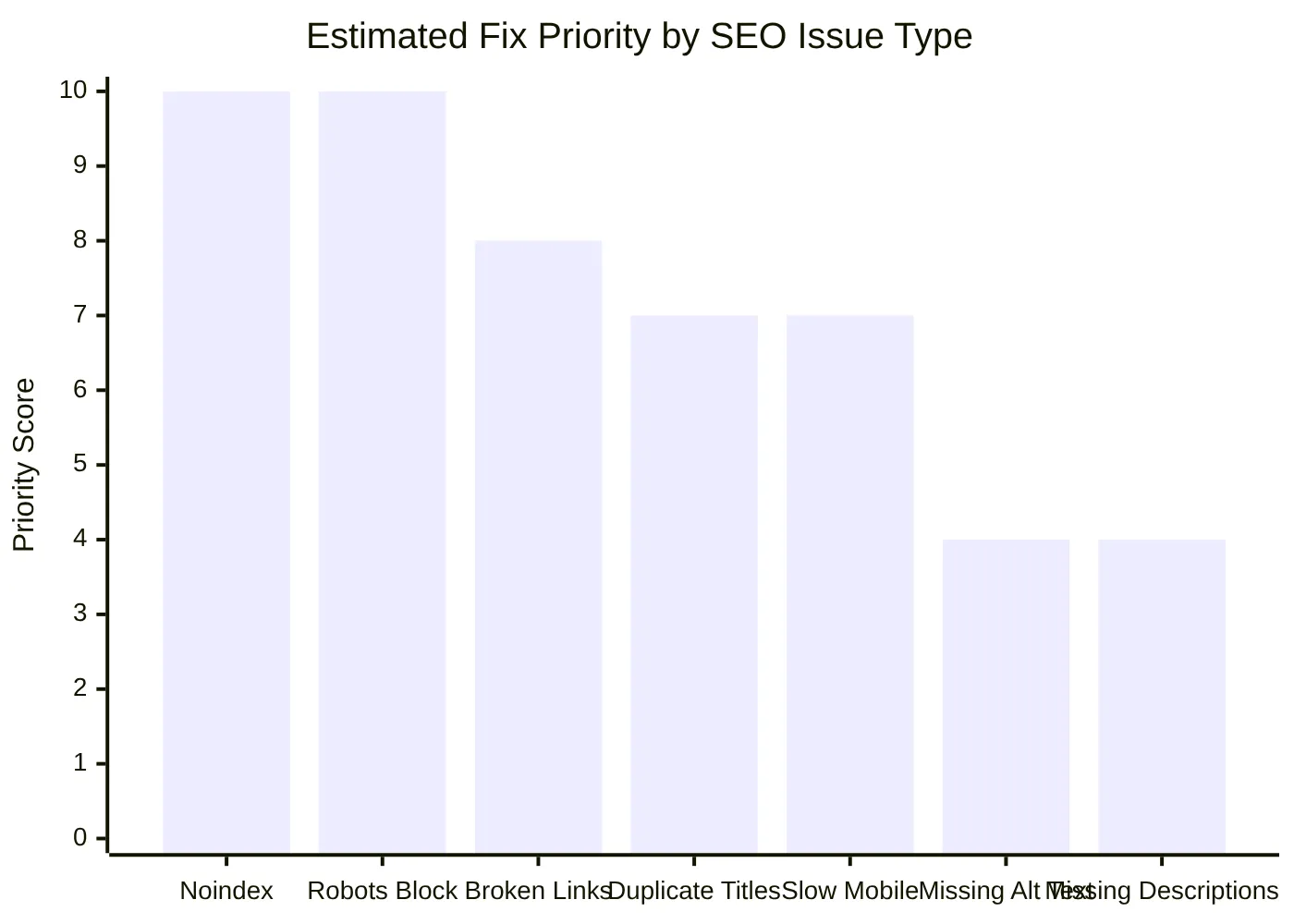
Use a separate checklist for larger audits. SeekLab provides a broader complete SEO audit checklist that can support deeper reviews after the first scan.
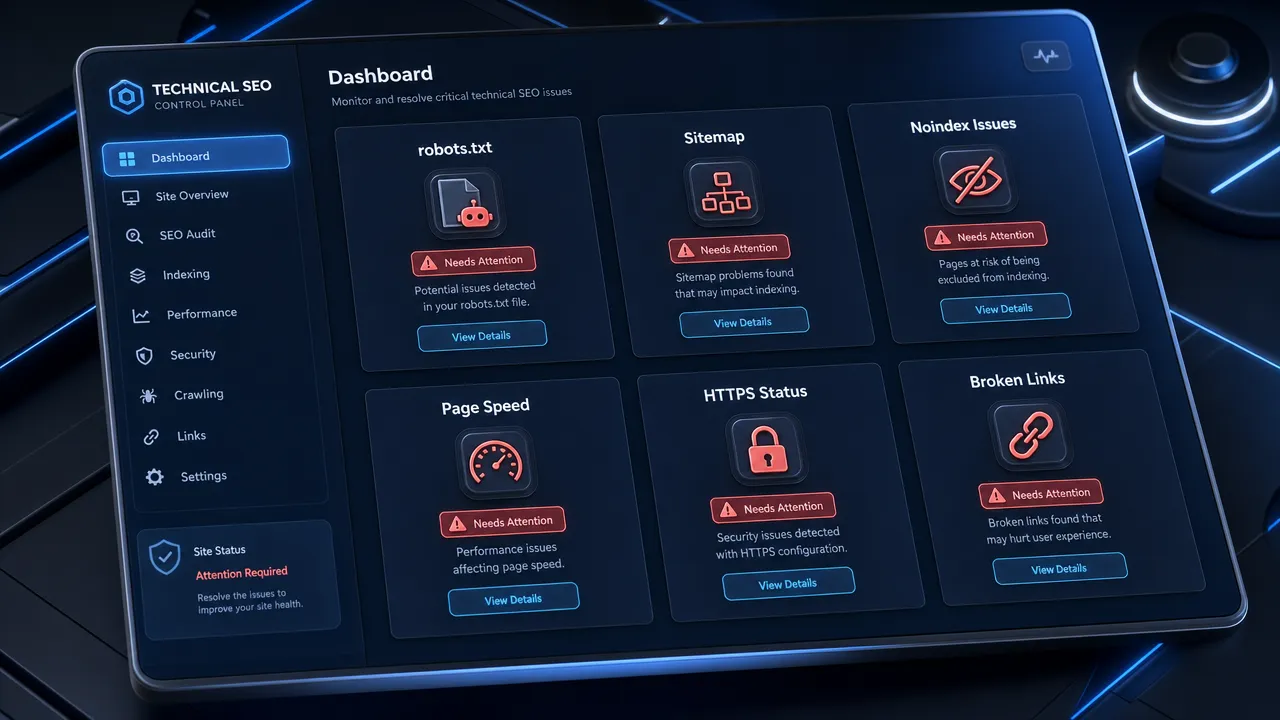
How to use SeekLab's free SEO audit tool step by step
Use SeekLab's audit tool to start the audit from a domain or website URL.
Follow these steps:
- Open the SeekLab audit page.
- Find the audit input field.
- Enter the website domain or URL.
- Start detection.
- Wait for the scan to finish.
- Confirm that the report status changes to Success.
- Review the SEO score and page count if displayed.
- Open the Critical issue group.
- Open the Warning issue group.
- Open the Notice issue group.
- Copy the report link or export the report if those actions are available.
- Convert the findings into a fix list.
- Re-run the audit after the fixes are published.
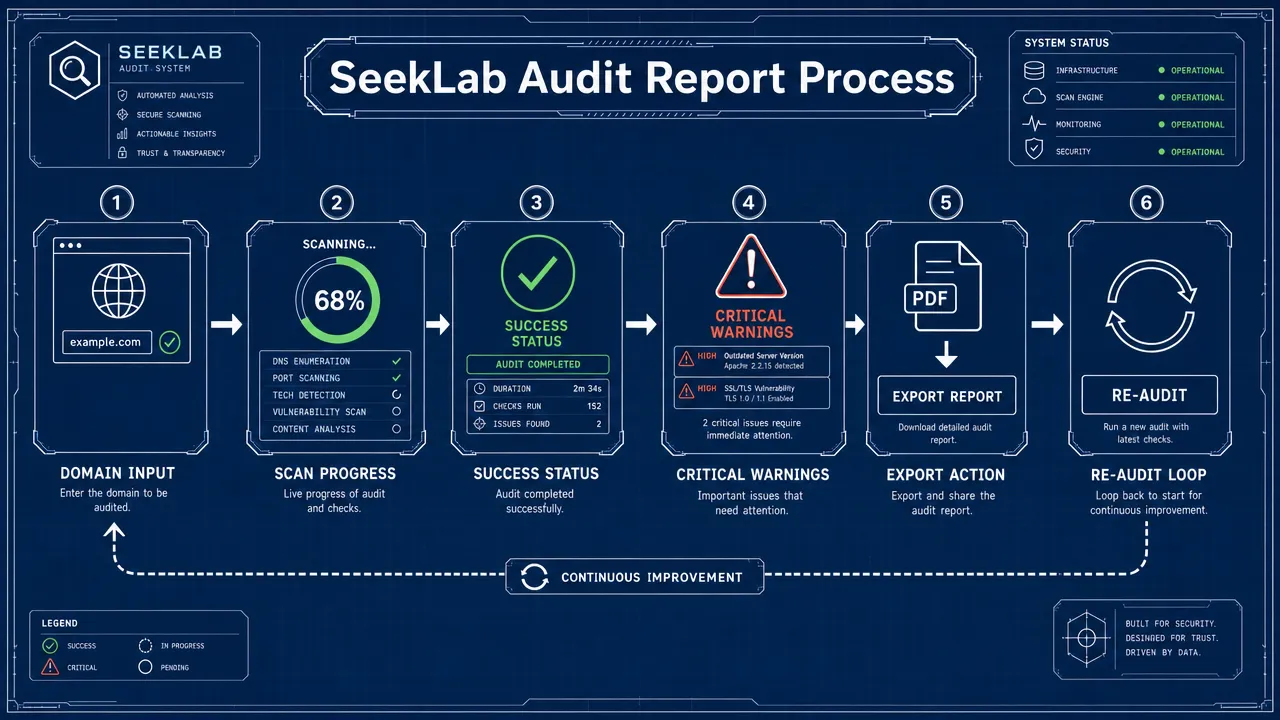
SeekLab's published user guide says the audit process includes entering the website URL, starting detection, waiting for the scan to complete, and reviewing the finished report. Use the official SeekLab audit tool user guide when you need the product-specific walkthrough.
Do not assume the displayed score is the only decision point. A site can have a moderate score and still have one severe issue on an important page.
Do not fix Notice items before Critical items unless the Notice item is part of the same template update. Example: if a developer is already editing a page template, fix related heading and metadata notices during the same release.
SeekLab materials describe audit categories that include SEO and accessibility, broken links detection, HTTP/HTTPS compliance, redirect optimization, crawlability check, title tag optimization, H1 and heading structure, meta description audit, content duplication check, page size and performance, image optimization, sitemap validation, robots.txt audit, indexability check, orphan pages detection, URL structure optimization, canonical URL check, SSL and HTTPS validation, mixed content detection, and external resource errors.
Use this report handling sequence:
Use the SeekLab services page if the report shows issues that require deeper technical SEO, performance, internal linking, sitemap, robots.txt, or AI readiness review.
How to prioritize issues from a free SEO audit tool report
A free SEO audit tool report becomes useful when each issue receives an owner, a priority, and a verification method.
Use this scoring method:
| Factor | Question | Score rule |
|---|---|---|
| Severity | Is it Critical, Warning, or Notice? | Critical gets highest priority. |
| Page value | Does it affect a landing page, service page, product page, or high-traffic page? | High-value pages move up. |
| Page count | Does it affect one page or a full template? | Template-wide issues move up. |
| Search access | Does it affect crawling or indexing? | Access issues move up. |
| User impact | Does it block navigation, reading, loading, or trust? | User-blocking issues move up. |
| Effort | Can the team fix it quickly? | High-impact quick fixes move up. |
Fix access issues first.
Examples:
- Important page has an accidental noindex tag.
- Important directory is blocked in robots.txt.
- Internal links point to 404 pages.
- Canonical tags point to redirected or non-indexable URLs.
- XML sitemap contains blocked, redirected, or error URLs.
Google explains robots directives in its robots meta tag documentation. Use this when fixing noindex issues.
Google explains robots.txt in its robots.txt documentation. Use this when the report flags crawl blocks.
Google explains duplicate URL consolidation in its canonicalization documentation. Use this when the report flags canonical issues.
Fix template-level issues next.
Examples:
- Every blog post uses the same title format.
- Every service page has a duplicate meta description.
- Every product page has missing H2 tags.
- Every page loads the same oversized hero image.
- Every template links to an outdated URL.
Template-level fixes create larger impact because one change can repair many pages.
Fix broken links and redirects after access and template issues.
Use these rules:
- Update internal links to final live URLs.
- Remove links to deleted external resources when no replacement exists.
- Redirect deleted internal pages to the closest relevant live page.
- Avoid redirect chains.
- Fix redirect loops immediately.
Google explains crawlable links in its links documentation. Use descriptive anchor text when replacing non-descriptive links.
Fix metadata and heading issues after structural blockers.
Use these rules:
- Write one unique title for each important page.
- Keep the title specific to the page topic.
- Write a meta description that summarizes the page accurately.
- Use one clear H1 that matches the page topic.
- Use H2 headings for major sections.
- Do not repeat the same keyword in every heading.
Fix image issues when the page includes meaningful images.
Use these rules:
- Add descriptive alt text to meaningful images.
- Leave decorative image alt attributes empty when appropriate.
- Compress oversized images.
- Use responsive image sizing.
- Add width and height attributes when possible to reduce layout shifts.
Fix page speed issues on templates with high traffic or high business value.
Use these rules:
- Compress and resize large hero images.
- Defer non-critical JavaScript.
- Remove unused scripts where possible.
- Reserve space for images, embeds, and banners.
- Improve server response time if diagnostics show backend delay.
- Use PageSpeed Insights for additional performance testing.
SeekLab also provides a page speed resource on how to improve page speed for SEO rankings. Use it when the audit report shows performance-related warnings.
Use search intent review when the audit shows thin content, duplicate content, or overlapping pages. SeekLab's guide to search intent and SEO conversions can support content-level decisions that a scan cannot fully automate.
Free SEO audit tool limits, re-audit rules, and FAQs
A free SEO audit tool checks visible issues. It does not provide a complete SEO strategy.
Do not expect a free scan to fully replace:
- Keyword research.
- Search intent mapping.
- Competitor analysis.
- Analytics review.
- Conversion analysis.
- Manual content quality evaluation.
- Server log analysis.
- Advanced JavaScript rendering review unless the tool explicitly supports it.
- Long-term SEO monitoring.
- Developer implementation planning.
Use Google Search Console when indexing status matters. The Google Search Console interface can help verify indexed pages, URL inspection results, sitemap submission, and indexing exclusions.
Run a re-audit after these events:
- Website redesign.
- CMS migration.
- URL structure change.
- Navigation update.
- New page template launch.
- Large content update.
- SSL or HTTPS change.
- Sitemap regeneration.
- Robots.txt update.
- Performance optimization release.
- Structured data deployment.
- Redirect migration.
Run periodic audits for active websites. Monthly or quarterly checks help catch broken links, duplicate metadata, redirect chains, missing alt text, and performance regressions.
Use the export or report link to create a working task list.
Recommended task fields:
| Field | Required entry |
|---|---|
| Issue | Use the exact report issue name. |
| Severity | Critical, Warning, or Notice. |
| Affected URL | Add the page or template affected. |
| Owner | Assign marketing, content, SEO, or development. |
| Fix action | State the exact change required. |
| Verification method | Re-audit, Search Console, PageSpeed Insights, or manual check. |
| Status | Open, in progress, fixed, or verified. |
FAQ
What is a free SEO audit tool?
A free SEO audit tool is a diagnostic tool that checks a website for common SEO issues, including crawlability, indexability, metadata, links, images, speed, mobile usability, security, and technical configuration.
How do I audit my website for free with SeekLab?
Open SeekLab's audit tool, enter your website domain or URL, start detection, wait for the scan to finish, and review the completed report. SeekLab's user guide describes report groups such as Critical, Warning, and Notice.
What should I fix first after using a free SEO audit tool?
Fix crawlability, indexability, server errors, broken important pages, redirect loops, and accidental noindex issues first. Then fix template-wide metadata, headings, internal links, images, mobile usability, and page speed issues.
Can a free SEO audit tool improve rankings?
The tool itself does not improve rankings. It identifies problems. Results depend on correct fixes, content quality, search intent fit, technical implementation, competition, and other search factors.
Is an SEO score enough to judge site health?
No. Use the score as a summary signal only. Review the actual issues, affected pages, severity levels, and business value of the pages.
Why does the report flag missing meta descriptions?
Meta descriptions can help summarize pages for search snippets. Google may generate its own snippet, but missing or duplicate descriptions are still common on-page issues that should be reviewed for important pages.
Why does page speed appear in a free SEO audit tool report?
Page speed affects user experience. Core Web Vitals measure loading, interactivity, and visual stability. Use the audit report and PageSpeed Insights to locate performance bottlenecks.
What is the difference between crawlability and indexability?
Crawlability means search engines can discover and fetch a page. Indexability means the page is eligible to appear in the search index. A page can be crawlable but not indexable if it has a noindex directive or points its canonical tag to another URL.
When should I contact SeekLab after an audit?
Contact SeekLab when Critical issues affect important pages, when fixes require developer support, when a migration creates redirect or indexing problems, or when the report needs deeper technical interpretation. Use the SeekLab services page for support options.
Start with SeekLab's free SEO audit tool. Enter your domain, review Critical issues first, export or save the report, assign fixes, and re-run the audit after updates.