How to Optimize robots.txt for AI Crawlers in 2026
Expert reviewed

AI crawler robots.txt optimization in 2026 requires selective crawler permissions that protect proprietary content while keeping revenue-critical pages accessible to search engines and AI answer systems.
Do not block AI bots as one group. Separate AI training crawlers, AI answer/search crawlers, user-triggered fetchers, traditional search crawlers, commercial SEO crawlers, and unknown scrapers before changing any robots.txt directives.
A safe policy starts with four checks: confirm what robots.txt can control, verify official user-agent names, keep important public pages crawlable, and monitor server logs after deployment. For most independent websites, B2B brand sites, exporter websites, ecommerce stores, and multilingual company sites, the practical default is selective access: allow search and answer discovery, restrict low-value paths, and block selected training crawlers only when the business has a clear content-control reason.
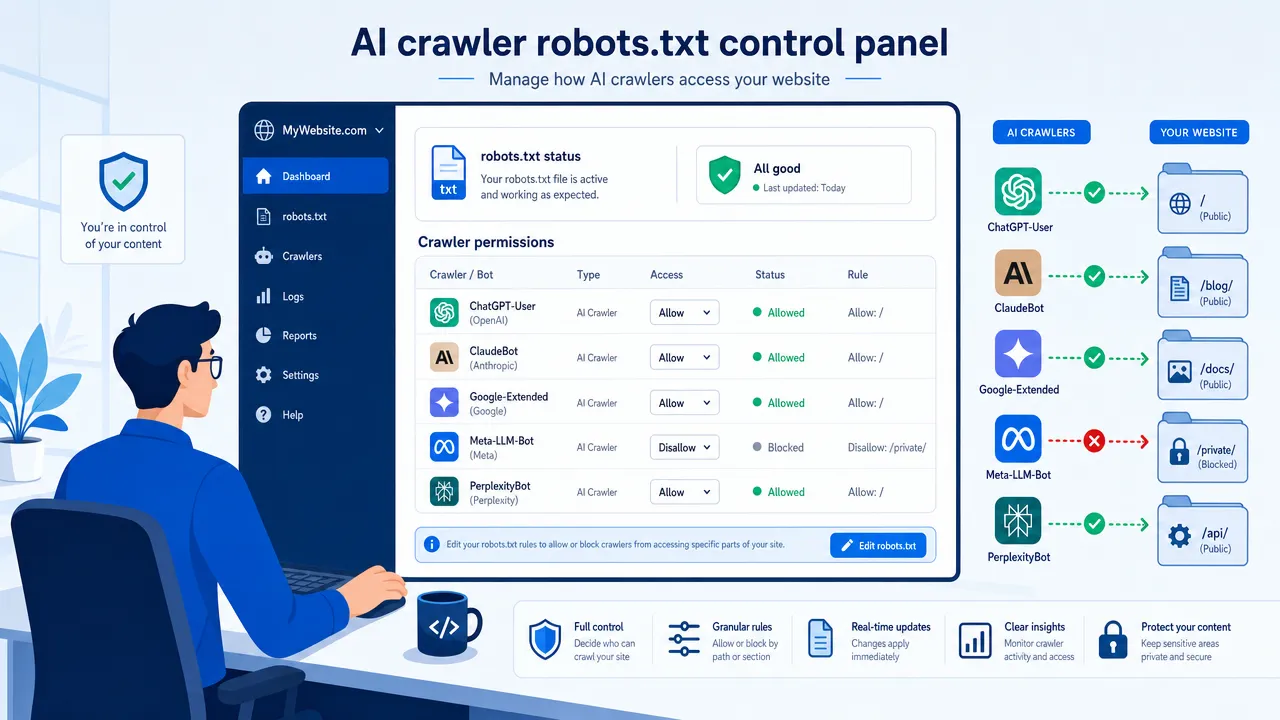
How AI crawler robots.txt optimization works as a crawler permission policy
AI crawler robots.txt optimization means using /robots.txt as a public crawler permissions file. It tells compliant crawlers which URL paths they may request. It does not secure private content, erase indexed pages, or force non-compliant scrapers to obey your rules.
The file must sit at the root of the host. For https://www.example.com/, the file location is https://www.example.com/robots.txt. Rules apply by host and protocol, so a multilingual setup using subdomains, ccTLDs, or separate staging hosts needs separate validation.
The formal standard is the Robots Exclusion Protocol, documented in RFC 9309. Google also describes robots.txt as a way to manage crawler traffic, not as a reliable method to keep pages out of Search. Use Google's robots.txt introduction for the crawling and indexing distinction.
Use these core robots.txt directives:
| Directive | Function | Practical rule |
|---|---|---|
User-agent |
Identifies the crawler group | Use official user-agent tokens only. |
Disallow |
Blocks crawling for matching paths | Use it for low-value, duplicate, private-looking, or training-restricted areas. |
Allow |
Permits crawling for matching paths | Use it to create exceptions inside broader blocked folders. |
Sitemap |
Points crawlers to XML sitemaps | Use it for product, blog, language, and image sitemap discovery. |
Do not confuse crawling control with indexing control. A blocked URL can still appear in search results if other pages link to it. If the goal is to prevent indexing, use a noindex directive in a meta robots tag or HTTP header. The crawler must be allowed to fetch the page to see the noindex, so blocking the URL in robots.txt can prevent the instruction from being read.
Use stronger controls for private content. Login areas, unpublished documents, partner-only files, pricing files, staging sites, and internal dashboards need authentication, IP restrictions, signed URLs, CDN rules, or WAF controls. MDN's robots.txt security guidance is clear on this point: robots.txt is not security.
For JavaScript-heavy websites, crawler permission is only one part of access. If important content, internal links, canonical tags, hreflang, or structured data appear only after client-side rendering, some crawlers may receive incomplete signals. SeekLab.io covers this issue in its guide to JavaScript SEO and indexing checks, which is especially relevant for sites built with modern frontend frameworks.
AI crawler robots.txt categories to classify before you block AI bots
Classify crawler purpose before writing rules. A single vendor may operate separate agents for training, search retrieval, user-triggered access, ads checks, or product infrastructure. Blocking the wrong agent can reduce discoverability without solving the content reuse problem.
Use this working classification:
| Category | Common purpose | robots.txt implication | Business warning |
|---|---|---|---|
| Search indexing crawlers | Traditional search discovery | Usually allow for public pages | Blocking Googlebot or Bingbot can damage SEO visibility. |
| AI training crawlers | Model training or improvement | Allow or block based on content policy | Blocking may reduce data exposure, but does not undo prior collection. |
| AI answer/search crawlers | Search retrieval, citation, answer discovery | Often allow for public commercial pages | Blocking can reduce AI-era discoverability and citation potential. |
| User-triggered fetchers | Fetch a URL because a user requested it | Treat separately from automated crawling | Some providers may not apply robots.txt in the same way. |
| Commercial SEO crawlers | Site audits, link analysis, monitoring | Allow, block, or rate-limit by operational need | Blocking may affect third-party diagnostics. |
| Unknown scrapers | Unverified or non-compliant bots | Do not rely on robots.txt alone | Use CDN/WAF rules, rate limits, and log monitoring. |
Known user-agent names must be checked against official documentation before deployment. Provider names and crawler roles can change.
| Organization | User-agent or token | Category | Official source | Policy note |
|---|---|---|---|---|
| OpenAI | GPTBot |
AI training crawler | OpenAI crawler docs | Block if model training reuse is not acceptable. |
| OpenAI | OAI-SearchBot |
AI answer/search crawler | OpenAI crawler docs | Allow if ChatGPT search discoverability matters. |
| OpenAI | ChatGPT-User |
User-triggered fetcher | OpenAI crawler docs | Do not treat it the same as GPTBot without checking current behavior. |
Googlebot |
Search indexing crawler | Googlebot docs | Keep unblocked for SEO unless there is a precise reason. | |
Google-Extended |
Generative AI product token | Google common crawler docs | Google states it does not affect Google Search inclusion or ranking. | |
| Bing | bingbot |
Search indexing crawler | Bing robots.txt guide | Keep unblocked if Bing discovery matters. |
| Perplexity | PerplexityBot |
AI answer/search crawler | Perplexity crawler docs | Perplexity recommends allowing it for discoverability. |
| Perplexity | Perplexity-User |
User-triggered fetcher | Perplexity crawler docs | Perplexity says it is user-requested and generally not governed like normal crawling. |
| Apple | Applebot |
Search and assistant crawler | Applebot documentation | Useful for Apple ecosystem discovery. |
| Apple | Applebot-Extended |
AI training control token | Applebot documentation | Use if you want Apple search access but not Apple foundation model training use. |
| Meta | Meta-ExternalAgent |
AI/product improvement crawler | Meta web crawler docs | Verify exact casing and purpose before deployment. |
| Meta | Meta-ExternalFetcher |
User-triggered fetcher | Meta web crawler docs | Treat separately from training-oriented crawlers. |
| Common Crawl | CCBot |
Public web corpus crawler | Common Crawl robots FAQ | Blocking reduces inclusion in Common Crawl datasets. |
Google-Extended needs special handling. It is a robots.txt product token, not a separate HTTP request user-agent string. Do not block Googlebot when the intended policy is only to restrict Google generative AI product use.
Anthropic crawler names such as ClaudeBot, Claude-User, and Claude-SearchBot have been discussed in source-backed reporting and Anthropic transparency materials, but the exact current crawler documentation should be verified directly before publishing production rules. Do not deploy unverified user-agent snippets copied from old articles.
Use IP verification where available. OpenAI and Perplexity publish crawler information through their official docs, and Perplexity provides official JSON endpoints for its crawler IP ranges. User-agent strings can be spoofed, so server logs should not trust names alone for sensitive access decisions.
AI crawler robots.txt rules for allow, block, and partial access
Use selective access as the default policy for public commercial websites. Keep search indexing and AI answer/search access available for public pages. Block selected AI training crawlers only when the site has proprietary, licensing, legal, or content reuse concerns.
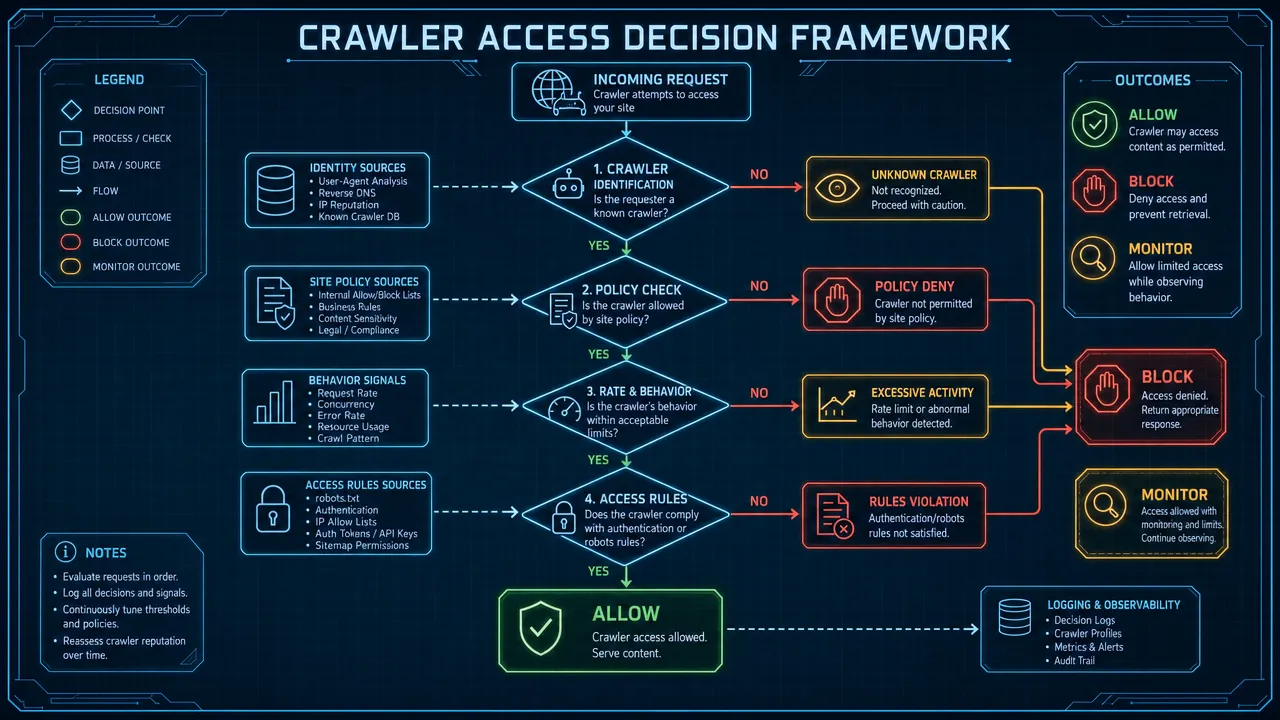
Apply this decision sequence:
-
Identify revenue-critical pages.
- Include homepage, service pages, product pages, category pages, market pages, blog guides, documentation summaries, and contact paths.
- Keep these crawlable unless a legal or security reason says otherwise.
-
Identify low-value paths.
- Common examples:
/cart/,/checkout/,/account/,/login/,/admin/,/search/, internal search pages, sort parameters, filter parameters, tracking parameters, duplicate tag archives, and staging paths. - Restrict these for all compliant crawlers where appropriate.
- Common examples:
-
Separate AI training crawlers from AI answer/search crawlers.
- Training crawlers may support model improvement.
- Answer/search crawlers may support cited responses, search discovery, or live retrieval.
- User-triggered fetchers may behave differently from both.
-
Verify user-agent tokens.
- Check official documentation before deployment.
- Recheck after major provider updates.
- Keep comments in the file explaining the business reason for each blocked agent.
-
Test with search tools and logs.
- Use Google Search Console URL Inspection.
- Use Bing's robots.txt tester.
- Fetch the live file through the CDN.
- Review logs for 48 hours after deployment.
Use these policy templates as operational patterns. Replace example.com with the live domain and test before publishing.
| Scenario | Policy direction | Example rule lines |
|---|---|---|
| Public brand site needing maximum discovery | Allow compliant crawlers | User-agent: *; Allow: /; Sitemap: https://www.example.com/sitemap.xml |
| Site wants to block AI training crawlers | Block selected training agents, allow others | User-agent: GPTBot; Disallow: /; User-agent: CCBot; Disallow: /; User-agent: *; Allow: / |
| Site wants AI answer access but not broad training access | Allow answer/search agents, block training agents | User-agent: OAI-SearchBot; Allow: /; User-agent: PerplexityBot; Allow: /; User-agent: GPTBot; Disallow: / |
| Ecommerce site with parameter crawl waste | Allow product/category pages, restrict noise | Disallow: /cart/; Disallow: /checkout/; Disallow: /*?sort=; Disallow: /*?filter= |
| Multilingual exporter site | Allow language folders and sitemaps | Allow: /en/; Allow: /de/; Allow: /fr/; Allow: /zh/; Allow: /ar/; Sitemap: https://www.example.com/sitemap-index.xml |
| Staging site | Block crawling, but use authentication too | User-agent: *; Disallow: / |
Do not use a production robots.txt file as a staging security control. Password-protect staging, restrict it by IP, or place it behind VPN access. A public staging URL returning 200 can still leak through links, screenshots, cached assets, or misconfigured deployment workflows.
For ecommerce and programmatic SEO sites, parameter control needs extra caution. Blocking every query string can remove useful filtered landing pages if those pages match real search demand and convert. SeekLab.io's guide to high-quality programmatic SEO strategy explains why scalable pages need search intent, distinct value, technical control, and internal links before they deserve indexable URLs.
For large template-driven sites, audit robots.txt together with canonicals, sitemaps, noindex rules, and internal linking. A blocked URL in the sitemap creates conflicting signals. A canonical URL blocked in robots.txt may not be crawled. A valuable category hidden behind JavaScript filters may be accessible to users but weak for crawlers. SeekLab.io's technical SEO audit for programmatic success covers these template-level risks.
AI crawler robots.txt mistakes that damage SEO and AI-era discoverability
The highest-risk mistake is placing Disallow: / in the wrong user-agent group. This can block Googlebot, Bingbot, Applebot, or other valuable crawlers from the whole site. Keep user-agent groups clean and avoid duplicate empty User-agent: * sections.
The second mistake is treating all AI crawlers as one category. Blocking GPTBot is not the same decision as blocking OAI-SearchBot. Blocking Google-Extended is not the same as blocking Googlebot. Blocking PerplexityBot is not the same as expecting control over Perplexity-User.
The third mistake is blocking language folders. Exporter and multilingual websites often depend on /en/, /de/, /fr/, /zh/, /ar/, or regional subfolders to generate international inquiries. If robots.txt blocks one folder, search engines and AI systems may not understand that the brand serves that market.
The fourth mistake is blocking CSS or JavaScript resources required for rendering. Google can render JavaScript, but blocked scripts and styles can still create incomplete page understanding. AI answer/search crawlers may have different rendering capabilities. Keep critical HTML, internal links, headings, and schema accessible as early and clearly as possible.
The fifth mistake is using robots.txt to hide sensitive content. Robots.txt is public. Listing /private-pricing/, /partner-contracts/, or /internal-docs/ can expose the location of sensitive-looking folders. Use authentication and access control first.
The sixth mistake is allowing CDN settings to override the origin file. Cloudflare documents a managed robots.txt feature that can affect the file served to crawlers depending on configuration. Always fetch the live file from the public domain, not only the origin server.
The seventh mistake is relying on Crawl-delay without checking support. Google does not support Crawl-delay for Googlebot. Some crawlers may recognize it, others may ignore it. Use server-side rate limiting or CDN controls when server load is the actual problem.
The eighth mistake is blocking PDFs without checking conversion value. Many B2B and exporter websites rely on product sheets, certifications, compliance documents, and technical datasheets. If those PDFs help buyers qualify a supplier, blocking them may reduce discoverability and inquiry quality.
Use this quick risk table before deployment:
| Mistake | Symptom | Correct action |
|---|---|---|
Wrong Disallow: / placement |
Key pages stop being crawled | Test user-agent groups and keep rollback copy. |
Blocking Googlebot instead of Google-Extended |
Search visibility drops | Use the correct Google product token. |
| Blocking all AI bots | Fewer AI answer citations or referrals | Allow selected answer/search crawlers if public discovery matters. |
| Blocking language folders | International pages lose crawl access | Validate hreflang targets and language sitemaps. |
| Blocking resources | Rendered page differs from source HTML | Allow critical JS, CSS, images, and structured data resources. |
| Treating robots.txt as security | Private paths remain accessible | Add authentication, WAF rules, or IP restrictions. |
| Ignoring CDN behavior | Live file differs from expected file | Fetch public robots.txt after every rules change. |
AI crawler robots.txt audit checklist for logs, sitemaps, and multilingual sites
Start with logs. Do not copy a blocklist before knowing which crawlers visit the site, which pages they request, and whether they affect server performance or lead-generating pages.

Run this audit monthly or after major site changes:
-
Export raw server logs.
- Capture user-agent string.
- Capture IP address.
- Capture timestamp.
- Capture requested URL.
- Capture status code.
- Capture bytes transferred.
- Capture response time.
- Capture host and protocol.
-
Group known crawlers.
- Search crawlers:
Googlebot,bingbot,Applebot. - AI training crawlers:
GPTBot,CCBot,Applebot-Extended,Meta-ExternalAgent, plus any verified current equivalents. - AI answer/search crawlers:
OAI-SearchBot,PerplexityBot, and verified current equivalents. - User-triggered fetchers:
ChatGPT-User,Perplexity-User,Meta-ExternalFetcher, and verified current equivalents.
- Search crawlers:
-
Verify IPs where official methods exist.
- Do not trust user-agent names alone.
- Check provider documentation for IP JSON, reverse DNS, or published verification instructions.
-
Map crawled URLs to business value.
- Mark homepage, product pages, service pages, category pages, documentation summaries, blog guides, market pages, and inquiry paths.
- Mark internal search, filters, sort URLs, cart, checkout, account pages, tag archives, duplicate PDFs, and staging paths.
-
Check status codes.
- Fix
5xxresponses affecting important crawlers. - Investigate accidental
403responses to search crawlers and answer/search crawlers. - Clean repeated
404or soft404hits. - Reduce redirect chains.
- Fix
-
Compare robots.txt with sitemaps.
- Sitemaps should list canonical, indexable,
200status URLs. - Do not include URLs blocked by robots.txt.
- Use sitemap indexes for large, ecommerce, image-heavy, or multilingual sites.
- Sitemaps should list canonical, indexable,
-
Validate internal linking.
- Important pages should not depend only on search forms, JavaScript click events, or orphaned sitemap inclusion.
- Product, category, service, and market pages should be reachable through crawlable links.
-
Review multilingual coverage.
- Check crawler access for
/en/,/de/,/fr/,/zh/,/ja/,/ko/,/ar/, or country folders. - Confirm hreflang targets are crawlable.
- Confirm canonicals do not point every language version back to English.
- Check crawler access for
-
Check CDN and WAF rules.
- Confirm the CDN serves the intended robots.txt file.
- Review bot management rules.
- Review rate limits and challenge pages.
- Confirm important crawlers are not blocked by generic data center IP rules.
-
Keep a rollback file.
- Save the previous robots.txt before deployment.
- Test on staging.
- Publish during a low-risk window.
- Monitor crawler activity for at least 48 hours.
Use a priority system. Not every issue deserves immediate engineering time.
| Priority | Fix now | Schedule | Deprioritize |
|---|---|---|---|
| Crawl access | Googlebot blocked, product folders blocked, staging returning 200 |
Minor bot rules cleanup | Cosmetic comments if parsing is correct |
| Server load | AI or scraper bursts causing 5xx errors |
Rate limits for high-cost crawlers | Crawlers with no traffic and no load impact |
| International SEO | Language folders blocked, broken hreflang targets | Sitemap segmentation by language | Low-value language pages with no commercial plan |
| Content access | Proprietary files public and crawlable | Training crawler policy review | Blocking every unknown bot only through robots.txt |
| Conversion | Inquiry pages blocked or broken | Internal link improvements | Low-traffic archive refinements |
SeekLab.io's SEO audit checklist for 2026 provides a broader framework for crawlability, indexation, Core Web Vitals, internal links, content quality, schema, JavaScript SEO, and international SEO. For AI crawler robots.txt work, the same principle applies: fix what blocks growth first, and do not spend weeks polishing low-impact rules while product pages remain hard to crawl.
AI crawler robots.txt recommendations by website type
Use the business model to set the crawler policy. A public B2B website and a gated research platform should not use the same rules.
| Website type | Recommended policy | Paths to keep crawlable | Paths to restrict |
|---|---|---|---|
| Official company website | Allow search and answer/search crawlers; selectively block training crawlers if needed | Homepage, services, about, blog, FAQ, contact | Admin, login, internal search, duplicate archives |
| Exporter website | Allow product, category, language, and market pages | Product folders, country pages, technical summaries, localized pages | Filters, sort parameters, carts, distributor-only documents |
| Multilingual brand site | Allow hreflang targets and language sitemaps | /en/, /de/, /fr/, /zh/, /ar/, regional folders |
Weak duplicate translations, internal search, tracking URLs |
| Ecommerce site | Allow product and category pages; restrict crawl waste | Product URLs, category hubs, buying guides | Cart, checkout, account, faceted combinations, session IDs |
| SaaS or documentation site | Allow public docs and feature pages; protect app paths | Docs, integrations, pricing summaries, support articles | App, account, API keys, private examples, staging |
| Publisher | Decide by licensing and citation value | Public articles, author pages, topic hubs | Premium pages, paywalled sections, licensed archives |
| Site under server pressure | Allow only high-value crawlers; use CDN/WAF controls | Core pages and key sitemaps | High-bandwidth files, abusive agents, parameter traps |
| Proprietary content site | Do not rely on robots.txt alone | Public abstracts and landing pages | Private docs, paid files, partner materials |
For independent websites and official company sites, avoid extreme rules unless logs justify them. A common overreaction is to block every crawler that looks AI-related. That can reduce the chance that AI systems understand the brand, products, services, and expertise accurately.
For exporter websites, keep public product and market pages accessible. International buyers may use search engines, AI answer systems, and assistant-style research flows to compare suppliers, specifications, regions, and compliance details. If the English product page is crawlable but the German or Arabic equivalent is blocked, the site may appear weaker in those markets.
For ecommerce sites, restrict crawl waste with precision. Blocking /search/, /*?sort=, /*?filter=, /*?add-to-cart=, and session parameters is often reasonable. Blocking a high-demand filtered category that converts is not reasonable without checking search data and business value.
For sites using large-scale templates, align robots.txt with technical architecture. A page pattern that creates thousands of thin, near-duplicate URLs can drain crawler attention and lower site quality signals. A page pattern with distinct data, localized examples, useful visuals, internal links, and clean HTML can support organic growth.
SeekLab.io helps brands build search visibility and AI-era discoverability through high-quality content production and technical optimization. The work is not limited to detecting robots.txt syntax issues. It covers full-site crawling, sitemap.xml and robots.txt validation, rendering checks, Core Web Vitals diagnostics, internal link equity, semantic structure, schema compliance, multilingual architecture, and AI search friendliness.
The practical value is prioritization. SeekLab.io does not aim to fix everything. It identifies what truly impacts growth, what can be deprioritized, and what needs action before teams invest in more content or development work. For many sites, the urgent issue is not a missing comment in robots.txt. It is a blocked product directory, a JavaScript-rendered navigation problem, a poor sitemap, thin multilingual pages, or a crawler trap created by filters.
SeekLab.io also connects crawler access to content quality and conversion. Allowing AI answer/search crawlers will not help much if the page structure is unclear, the headings do not match search intent, the internal links are weak, or the content sounds generic. The stronger approach is to make public pages easier for search engines, AI systems, and real users to understand through structured layouts, clear information architecture, useful visuals, schema, and conversion paths.
For teams in APAC, the United States, Europe, and the Middle East, crawler policy should also reflect regional growth goals. SeekLab.io has teams and legal entities in Singapore and Shanghai, plus a BD team based in Dubai, which supports work across multilingual and cross-border website scenarios.
Use the following operating rule: before writing more content or changing technical rules, make the right strategic decision first. A crawler policy should support qualified traffic, credible discovery, and inquiry generation. It should not be a copied blocklist.
Frequently asked questions about AI crawler robots.txt
Should I block AI crawlers in robots.txt?
For most public commercial websites, no. The practical default is selective access: allow search indexing and AI answer/search crawlers on public pages, restrict low-value paths, and block specific AI training crawlers only when there is a clear content-control, licensing, or legal reason. Blocking every AI-related crawler can reduce the chance that AI systems describe the brand, products, and services accurately.
Does robots.txt stop AI from using my content?
Only partially. A Disallow rule asks compliant crawlers not to fetch a path, but it does not undo data already collected, does not bind non-compliant scrapers, and does not remove content that AI systems learned from other sources. It is a crawl-permission signal, not a content-removal or security tool.
What is the difference between GPTBot and OAI-SearchBot?
GPTBot is OpenAI's training crawler, while OAI-SearchBot supports ChatGPT search discovery. Blocking GPTBot to limit model-training reuse does not have to mean blocking OAI-SearchBot. Many sites that want ChatGPT search visibility allow OAI-SearchBot while restricting GPTBot. Verify current behavior in OpenAI's crawler documentation before deployment.
Does blocking Google-Extended hurt my Google Search rankings?
Google states that Google-Extended controls generative AI product use and does not affect Google Search inclusion or ranking. The risk comes from confusing it with Googlebot: blocking Googlebot can damage search visibility, so use the correct product token for the intended policy.
Is robots.txt enough to protect private or proprietary content?
No. Robots.txt is public, so listing sensitive folders can reveal where they are. Login areas, pricing files, partner documents, and staging sites need authentication, IP restrictions, signed URLs, or WAF and CDN controls. Treat robots.txt as a crawl-management file, not a security boundary.
How often should I audit robots.txt for AI crawlers?
Run a full audit monthly or after any major site change, and recheck user-agent tokens after major provider updates. Crawler names, categories, and policies change frequently, so a file that was correct last quarter can drift out of date.
Get a free audit report if you need a practical review of your robots.txt, sitemaps, crawler access, JavaScript rendering, internal links, multilingual structure, and high-impact SEO issues. For crawler policy decisions across official company sites, exporter websites, ecommerce stores, SaaS documentation, or multilingual brands, contact us through SeekLab.io.